Power / Batteries & Chargers
User Manual for Bosch GAA 12V-21 Professional USB Charging Adapter
Quick guide for the Bosch GAA 12V-21 Professional USB Charging Adapter. Learn how to insert the battery, connect heating elements, charge USB devices, and troubleshoot common issues.
Table of contents
Manual images
Click an image to enlargeQuick guide from the manual
The Bosch GAA 12V-21 Professional is a battery adapter designed to power USB devices and heating elements for heated workwear using Bosch 10.8V or 12V Li-ion batteries. Key operations include inserting the battery, connecting heating elements, and charging external USB devices.
Product Description
The adapter serves as a power source for mobile devices and heated clothing. It features a USB port and a dedicated socket for heating elements. It is compact and includes a belt clip for portability.
Components
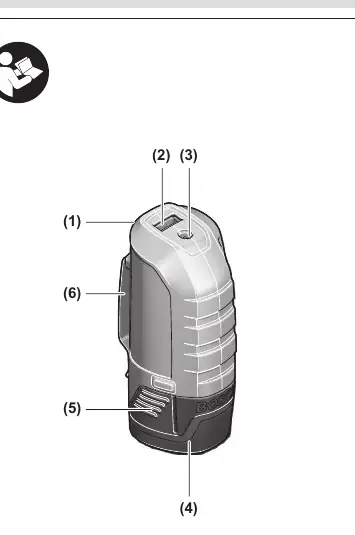
- (1) Battery adapter
- (2) USB port
- (3) Socket for heating element connector
- (4) Battery
- (5) Battery release buttons
- (6) Belt clip
- (7) Connector plug
- (8) USB activation button
Operation
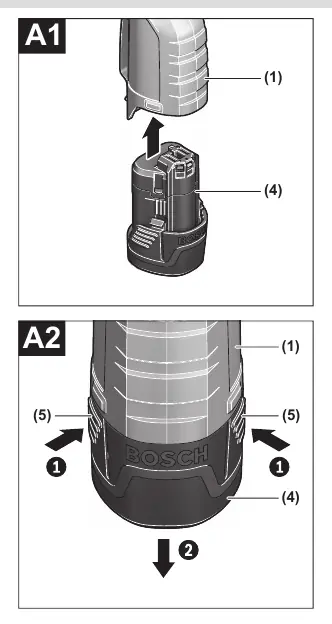
Inserting and Removing the Battery
Do not use force when inserting the battery. Slide the battery (4) into the adapter (1) until it stops. To remove, press the release buttons (5) on the battery and pull it out.
Connecting Heating Elements
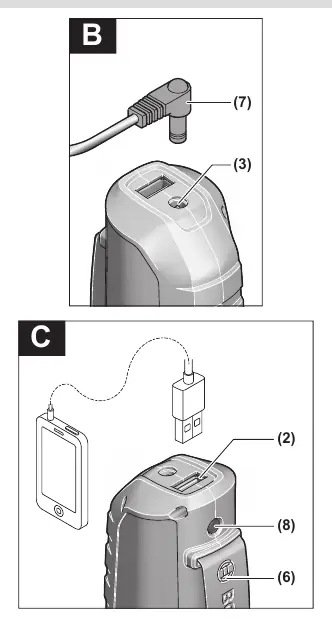
Plug the connector plug (7) into the socket (3) on the adapter. Slide the adapter (1) into the designated pocket in the garment or attach it to your belt using the belt clip (6).
Charging External USB Devices
Connect your USB device's charging cable to the USB port (2). Press the activation button (8) for approximately 3 seconds to start charging. The USB port automatically deactivates after about 2 hours to save energy, or after 30 seconds if no cable is connected.
Troubleshooting
If the heating element does not warm up, ensure the battery is charged and the connector plug (7) is correctly inserted. If an external USB device does not charge, ensure the battery is charged, the cable is connected to the USB port (2), and the activation button (8) has been pressed for 3 seconds.
Maintenance and Service
For repairs, maintenance, or spare parts, visit www.bosch-pt.com. Always include the 10-digit article number from the product nameplate in all correspondence.
Transport and Disposal
Lithium-ion batteries are subject to dangerous goods legislation. Transport batteries only if the housing is undamaged. Dispose of electrical equipment and batteries in an environmentally friendly manner, following local regulations.
Official resources from the manual
Manufacturer information
Bosch
Practical help
Common problems
Heating element does not warm up
Charge the battery or ensure the connector plug (7) is correctly inserted into the socket (3).
External USB device does not charge
Charge the battery, ensure the charging cable is connected to the USB socket (2), and press the activation button (8) for approx. 3 seconds.
Before use
- Ensure the battery is fully charged.
- Check that the battery release buttons are not broken or faulty.
- Verify the USB device is compatible with the adapter's output (5V, 2.1A).
- Ensure the connector plug is clean and undamaged.
Show more Show less
Specs in practice
- Heating Element Output
- 12V, 1.2A for compatible heated workwear.
- Operating Temperature
- -20°C to +50°C.
Images and diagrams
- (1) Battery adapter
- (3) Heating element socket
- (5) Battery release buttons
- (7) Connector plug
- (8) USB activation button
Model compatibility
- Compatible with Bosch 10.8V and 12V Li-ion batteries.

Manual page author
Emily Carter
User documentation editor