Tools / Drills
User Manual for Bosch UniversalDrill 18V and UniversalImpact 18V
Quick guide for the Bosch UniversalDrill 18V and UniversalImpact 18V. Includes setup, operation, tool changing, safety, and maintenance instructions.
Table of contents
Manual images
Click an image to enlargeQuick guide from the manual
This manual provides essential information for operating the Bosch UniversalDrill 18V and UniversalImpact 18V cordless drill/drivers. Before using the tool, ensure the battery is fully charged and correctly inserted. The tool features a keyless chuck for easy bit changes and a multi-stage torque setting for precise screwdriving.
Device Description
The tool consists of the following main components:
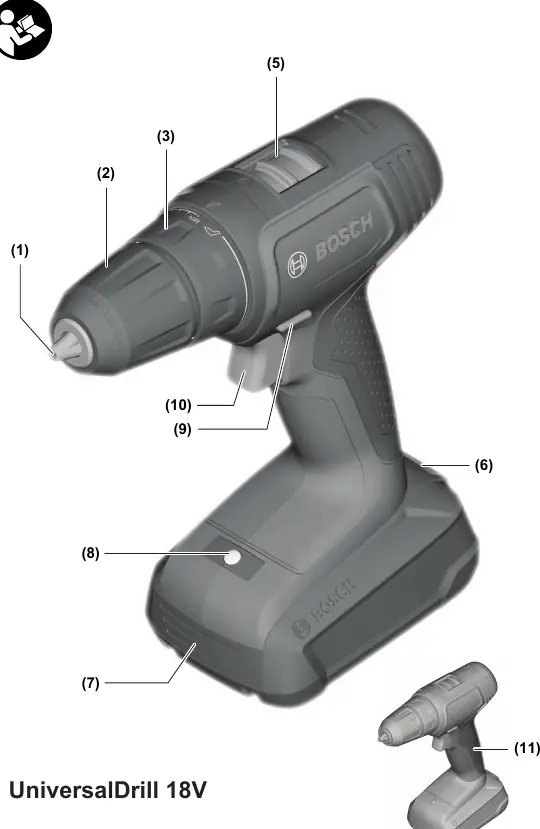
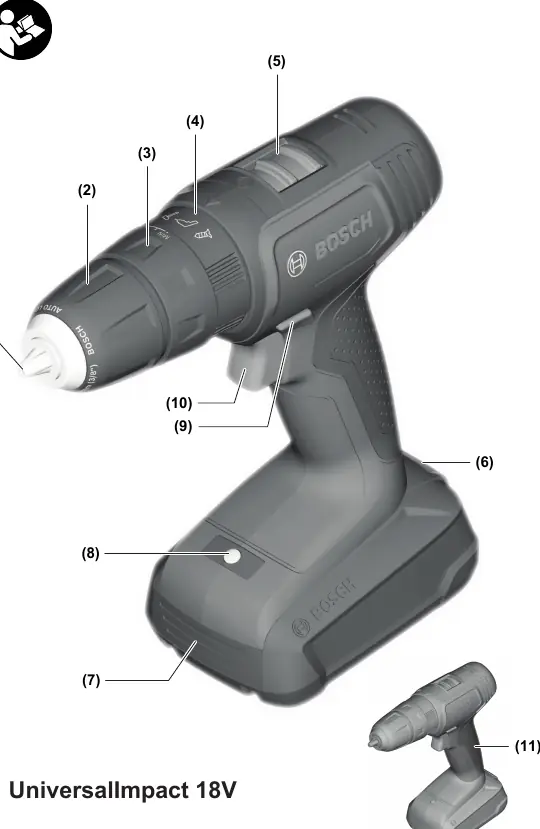
- (1) Tool holder
- (2) Keyless chuck
- (3) Torque presetting ring
- (4) Operating mode presetting ring (UniversalImpact 18V only)
- (5) Gear selector switch
- (9) Rotational direction switch
- (10) On/off switch
- (8) Worklight
Assembly
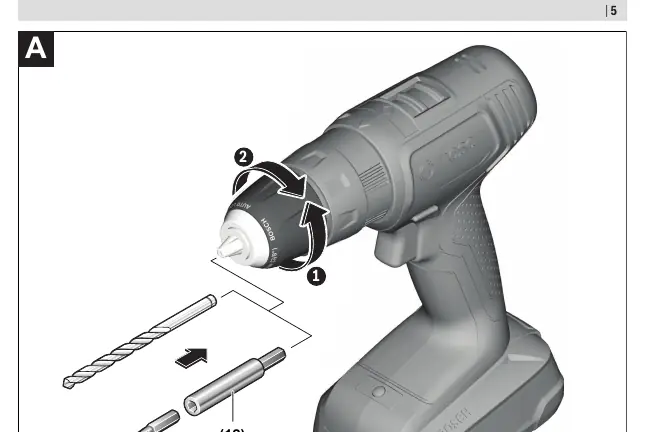
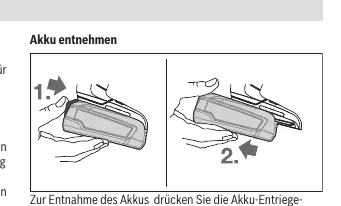
Always remove the battery before performing any maintenance, changing tools, or transporting the device. To insert the battery, slide it into the handle until it clicks into place. To remove, press the battery release button and pull the battery backward.
Operation
Setting Rotational Direction: Use the rotational direction switch (9) to change the direction. Set it to the middle position to lock the tool and prevent accidental startup.
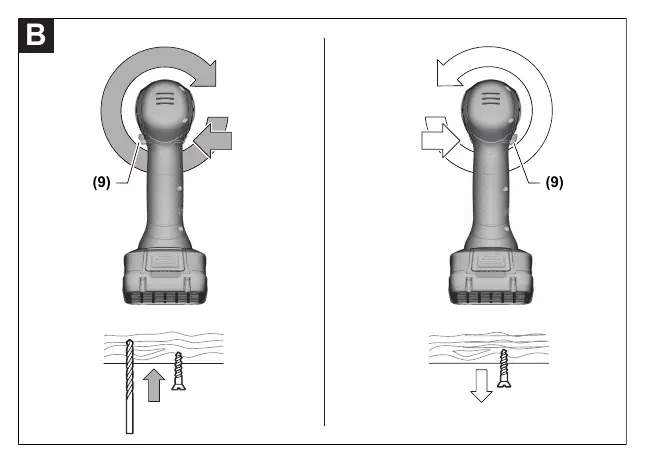
Switching On/Off: Press and hold the on/off switch (10) to start. The worklight (8) illuminates the area when the switch is pressed.
Adjusting Speed: The speed is controlled by how far you press the on/off switch (10).
Torque Selection: Use the torque presetting ring (3) to select the required torque in 20 stages. For drilling, set the ring to the drill symbol.
Gear Selection: Use the gear selector switch (5) to choose between Gear I (low speed, high torque) and Gear II (high speed, low torque).
Maintenance and Cleaning
Keep the tool and ventilation slots clean for safe and efficient operation. Always remove the battery before cleaning.
Manufacturer information
Bosch
Practical help
Common problems
Tool stops during operation
The battery may be empty or overheated. Check the battery charge level or allow it to cool down.
Tool will not start
Ensure the battery is fully inserted and the rotational direction switch is not in the middle (locked) position.
Before use
- Charge the battery fully before first use.
- Ensure the rotational direction switch is set to the desired direction.
- Select the appropriate gear (I or II) for the task.
- Set the torque ring to the correct setting for the screw size or drilling mode.
Specs in practice
- 0-440 / 0-1450 min-1
- No-load speed for Gear I and Gear II respectively.
Images and diagrams
- The tool features a keyless chuck (2) that locks automatically when the on/off switch is not pressed.
- The torque ring (3) allows for 20 different torque settings plus a drill mode.
Model compatibility
- Compatible with Bosch PBA 18V series batteries.

Manual page author
David Miller
Documentation analyst
Organizes user manual content into clear summaries, with attention to model details, product context, and everyday usability.