Tools / Drills
User Manual for Fieldmann FDS 10150-A Cordless Screwdriver
Quick guide for the Fieldmann FDS 10150-A cordless screwdriver. Learn how to operate, charge, change bits, and maintain your tool safely.
Table of contents
Manual images
Click an image to enlargeQuick guide from the manual
The Fieldmann FDS 10150-A is a 3.6V cordless screwdriver designed for DIY tasks. Before using the tool, ensure the battery is charged and you are familiar with the safety instructions. The tool features a rotating handle for different working positions and a built-in LED light for visibility.
Product description
The screwdriver consists of the following main components:
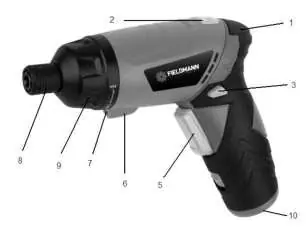
- 1: LED battery display
- 2: Handle rotation switch
- 3: Direction switch
- 4: Charging port
- 5: Trigger
- 6: LED light switch
- 7: LED light
- 8: Chuck
- 9: Torque setting (1-9)
- 10: Battery
Assembly and setup
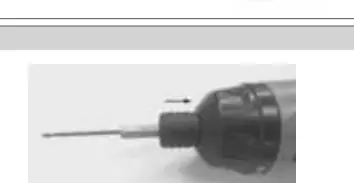
Bit changing
To insert or change a bit, select the desired bit from the storage and insert it into the chuck (8).
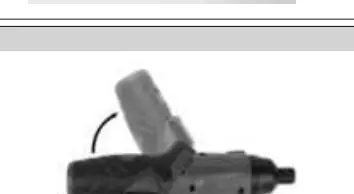
Handle rotation
The handle can be adjusted for different working angles. Press the handle rotation switch (2) and rotate the handle clockwise until it clicks into the horizontal position. To return to the pistol grip position, press the switch again and rotate the handle back until it clicks.
Operation
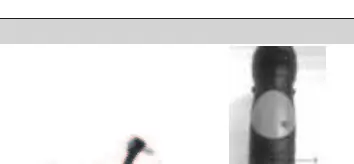
Charging
Connect the charger to a power outlet (230V ~ 50Hz) and insert the connector into the charging port (4) on the handle. A charging indicator will light up.
Switching on and off
Press the trigger (5) to start the tool. Release the trigger to stop the rotation. Note that the chuck may continue to rotate for a short time after releasing the trigger.
Direction of rotation
Use the direction switch (3) to change the rotation direction:
- Clockwise (Screwing): Set the switch to the left (L).
- Counter-clockwise (Unscrewing): Set the switch to the right (R).
Maintenance and storage
- Always disconnect the charger before cleaning or maintenance.
- Keep the tool clean and dry. Use a soft cloth dampened with lukewarm water for cleaning plastic parts. Do not use harsh detergents or solvents.
- Store the tool in a dry place, away from heat sources and out of reach of children.
- Regularly check the tool for any signs of wear or damage.
Safety
Always wear eye and ear protection. Do not use the tool in explosive environments or near flammable materials. Keep the tool away from children and unauthorized persons. Do not expose the tool to rain or moisture.
Manufacturer information
Fieldmann
Practical help
Common problems
Tool does not start
Check if the battery is charged and the direction switch is not in the neutral position.
Abnormal noise or smell
Stop using the tool immediately and contact an authorized service center.
Before use
- Ensure the battery is fully charged.
- Check that the bit is securely inserted into the chuck.
- Verify the direction switch is set to the desired rotation.
- Ensure the workspace is clean and well-lit.
- Check for any visible damage to the tool or charger.
Specs in practice
- Protection Class
- Class II (double insulation).
- Ingress Protection
- IP20 (protection against solid objects over 12mm, no water protection).
Images and diagrams
- The tool features a rotating handle for ergonomic use in tight spaces.
- The torque setting (9) allows adjustment for different screw sizes.
- The LED light (7) helps illuminate the work area.
Model compatibility
- Use only the charger provided by the manufacturer.
- Do not use the tool for professional purposes; it is intended for DIY use.

Manual page author
Michael Turner
Technical manual editor
Reviews PDF manuals for structure, safety notes, and practical product details so readers can find the right information quickly.