Tools / Drills
Cordless Drill/Driver User Manual Bosch EasyDrill 18V-40 / EasyImpact 18V-40
Quick guide for the Bosch EasyDrill 18V-40 and EasyImpact 18V-40 cordless drill/driver. Includes setup, operation, tool changes, and safety instructions.
Table of contents
Manual images
Jump to the sectionQuick guide from the manual
This manual covers the operation and safety for the Bosch EasyDrill 18V-40 and EasyImpact 18V-40 cordless drill/drivers. Before first use, ensure the battery is fully charged. Always remove the battery before performing maintenance, changing tools, or transporting the device to prevent accidental activation.
Device Description
The main components are:
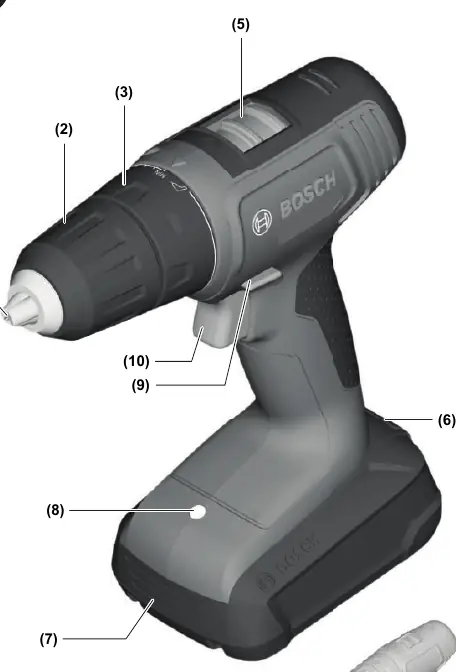
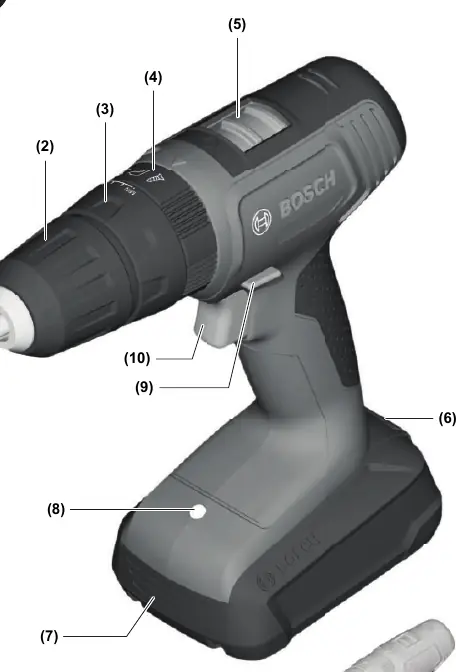
- (1) Tool holder
- (2) Keyless chuck
- (3) Torque presetting ring
- (4) Operating mode presetting ring (EasyImpact 18V-40 only)
- (5) Gear selector switch
- (6) Battery release button
- (7) Rechargeable battery
- (8) Worklight
- (9) Rotational direction switch
- (10) On/off switch
- (11) Handle (insulated gripping surface)
- (12) Universal bit holder
Assembly and Operation
Battery Installation
Set the rotational direction switch (9) to the middle position to prevent accidental starting. Insert the charged battery (7) into the handle until it clicks into place.
Tool Change
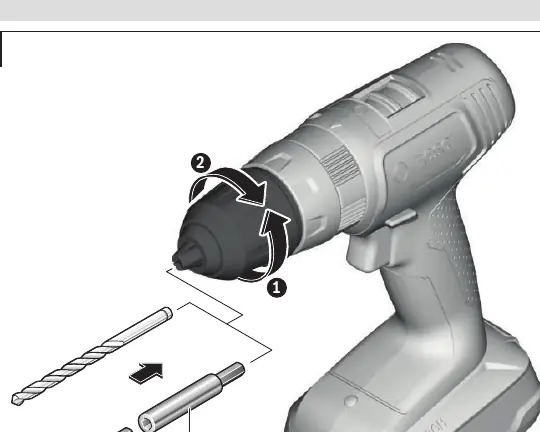
The drill spindle is locked when the on/off switch (10) is not pressed. Open the keyless chuck (2) by turning it in the direction of rotation ➊. Insert the tool and tighten the chuck sleeve (2) firmly by hand in the direction of rotation ➋ until it stops clicking.
Operation
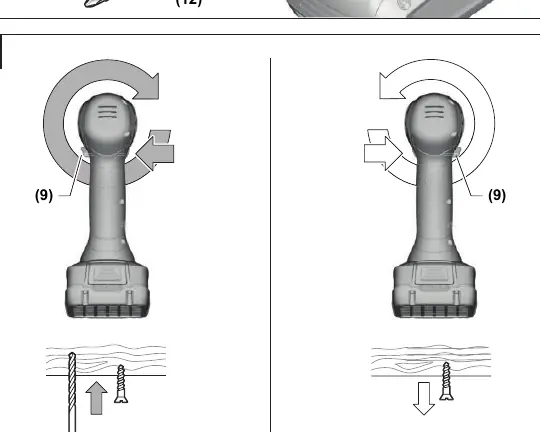
- Rotational Direction: Use the switch (9) to change direction. Press to the left for right rotation (drilling/screwing) and to the right for left rotation (loosening).
- Switching On/Off: Press and hold the on/off switch (10). The worklight (8) illuminates the area. Release the switch to turn off.
- Speed Adjustment: Regulate speed by varying the pressure on the on/off switch (10).
- Torque Preselection: Use the torque ring (3) to select from 20 stages.
- Gear Selection: Use the gear selector (5). Gear I is for low speed/high torque (large drilling diameters/screwing). Gear II is for high speed (small drilling diameters).
- Mode Selection (EasyImpact 18V-40): Use the mode ring (4) to select between Screwdriving, Drilling, or Impact Drilling.
Maintenance and Safety
Always keep the tool and ventilation slots clean for safe operation. If the tool blocks, switch it off immediately to prevent kickback. The tool features temperature-dependent overload protection; if the tool is overloaded or the battery temperature is too high, the electronics will switch the tool off until it returns to the optimal operating temperature range.
Manufacturer information
Bosch
Practical help
Common problems
Tool stops automatically during use
The tool is likely overloaded or the battery temperature is too high. Allow the tool to cool down and return to the optimal operating temperature range.
Battery does not charge
Ensure you are using a compatible charger. The following chargers are NOT compatible with PBA batteries: AL 1814 CV, AL 1820 CV, AL 1860 CV, AL 2215 CV.
Tool does not start
Check if the rotational direction switch (9) is in the middle position (locked). Move it to the left or right to enable operation.
Before use
- Ensure the battery is fully charged.
- Check that the rotational direction switch is not in the middle (locked) position.
- Select the appropriate gear (I or II) for your task.
- Set the torque ring to the desired setting.
- For EasyImpact 18V-40, ensure the correct operating mode (Screwdriving, Drilling, or Impact Drilling) is selected.
Specs in practice
- Torque (20 stages)
- Allows precise control over the tightening force to prevent over-tightening screws.
- Impact rate (EasyImpact 18V-40)
- The number of impacts per minute for drilling into masonry/brick.
Images and diagrams
- (1) Tool holder, (2) Keyless chuck, (3) Torque ring, (4) Mode ring, (5) Gear switch, (6) Battery release, (7) Battery, (8) Worklight, (9) Direction switch, (10) On/off switch, (11) Handle, (12) Bit holder.
Model compatibility
- Compatible with PBA 18V series batteries.
- Compatible with AL 18 series chargers (excluding specific models listed in the manual).

Manual page author
Michael Turner
Technical manual editor
Reviews PDF manuals for structure, safety notes, and practical product details so readers can find the right information quickly.