Tools / Drills
User Manual for Bosch GSR 18V-65 and GSB 18V-65 Cordless Drill/Driver
Quick guide for the Bosch GSR 18V-65 and GSB 18V-65 cordless drill/drivers. Includes setup, operation, safety instructions, and maintenance.
Table of contents
Manual images
Jump to the sectionQuick guide from the manual
This manual covers the Bosch GSR 18V-65 and GSB 18V-65 professional cordless drill/drivers. Always read the safety instructions before use.
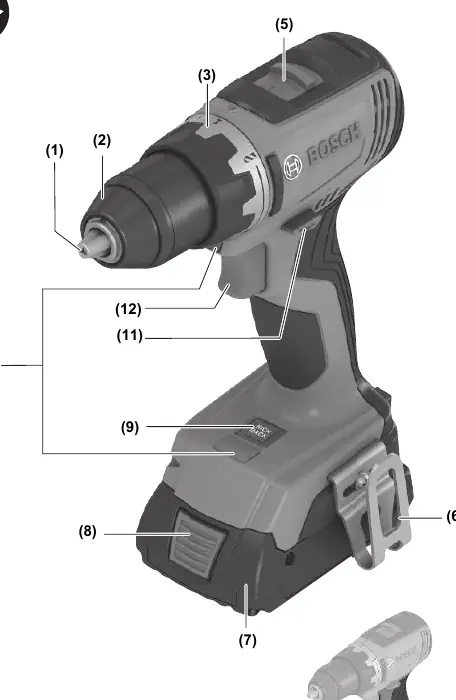
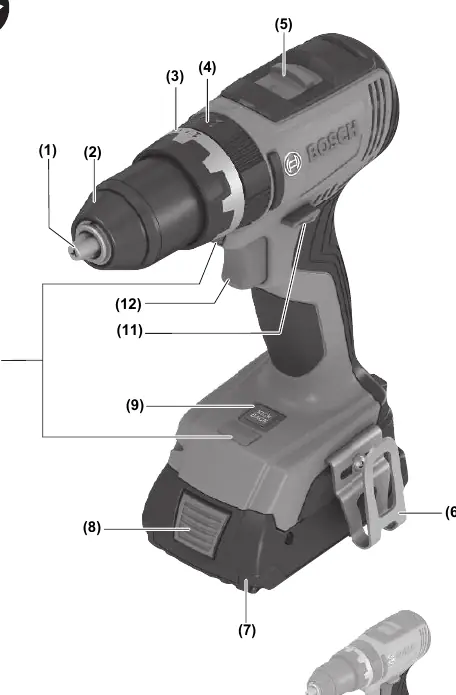
- Battery: Insert the charged battery into the holder until it clicks. Press the release button to remove.
- Tool Change: Open the keyless chuck by turning it, insert the tool, and tighten firmly by hand until a click is heard.
- Operation: Use the on/off switch to start. The speed is variable based on pressure. Use the gear selector only when the tool is at a standstill.
Product Description
The tool is intended for driving and loosening screws and for drilling in wood, metal, ceramic, and plastic. The GSB model is also designed for impact drilling in brick, masonry, and stone.
Assembly
Before any work on the tool (e.g., maintenance, tool change), remove the battery. Wear protective gloves when changing tools, as the tool and chuck can become hot.
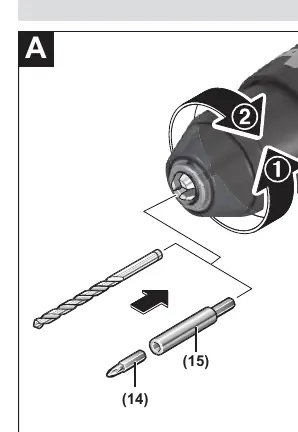
Operation
Worklight: The worklight illuminates the work area in poor lighting conditions. It turns on when the on/off switch is pressed lightly.
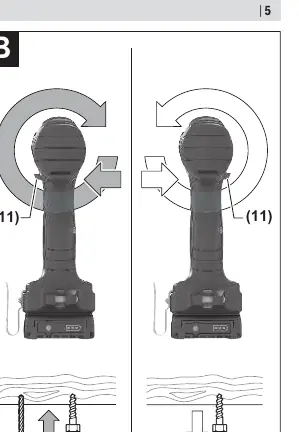
Direction: Use the rotational direction switch to change the direction. Do not change while the on/off switch is pressed.
Operating Modes: Set the torque/mode ring to the desired symbol (Drilling, Screwdriving, or Impact Drilling for GSB).
Speed and Torque: Adjust speed by varying pressure on the on/off switch. Preselect torque in 20 stages for screwdriving.
KickBack Control: This feature provides better control and user protection. If the tool rotates unexpectedly around the drilling axis, it shuts off automatically. The worklight flashes and the KickBack Control button lights up red.
Maintenance and Service
Keep the tool and ventilation slots clean for safe operation. For repairs or spare parts, contact your local Bosch service center.
Manufacturer information
Bosch
Practical help
Common problems
KickBack Control triggered (red LED on button)
Switch the tool off and on again to reset.
Tool will not start
Check battery charge level or ensure the KickBack Control function is not faulty.
Battery not charging
Ensure the charger is compatible and the battery is within the allowed temperature range (0 to +35 °C).
Before use
- Ensure the battery is fully charged.
- Check that the correct tool bit is inserted and tightened.
- Set the gear selector to the appropriate speed (1 or 2).
- Set the torque/mode ring to the correct setting for the task.
Specs in practice
- 0-550 / 0-2100 min-1
- No-load speed range for 1st and 2nd gear.
Images and diagrams
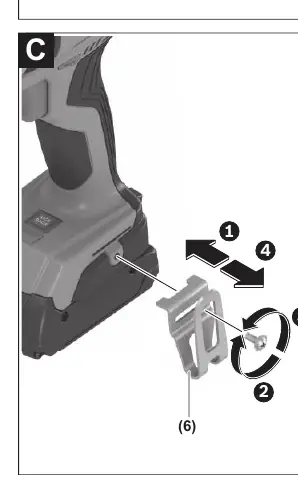
- (1) Tool holder
- (2) Keyless chuck
- (3) Torque presetting ring
- (4) Operating mode ring (GSB only)
- (5) Gear selector
Model compatibility
- Compatible with all Bosch 18V batteries (GBA and ProCORE18V series).

Manual page author
David Miller
Documentation analyst
Organizes user manual content into clear summaries, with attention to model details, product context, and everyday usability.