Tools / Drills
Bosch EXACT ION Industrial Cordless Screwdriver User Manual
Quick guide for the Bosch EXACT ION industrial cordless screwdriver. Includes setup, torque adjustment, battery maintenance, and troubleshooting.
Table of contents
Manual images
Jump to the sectionQuick guide from the manual
The Bosch EXACT ION is an industrial cordless screwdriver designed for tightening and loosening screws, nuts, and other threaded fasteners. Before use, ensure the battery is charged and the correct rotational direction is set.
Device Description
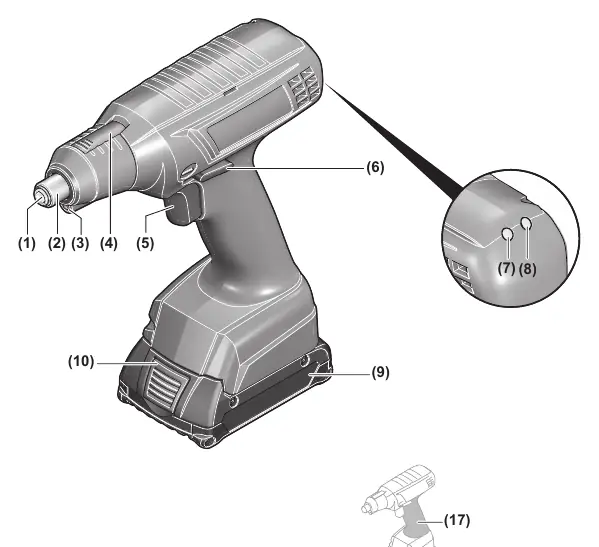
The tool features a torque-dependent shut-off clutch, an LED worklight, a battery charge indicator, and a USB port for configuration. Key components include the tool holder, quick-change chuck, torque preselection slider, and rotational direction switch.
Assembly
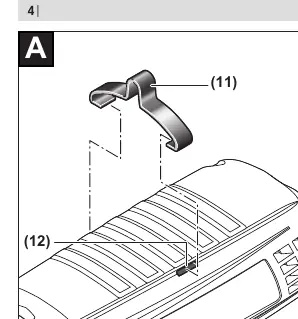
Hanging Hook: Attach the hanging hook (11) to the tool by snapping it into the slots (12). Regularly check the condition of the hook and the suspension device.
Operation
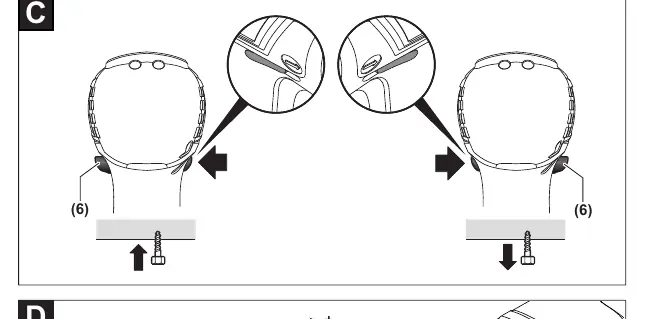
Setting Rotational Direction: Use the rotational direction switch (6). Clockwise for driving in screws, anti-clockwise for loosening. The tool will not start if the switch is in the center position.
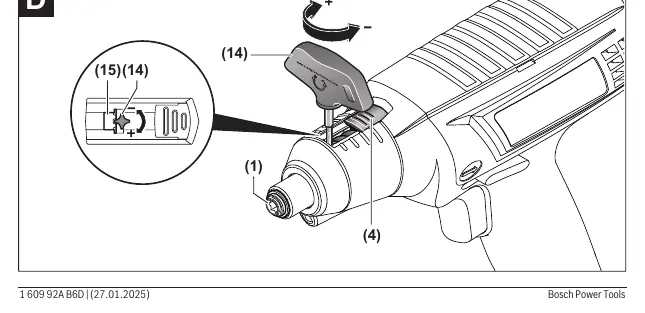
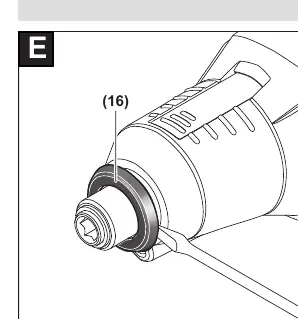
Setting Torque: The torque depends on the spring preload of the shut-off clutch. Use the supplied adjustment tool (14) to set the torque. Slide the slider (4) back, insert the adjustment tool into the tool holder (1), and rotate until the setting disc (15) is visible in the housing opening. Insert the adjustment tool into the disc and rotate to adjust the torque.
Switching On/Off: Press the on/off switch (5) to start. The tool switches off automatically when the set torque is reached.
Maintenance
Lubrication: Clean the gearbox with a mild solvent after the first 150 operating hours and lubricate with Bosch special gearbox grease. Repeat every 300 hours. Lubricate moving parts of the shut-off clutch after 100,000 screw connections with motor oil (SAE 10/SAE 20) and Molykote grease.
General Maintenance: Check the entire tool for damage and wear every 100,000 screw connections. Have maintenance and repairs performed only by qualified specialists.
Manufacturer information
Bosch
Practical help
Common problems
Tool does not start
Check battery charge; ensure rotational direction switch is not in the center position.
Torque not reached
Check battery charge; ensure torque is set within the specified range.
Tool overheated
Wait for the LED indicator to stop flashing before restarting.
Before use
- Check battery charge level
- Set correct rotational direction
- Adjust torque setting
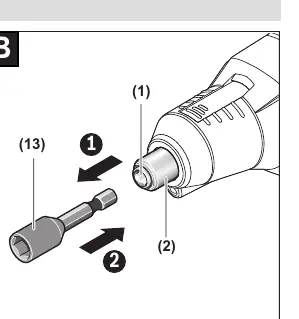
- Insert appropriate bit into tool holder
Specs in practice
- No-load speed
- Rotational speed of the tool without load.
- Protection rating IP 20
- Protected against solid objects > 12.5mm; no protection against water.
Images and diagrams
- (1) Tool holder
- (2) Quick-change chuck
- (4) Torque preselection slider
- (5) On/Off switch
- (6) Rotational direction switch
Model compatibility
- Use only Bosch recommended batteries (GBA 18V, ProCORE18V) and chargers (GAL 18, GAX 18, GAL 36).

Manual page author
Michael Turner
Technical manual editor
Reviews PDF manuals for structure, safety notes, and practical product details so readers can find the right information quickly.