Home Appliances / Fans
User Manual for Bosch UniversalFan 18V-1000 Cordless Fan
Quick guide for the Bosch UniversalFan 18V-1000 cordless fan. Includes setup, mounting options (tripod, hooks, rods), battery operation, and maintenance instructions.
Table of contents
Manual images
Click an image to enlargeQuick guide from the manual
The Bosch UniversalFan 18V-1000 is a cordless fan designed for indoor and outdoor use in dry conditions. This guide provides essential information for safe operation, mounting, and maintenance.
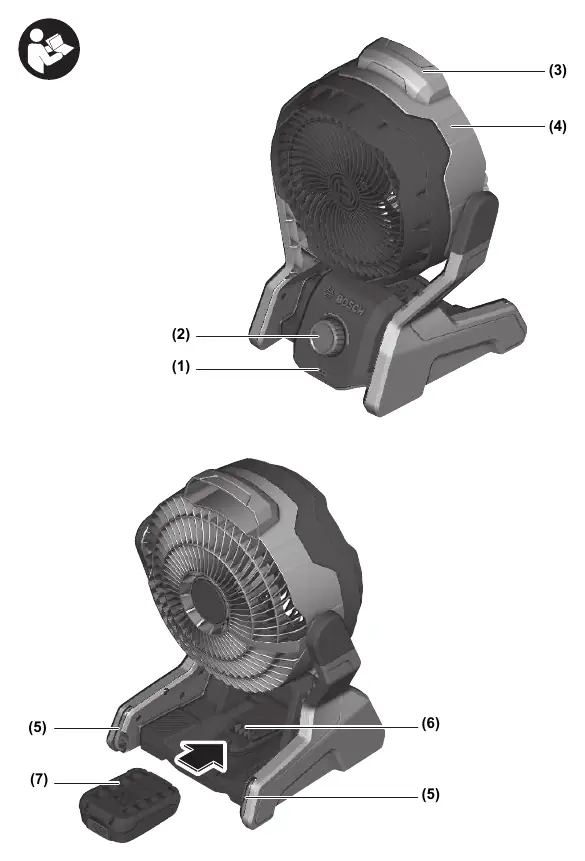
Safety instructions
- Supervision: Children must be supervised to ensure they do not play with the fan or charger.
- Usage: This fan can be used by children aged 8 or older and persons with physical, sensory, or mental limitations if supervised or instructed in safe operation.
- Airflow: Always keep the air outlet and air inlet free. Do not block the fan wheel or insert objects into it.
- Battery Safety: Protect the battery from heat, fire, dirt, water, and moisture. Do not open the battery.
Operation
Switching On/Off: Rotate the operating button clockwise to switch on. Rotate anticlockwise until an audible click is heard to switch off.
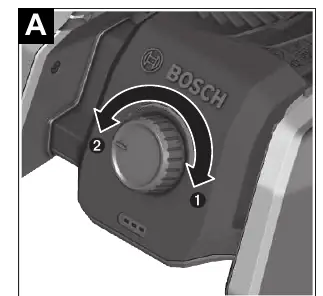
Air Speed: Rotate the operating button clockwise to increase speed and anticlockwise to decrease speed.
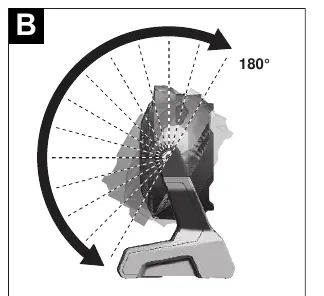
Aligning the Fan Head: Hold the fan by the carrying handle and tilt the fan head forwards or backwards. It can be tilted up to 30° forwards and 150° backwards.
Mounting and Attachment Options
The fan offers multiple mounting options:
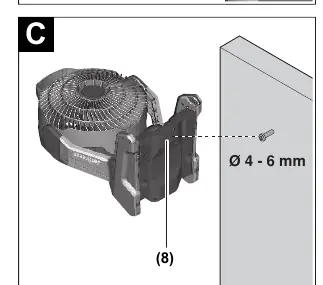
- Keyhole: Position the wide part of the keyhole over a screw head (Ø 4–6 mm) and slide the fan downwards to secure.
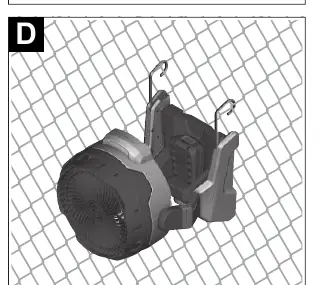
- Utility Hooks: Pull the hooks out of their slots and rotate if necessary. Hang on a stable surface (max. depth 36 mm).
- Rods: Use the two rod holders to secure the fan to rods (max. Ø 22 mm).
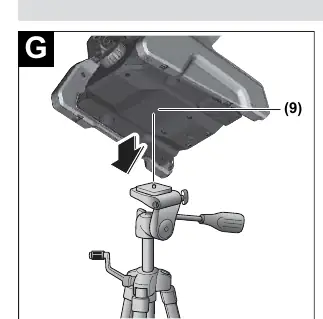
- Tripod: Use the 1/4" tripod mount to secure the fan to a tripod (capacity > 3 kg).
- Screw Clamps: Use the clamping surfaces to attach the fan with screw clamps.
Maintenance and Cleaning
Remove the battery before any work on the fan (assembly, cleaning, transport, storage). Regularly clean the fan and the grille in front of the ventilation slots. Blow out the interior of the fan head, propeller, and motor housing with dry compressed air. Do not use brake fluid, petrol, petroleum-based products, or strong solvents for cleaning.
Storage
Remove the battery before storing. Store in a cool, dry place protected from direct sunlight, heat, and cold. Keep in original packaging to protect from dust.
Manufacturer information
Bosch
Practical help
Common problems
Fan does not start
Check if the battery is charged and correctly inserted into the battery holder.
Fan stops automatically
The overload protection or temperature protection has been triggered. Wait until the fan cools down to the optimal operating temperature range.
Before use
- Charge the battery fully before first use.
- Ensure the air intake and outlet are free of obstructions.
- Check that the fan wheel is not blocked.
- Select the appropriate mounting method for your location.
- Ensure the battery is securely locked in place.
Specs in practice
- Rated voltage
- 18 V
Images and diagrams
- Figure A: Operating button for On/Off and speed control.
- Figure B: Fan head tilt adjustment.
- Figure C: Mounting using the keyhole.
- Figure D: Mounting using utility hooks.
- Figure F: Mounting on rods using rod holders.
Model compatibility
- Compatible with Bosch 18V PBA batteries.
- Not compatible with AL 1814 CV, AL 1820 CV, AL 1860 CV chargers.

Manual page author
David Miller
Documentation analyst
Organizes user manual content into clear summaries, with attention to model details, product context, and everyday usability.