Home Appliances / Fans
User Manual for Gallet VEN 11T Tower Fan
Quick guide for the Gallet VEN 11T tower fan. Includes assembly instructions, operation settings, maintenance tips, and troubleshooting steps.
Table of contents
Quick guide from the manual
The Gallet VEN 11T is a tower fan designed for indoor air circulation. Before use, ensure the device is fully assembled and placed on a stable surface. The fan features three speed settings, an oscillation function, and a timer up to 120 minutes. Always disconnect the device from the power supply when not in use, before cleaning, or before assembly/disassembly.
Description of the appliance
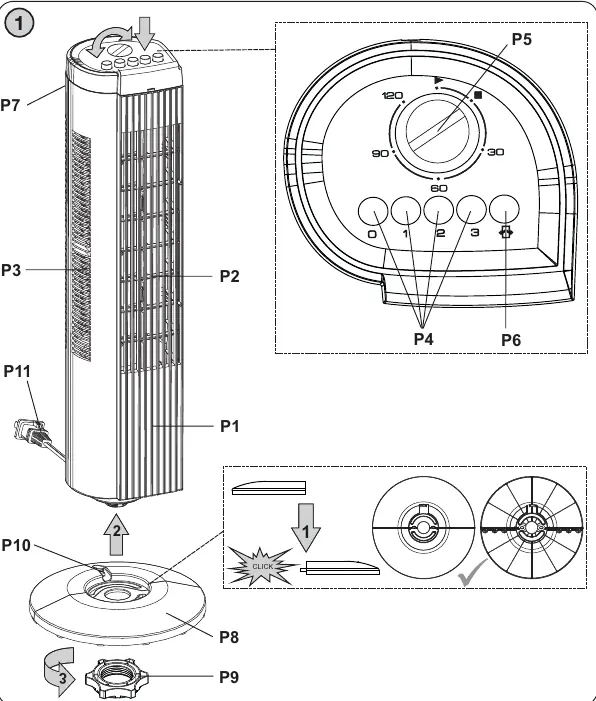
The fan consists of the following main parts: P1 Fan body, P2 Air flow openings, P3 Air suction openings, P4 Speed switch/selector, P5 Timer, P6 Oscillation switch, P7 Transport hole, P8 Base, P9 Base nut, P10 Power cord groove, and P11 Power cord.
Assembly
1. Unscrew the base nut P9 from the bottom of the fan body P1.2. Assemble the base P8.3. Place the base P8 onto the bottom of the fan body P1 and secure it by tightening the nut P9. Ensure the power cord P11 is routed through the groove P10.
Operation
Connect the power cord to an electrical outlet. Use the buttons on the base P4 to select the desired speed:
- Button (3): High air flow velocity
- Button (2): Medium air flow velocity
- Button (1): Low air flow velocity
- Button (0): Off
Oscillation: Press the oscillation knob P6 to start the fan rotating from side to side. Push the knob again to stop oscillation.
Timer: Use the rotary regulator P5 to set the operation time between 1 and 120 minutes. The fan will automatically switch off when the set time expires. For continuous operation, set the regulator to the continuous symbol.
Maintenance
Always unplug the unit before cleaning. Wipe the exterior with a soft, damp cloth or sponge. Do not use abrasive cleaners. Ensure no water enters the appliance. Do not immerse the fan or power cord in water or other liquids.
Troubleshooting
If the device is not working, check the following:
- Ensure the power cord is firmly plugged into the outlet.
- Verify the outlet is functioning by testing it with another electrical appliance.
- Check the power cord for any visible damage.
Technical specifications
- Power input: 35 W
- Power supply: 230 V ~ 50 Hz
- Height: 74 cm
- Timer: Up to 120 minutes
- Noise level: 46-52 dB(A)
- Cable length: 1.5 m
- Weight (net): 2.9 kg
Safety warnings
Do not use the fan outdoors, in bathrooms, or near water sources like bathtubs, showers, or swimming pools. Do not cover the air ventilation holes. Never insert fingers or objects into the fan openings. Do not place the fan on soft surfaces like beds or carpets while in operation.
Practical help
Common problems
Device is not working
Check if the power cord is firmly plugged in, verify the outlet is working with another device, and inspect the power cord for damage.
Before use
- Remove all packaging materials
- Assemble the base to the fan body
- Ensure the power cord is routed through the base groove
- Check that the local voltage matches the device requirements (230V)
Images and diagrams
- The assembly diagram illustrates the base attachment process using the base nut.
- The control panel diagram identifies the timer dial, speed buttons, and oscillation switch.
Model compatibility
- For indoor household use only.
- Not suitable for use in bathrooms or wet environments.
- Do not use near open flames or heat sources.

Manual page author
David Miller
Documentation analyst
Organizes user manual content into clear summaries, with attention to model details, product context, and everyday usability.