Tools / Impact Wrenches
User Manual for Bosch GDR 12-LI Cordless Impact Driver
Quick guide for the Bosch GDR 12-LI cordless impact driver. Learn about battery installation, tool changing, operation modes, torque settings, and maintenance.
Table of contents
Manual images
Click an image to enlargeQuick guide from the manual
The Bosch GDR 12-LI is a cordless impact driver designed for driving and loosening screws and bolts, as well as tightening and loosening nuts. This guide provides essential information for safe and efficient operation.
Safety Instructions
- Always wear eye protection.
- Remove the battery before performing any maintenance, changing tools, or transporting the device.
- Hold the tool by insulated gripping surfaces when performing operations where the fastener may contact hidden wiring.
- Secure the workpiece using clamping devices or a vice.
Battery Operation
Lithium-ion batteries are supplied partially charged. Fully charge the battery before first use.
- Inserting: Push the charged battery into the holder until it clicks.
- Removing: Press the battery release buttons and pull the battery out. Do not use force.
- Charge Indicator: Press the on/off switch halfway to see the charge level (3 green lights = 70-100%, 1 flashing green = 5-40%).
Assembly
Changing the Tool:
- Pull the locking sleeve forward.
- Guide the application tool into the tool holder up to the stop.
- Release the locking sleeve to lock the tool.
Use only screwdriver bits with a ball catch (DIN 3126-E6.3). Other bits can be used with a universal bit holder with a ball catch.
Operation
- Rotational Direction: Use the switch to change direction. Right rotation for driving screws/tightening nuts; Left rotation for loosening.
- Switching On/Off: Press and hold the on/off switch. The LED illuminates the work area. Release the switch to turn off.
- Speed Adjustment: Speed is controlled by the pressure applied to the on/off switch.
- Overload Protection: In case of heavy loading or temperature issues, the speed is reduced until the tool reaches the permitted temperature range.
Practical Advice
Maximum torque is achieved after an impact duration of 6-10 seconds. Always check the actual tightening torque with a torque wrench. Torque depends on the screw/nut strength, type of backing (washers, etc.), and lubrication.
Maintenance
- Clean air vents regularly to prevent dust accumulation.
- Clean the tool holder and locking sleeve periodically.
- Keep the tool and ventilation slots clean for safe operation.
Manufacturer information
Bosch
Practical help
Common problems
Tool does not start
Check battery charge status and ensure it is properly inserted.
Reduced operating time
Battery may be deteriorated and needs replacement.
Tool overheats or slows down
Temperature-dependent overload protection is active. Allow tool to cool down.
Before use
- Ensure battery is fully charged
- Check that the correct bit is inserted
- Verify rotational direction switch is set correctly
- Ensure workpiece is secured
Specs in practice
- Rated voltage
- 12V DC
- No-load speed
- 0-2600 min-1
Images and diagrams
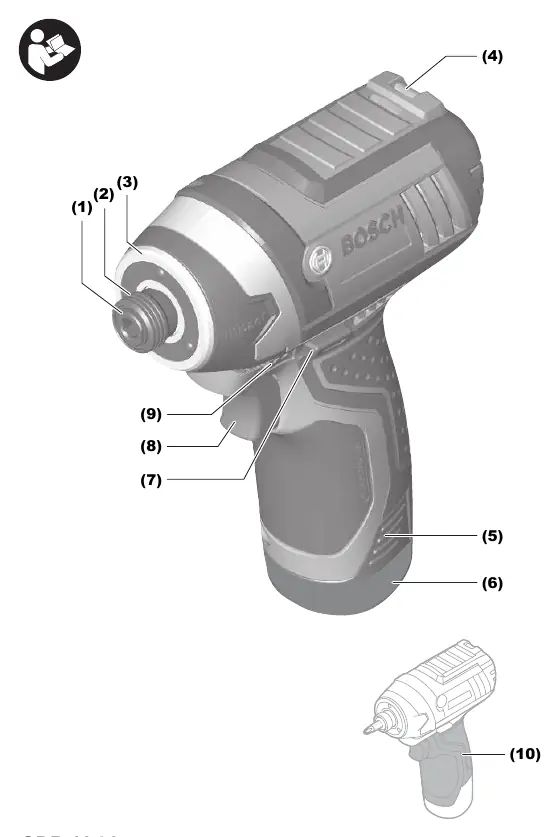
- (1) Tool holder
- (2) Locking sleeve
- (7) Rotational direction switch
- (8) On/off switch
Model compatibility
- Compatible with GBA 12V batteries
- Compatible with GAL 12... and GAX 18... chargers

Manual page author
David Miller
Documentation analyst
Organizes user manual content into clear summaries, with attention to model details, product context, and everyday usability.