Tools / Saws
User Manual for Craftsman 12.0-Volt Cordless Right-Angle Impact Driver 320.17562
Quick guide for the Craftsman 12.0-Volt Cordless Right-Angle Impact Driver (Model 320.17562). Includes operation, battery charging, bit installation, maintenance, and troubleshooting steps.
Table of contents
Manual images
Click an image to enlargeQuick guide from the manual
This manual provides essential instructions for the safe and efficient operation of the Craftsman 12.0-Volt Cordless Right-Angle Impact Driver. Before first use, ensure the battery is fully charged. Always wear eye protection and keep the tool's rotational direction selector in the center (locked) position when not in use or during maintenance.
Product description
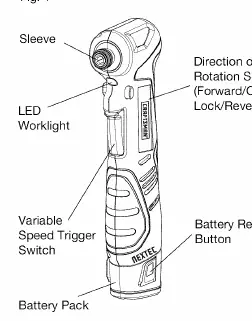
The tool features a variable-speed trigger, an LED worklight for visibility, and a FuelGauge to monitor battery charge. It is designed for driving screws and nuts in tight spaces. The tool uses a 1/4-inch hex bit retainer.
Safety warnings
- Always wear safety goggles or glasses with side shields.
- Keep the work area clean and well-lit.
- Do not operate in explosive environments.
- Disconnect the battery before making adjustments, changing accessories, or storing the tool.
- Do not force the tool; use it for its intended application.
- Keep hands away from motor-housing vents during operation.
Battery charging and maintenance
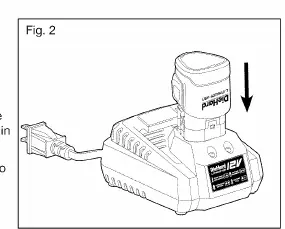
The Lithium-Ion battery pack should be charged at room temperature (32°F to 104°F). The charger will communicate with the battery to evaluate its condition. A green flashing light indicates charging, while a solid green light indicates a full charge. If the red light flashes, the battery or charger may be defective. Store batteries in a 30%-50% charged condition if storing for longer than 30 days.
Operation
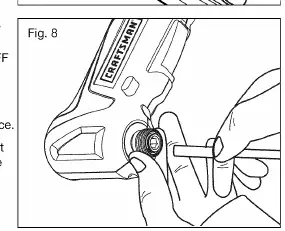
Installing and removing bits: Lock the trigger by placing the selector in the center position. Pull the sleeve toward the front of the tool, insert or remove the 1/4-inch shank bit, and release the sleeve. Ensure it returns to its original position.
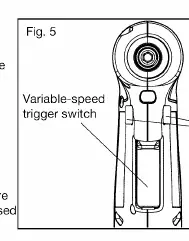
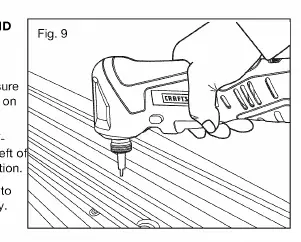
Direction control: Use the selector above the trigger to choose forward (left) or reverse (right) rotation. Always allow the tool to come to a complete stop before changing direction.
Troubleshooting
- Tool does not work: Battery is depleted; charge the battery.
- Bit cannot be installed: Sleeve is not released; release the sleeve. Bit does not fit; ensure you are using a 1/4-inch shank bit.
- Motor overheating: Cooling vents are blocked; clean the vents and do not cover them during operation.
Manufacturer information
CRAFTSMAN
Practical help
Common problems
Tool does not work
The battery is depleted. Charge the battery pack.
Bit cannot be installed
Ensure the sleeve is fully pulled forward. Verify that you are using a 1/4-inch shank bit.
Motor overheating
Ensure cooling vents are free from dust and obstacles. Do not cover vents during operation.
Before use
- Charge the battery pack before first use.
- Inspect the tool for any breakage or damage.
- Ensure the rotational direction selector is in the center (locked) position.
- Wear appropriate eye protection.
- Verify the battery pack is securely latched into the tool.
Specs in practice
- No Load Speed
- 0-2100 RPM
- Impacts per minute
- 0-3400 BPM
Images and diagrams
- Fig 1: Identifies the sleeve, LED worklight, trigger, selector, and battery release.
- Fig 2: Shows the battery alignment and insertion into the charger.
- Fig 8: Illustrates the process of pulling the sleeve to install or remove a bit.
Model compatibility
- Use only the specified battery pack (320.11221) and charger (320.10006).
- Charger is intended for vertical or floor-mounted use.

Manual page author
Emily Carter
User documentation editor
Prepares concise manual descriptions and highlights the most useful setup, operation, and maintenance information for readers.