Garden / Garden Tools
User Manual for Bosch UniversalHedgeCut and AdvancedHedgeCut Hedge Trimmers
Quick guide for Bosch UniversalHedgeCut (50, 58, 60) and AdvancedHedgeCut (65, 68, 70) hedge trimmers. Includes safety instructions, operation, maintenance, and troubleshooting.
Table of contents
Manual images
Click an image to enlargeQuick guide from the manual
This manual provides essential information for the safe and efficient operation of the Bosch UniversalHedgeCut and AdvancedHedgeCut series hedge trimmers. Always ensure the tool is switched off and disconnected from the power source before performing any maintenance or cleaning.
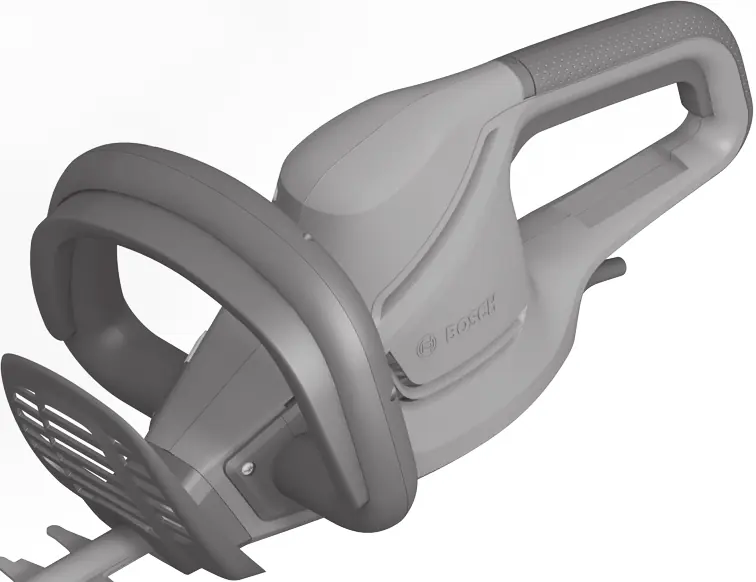
Safety instructions
General Power Tool Safety: Keep your work area clean and well-lit. Do not operate power tools in explosive atmospheres. Keep children and bystanders away while operating the tool.
Hedge Trimmer Safety: Keep all parts of the body away from the blade. Do not attempt to remove cut material or hold material to be cut when blades are moving. Always carry the hedge trimmer by the handle with the blade stopped. When transporting or storing, always fit the blade cover. Hold the hedge trimmer by insulated gripping surfaces only, as the blade may contact hidden wiring or its own cord.
Operation
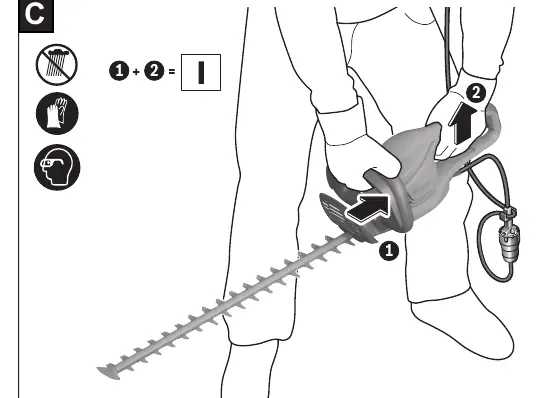
Switching ON/OFF: To switch ON, first press and hold the lock-off button (3). Then press the On/Off switch (2) and keep it pressed. To switch OFF, release the lock-off button (3) and then release the On/Off switch (2).
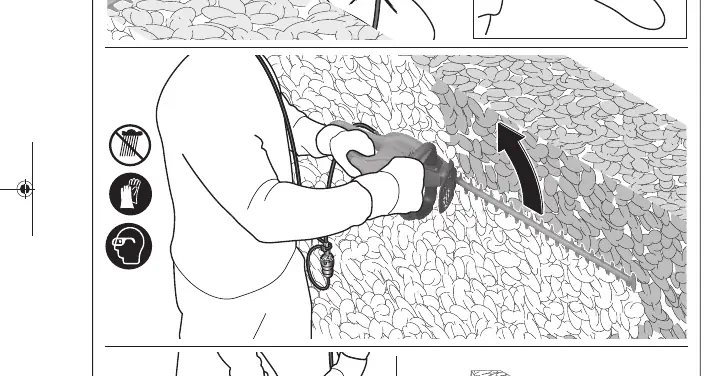
Working with the hedge trimmer: Move the hedge trimmer evenly forward along the cutting line. The double-edge cutting blade enables cutting in either direction or with a side-to-side motion. Cut the sides of the hedge first, then the top. To cut the sides straight, we recommend cutting from bottom to top in the direction of growth. To reach a level finish, fasten a piece of string along the length of the hedge at the required height and use it as an alignment guide.
Maintenance and cleaning
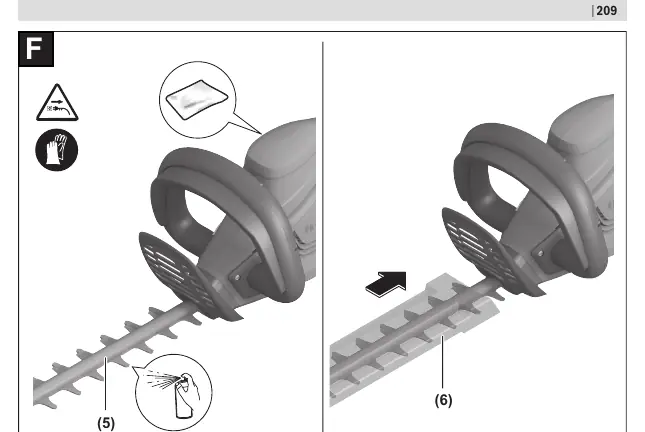
Always disconnect the power plug before any work on the product. Keep the product and ventilation slots clean for safe operation. Never spray the product with water or immerse it in water. Lubricate the cutting blade with maintenance spray before use. Check all nuts, bolts, and screws regularly to ensure the product is in a safe working condition.
Troubleshooting
If the hedge trimmer does not operate, check the power supply, socket, mains cable, extension cable, and fuse. If the hedge trimmer operates intermittently, check internal wiring or the On/Off switch. If the motor runs but the blades remain stationary, there may be an internal error. If the cutting blade becomes hot, it may be blunt, have dents, or require lubrication.
Manufacturer information
Bosch
Practical help
Common problems
Hedge trimmer does not operate
Check power supply, socket, mains cable, extension cable, and fuse.
Hedge trimmer operates intermittently
Internal wiring or On/Off switch may be defective; contact a service agent.
Cutting blade becomes hot
Blade may be blunt, have dents, or lack lubrication. Sharpen, inspect, or apply lubricant spray.
Excessive vibrations/noise
The machine may be defective; contact a service agent.
Before use
- Check mains voltage matches the rating plate
- Inspect mains cable and extension cable for damage
- Ensure all guards and handles are fitted
- Lubricate the cutting blade with maintenance spray
- Check that all nuts, bolts, and screws are tight
Specs in practice
- Rated power input
- Power consumption in Watts (480W or 500W depending on model).
- Cutting length
- The length of the blade (500mm to 700mm depending on model).
- Tooth opening
- Maximum branch diameter the blade can cut (26mm to 34mm depending on model).
Images and diagrams
- Figures A & B: Identification of components including handle, switch, and blade.
- Figures C & D: Correct two-handed switching on/off procedure.
- Figure E: Proper working technique for cutting sides and top of hedges.
- Figure F: Lubrication of the blade.
Model compatibility
- Use only approved extension cables.
- Use an RCD with a tripping current of not more than 30mA.
- Extension cables must be suitable for outdoor use.

Manual page author
Emily Carter
User documentation editor
Prepares concise manual descriptions and highlights the most useful setup, operation, and maintenance information for readers.