Tools / Nailing Tools
User Manual for Bosch UniversalTacker 18V-14 Cordless Tacker
Quick guide for the Bosch UniversalTacker 18V-14 cordless tacker. Learn how to load the magazine, adjust impact force, and use the paper tacking and spacing accessories.
Table of contents
Manual images
Click an image to enlargeQuick guide from the manual
The Bosch UniversalTacker 18V-14 is a cordless tacker designed for fastening fabrics, leather, cardboard, foils, and insulation materials to soft surfaces like wood. This guide provides essential information for safe and efficient operation.
Safety Instructions
- Always wear eye protection.
- Keep children and bystanders away while operating the tool.
- Disconnect the battery before performing any maintenance, changing accessories, or storing the tool.
- Do not use the tool to fasten electrical cables.
- Always assume the tool contains fasteners.
Battery Usage
Use only the chargers listed in the technical data. Lithium-ion batteries are supplied partially charged. Ensure the battery is fully charged before the first use. Insert the battery into the holder until it clicks into place. To remove, press the release button and pull the battery out.
Loading the Magazine
Use only original Bosch accessories. The precision parts of the tacker are matched to Bosch staples and nails.
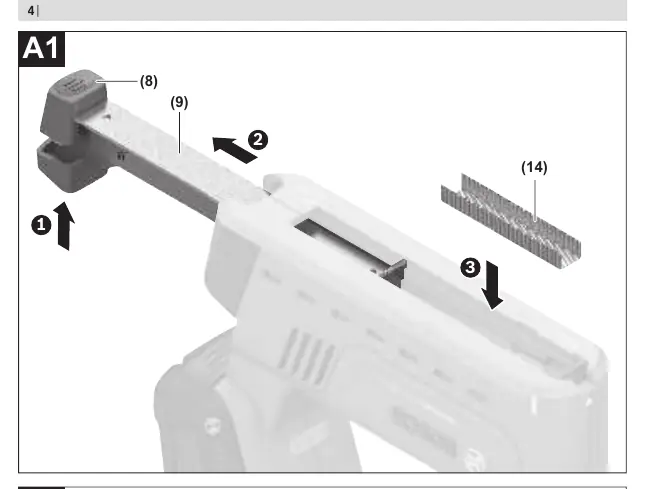
- Turn the tool around.
- Press the magazine release and pull the magazine out from the back.
- Insert the staple strip or nail strip.
- Slide the magazine back in until it clicks into place.
Operation
Starting Operation
The trigger lock, connected to the movable tacker head, prevents unintended firing if the trigger is pressed accidentally.
Single Actuation
- Place the tacker head firmly against the workpiece until fully pushed in.
- Maintain pressure and press the trigger.
- Release the trigger and lift the tacker head from the workpiece.
Contact Actuation
For faster work, hold the trigger pressed. Press the tacker head firmly onto the workpiece until the staple is released. Move to the next position and press the tacker head firmly again.
Preselecting Impact Force
Use the thumbwheel to preselect the required impact force. Always test the setting on a scrap piece of material first. The required force depends on the length of the staples/nails and the hardness of the material.
Practical Advice
- Removing Jammed Staples: Remove the battery before attempting to clear a jam. Open the magazine and remove the jammed staple, using pliers if necessary.
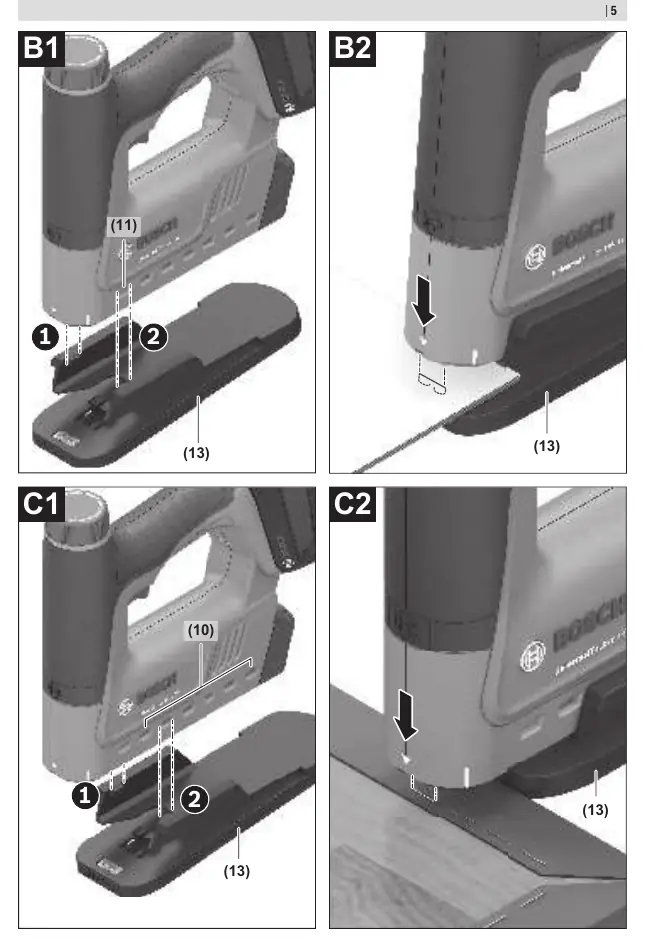
- Paper Tacking: Use the paper tacker accessory to tack up to 80 sheets. Note that only slot 1 is suitable for paper tacking.
- Spacing: Use the spacer accessory to set an equal distance (1 cm to 11 cm) from the material edge.
Maintenance
Keep the tool and ventilation slots clean for safe operation. Remove the battery before any maintenance work.
Manufacturer information
Bosch
Practical help
Common problems
Staple jam
Remove the battery, open the magazine, and remove the jammed staple using pliers if necessary.
Tool overheats
The tool is designed for short-term use (max 10 minutes of constant use). Switch off and allow it to cool down.
Before use
- Ensure the battery is fully charged.
- Check that the correct staples or nails are loaded.
- Test the impact force setting on a scrap piece of material.
- Ensure the workpiece is suitable for tacking.
Specs in practice
- Magazine capacity
- Maximum 140 staples or nails.
Images and diagrams
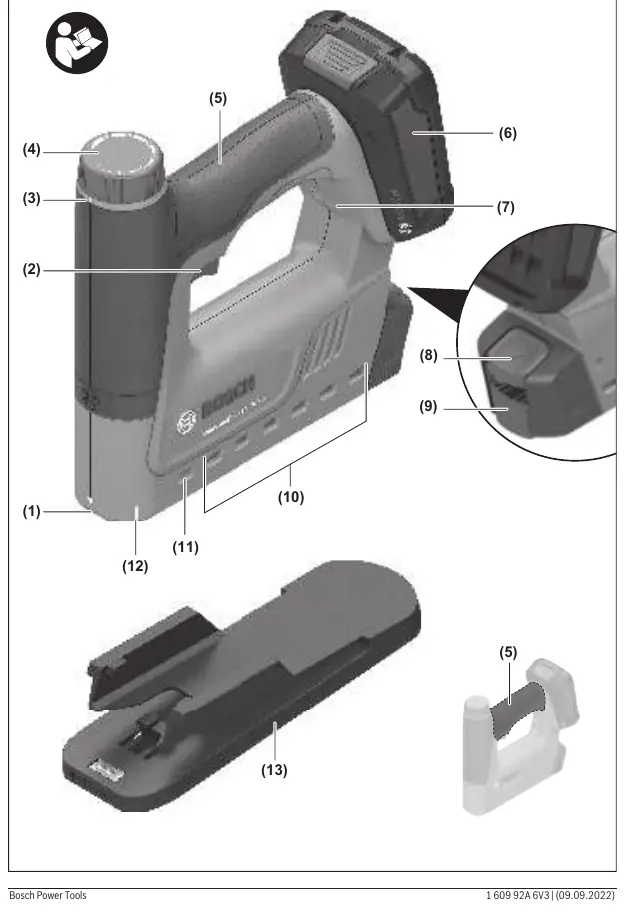
- (1) Tacker head
- (4) Thumbwheel for impact force
- (13) Paper tacker/spacer
Model compatibility
- Only use original Bosch accessories.
- 19 mm staples cannot be used with this tool.
- Compatible with PBA 18V batteries.

Manual page author
Michael Turner
Technical manual editor
Reviews PDF manuals for structure, safety notes, and practical product details so readers can find the right information quickly.