Baby / Children Products
User Manual for Bright Starts 12206-ES Minnie Mouse Rosy Skies Baby Bouncer
Quick guide for the Bright Starts 12206-ES Minnie Mouse Rosy Skies Baby Bouncer. Includes assembly instructions, safety warnings, battery installation, and care tips.
Table of contents
Manual images
Click an image to enlargeQuick Guide
The Bright Starts Minnie Mouse Rosy Skies Comfy Bouncer is designed for infants. Stop using the bouncer when the baby starts trying to sit up or has reached 20 lb (9 kg), whichever comes first. This product is not for sleep or unsupervised use. Always use the bouncer on the floor and never on elevated surfaces.
Assembly Instructions
Adult assembly is required. Ensure all parts are present before beginning.
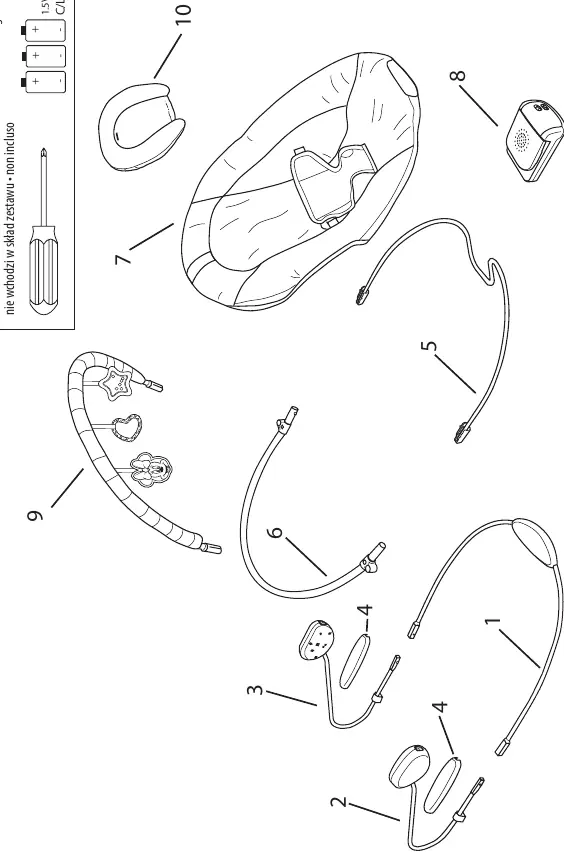
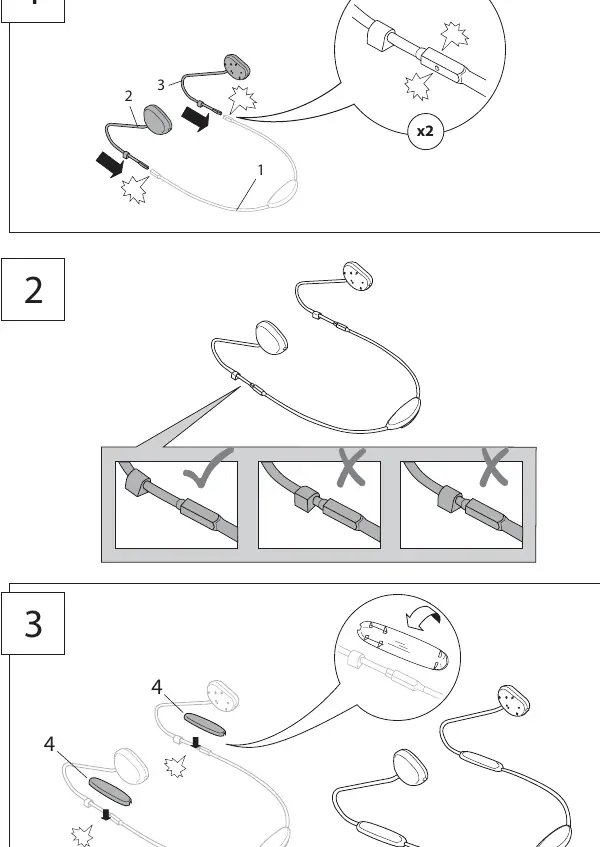
- Step 1-3: Connect the base frame wires and hubs. Ensure the hubs are securely clicked into place.
- Step 4-5: Attach the footrest wire and backrest tube to the connecting hubs.
- Step 6: Secure the seat pad onto the frame.
- Step 7-9: Install the music/vibration unit onto the frame.
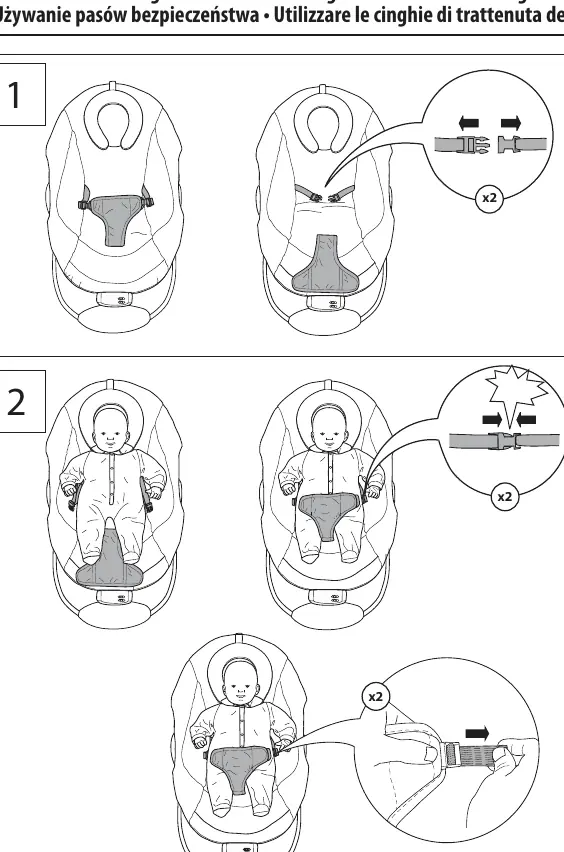
- Step 10-13: Attach the seat pad and secure the buckles.
- Step 14-15: Attach the headrest and the toy bar with toys.
Battery Installation
The music/vibration unit requires (3) size C/LR14 (1.5V) alkaline batteries (not included).
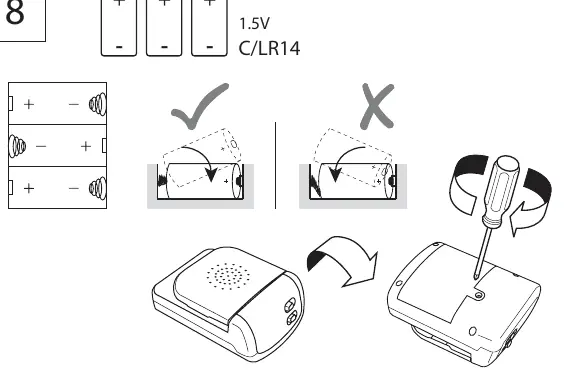
- Use a Phillips screwdriver to open the battery compartment on the music/vibration unit.
- Insert (3) C/LR14 batteries, ensuring the polarity matches the markings inside the compartment.
- Replace the cover and tighten the screw.
- If the product operates erratically, produces distorted sound, or has dim lights, replace the batteries.
Using the Bouncer
The bouncer features a music and vibration unit located at the front.
- Vibration: Slide the Vibration ON/OFF switch to the ON position. The vibration function automatically turns off after 30 minutes.
- Music: Slide the Music/Volume switch to the LOW or HIGH position to play melodies. Slide to OFF to stop the music.
Care and Cleaning
- Seat pad: Remove from frame. Fasten buckles and hook-and-loop patches. Machine wash with cold water, gentle cycle. No bleach. Tumble dry, low heat.
- Headrest: Fasten all hook-and-loop patches. Machine wash with cold water, gentle cycle. No bleach. Air dry flat.
- Toy bar and toys: Wipe clean with a damp cloth and mild soap. Air dry. Do not immerse in water.
- Frame: Wipe the metal frame with a soft, clean cloth and mild soap.
Safety Warnings
- Fall Hazard: Never leave the child unattended. Always use restraints and adjust to fit snugly.
- Suffocation Hazard: Never use on a bed, sofa, cushion, or other soft surface. If the baby falls asleep, move them to a firm, flat sleep surface like a crib or bassinet.
- General: Never lift or carry the baby in the bouncer. Never use the toy bar as a handle. Never attach additional strings or straps to the product.
Manufacturer information
Bright Starts
Practical help
Common problems
Product operates erratically, distorted sound, or failed lights
Replace the batteries. Weak batteries often cause these issues.
Music or vibration not working
Check that batteries are installed with correct polarity and are fresh.
Before use
- Check for damaged, missing, or loose parts.
- Ensure baby is under 20 lb (9 kg) and cannot sit up yet.
- Install 3 fresh C/LR14 (1.5V) alkaline batteries.
- Place bouncer only on the floor.
- Ensure all buckles and restraints are fastened securely.
Specs in practice
- Weight Limit
- Maximum 20 lb (9 kg).
- Vibration Timer
- Automatically turns off after 30 minutes.
Images and diagrams
- Assembly steps show connecting the base frame, footrest, and seat pad.
- Battery compartment is located on the music/vibration unit.
Model compatibility
- Not for sleep or unsupervised use.
- Do not use on elevated surfaces.

Manual page author
David Miller
Documentation analyst
Organizes user manual content into clear summaries, with attention to model details, product context, and everyday usability.