Electronics / Audio
Caliber 120DAB Car Radio User Guide
Quick start guide for the Caliber 120DAB car radio, covering installation, wiring, DAB antenna setup, Bluetooth pairing, and system operation.
Table of contents
Manual images
Jump to the sectionQuick guide from the manual
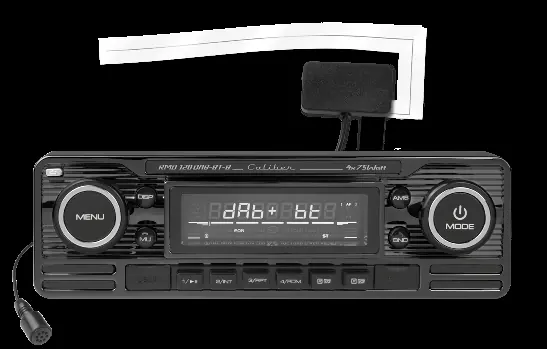
This document provides essential instructions for the installation and operation of the Caliber 120DAB car radio. Key procedures include connecting the wiring harness, installing the DAB antenna on the windshield, and pairing your mobile device via Bluetooth.
Wiring and Connections
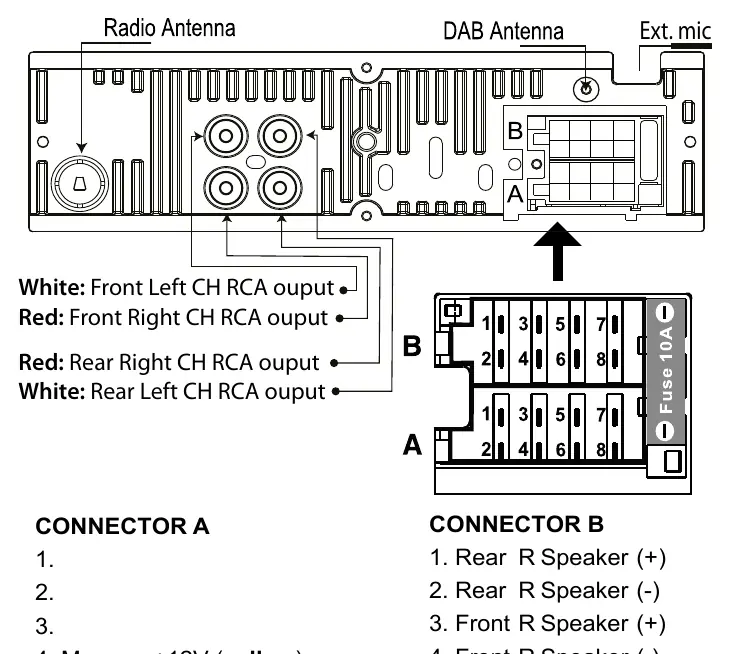
The unit uses standard ISO connectors. Ensure all connections are secure before powering on the device. The wiring diagram details connections for front and rear speakers, power supply (memory, ignition, ground), and remote antenna output. An external microphone input is also provided.
DAB Antenna Installation
For optimal DAB reception, the antenna must be installed correctly:
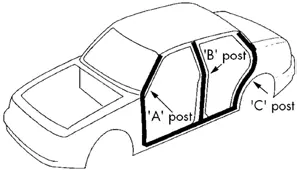
- Remove the cover of the A-post.
- Stick the transparent part of the antenna onto the windshield near the A-post.
- Attach the black part of the antenna to the metal car frame.
- Connect the male SMA connector to the back of the head unit.
System Operation
The radio features a multi-function interface. Use the MENU button to access system settings (AF, TA, PTY, Area, etc.) and the MODE button to switch between sources (Radio, USB, SD, Bluetooth). The AMS function automatically stores the 6 strongest stations in the current band.
Bluetooth Connectivity
To pair your phone:
- Press and hold the MENU button for 3 seconds to open the Bluetooth menu.
- Activate Bluetooth on your phone and search for available devices.
- Select Car Audio and enter the password 8888.
- Upon successful connection, BT ON will be displayed.
Maintenance and Safety
Use only in vehicles with a 12V negative ground system. Do not attempt to disassemble or modify the unit. Clean the front panel with a soft, dry cloth. If the unit malfunctions, use a non-metallic pointed object to press the reset button (located behind the front panel) for 5 seconds to restore factory settings.
Manufacturer information
Caliber Europe
Practical help
Common problems
Unit does not power on
Check the wiring connections, specifically the red (+12V ignition) and yellow (+12V memory) wires. Perform a system reset if necessary.
Bluetooth connection fails
Ensure the device is in pairing mode (hold MENU for 3 seconds), use the correct password '8888', and ensure your phone's Bluetooth is active.
DAB reception is poor
Verify that the DAB antenna is correctly installed on the windshield and that the black part is properly grounded to the metal car frame.
Before use
- Ensure vehicle has a 12V negative ground electrical system.
- Verify all speaker and power wires are connected according to the wiring diagram.
- Install the DAB antenna on the windshield near the A-post.
- Remove the front panel to insert an SD card (max 16GB).
- Ensure the temperature in the vehicle is between 0°C and +45°C.
Specs in practice
- Power Supply
- Requires DC 11-15V; do not connect to 24V systems.
- Load Impedance
- Compatible with 4 Ohm speakers.
- Bluetooth Freq range
- Operates between 2402-2480 MHz.
Images and diagrams
- Connector A: Power and control signals (Memory, Remote, Ignition, Ground).
- Connector B: Speaker outputs (Front/Rear Left/Right).
- RCA Outputs: Dedicated outputs for external amplifiers.
Model compatibility
- SD card slot supports up to 16GB for music files.
- Compatible with MP3 and WMA playback formats.
- Designed for 12V automotive use only.

Manual page author
Michael Turner
Technical manual editor
Reviews PDF manuals for structure, safety notes, and practical product details so readers can find the right information quickly.