Electronics / Monitors
Caliber HCG 012QIDAB-BT Digital Radio User Guide
Quick guide for the Caliber HCG 012QIDAB-BT digital radio, covering setup, alarm configuration, DAB+/FM radio operation, Bluetooth connectivity, and wireless charging features.
Table of contents
Quick guide from the manual
The Caliber HCG 012QIDAB-BT is a multifunctional digital radio featuring DAB+ and FM reception, Bluetooth connectivity, dual alarms, and a built-in Qi wireless charging pad. This guide provides essential steps for initial setup and daily operation.
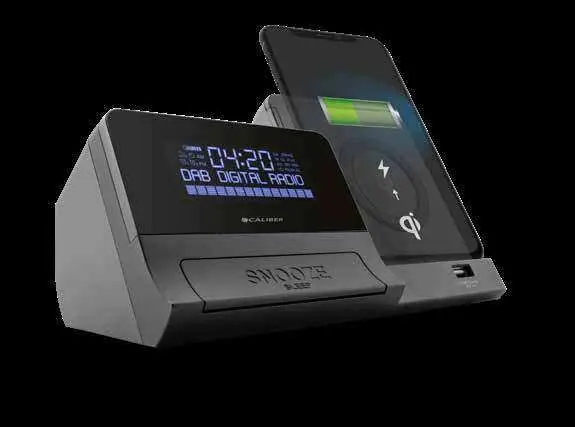
Connection and clock set
- Plug the provided adapter into a 100-240V AC outlet and the other end into the DC input (2).
- If a DAB+ channel is received, the clock will set automatically. Otherwise, press 'Clock' (10) to set the time manually.
- Use the down (11) and up (12) buttons to adjust the time, then confirm by pressing 'Clock' (10).
Alarm setting
- Set the clock to standby using the power button (8).
- Press ALARM 1 (6) or ALARM 2 (7) to begin the alarm wizard.
- Follow the on-screen steps using the select button (9) to confirm settings, including duration, source (radio/buzzer), and repetition.
- Note: If there is no activity for 5 seconds during the wizard, it will exit without saving.
- When the alarm sounds, press the SNOOZE button (15) for a 9-minute delay or the power button (8) to turn it off.
Radio operation
- Press the power button (8) to turn the radio on.
- Use the source button (8) to toggle between DAB+ and FM modes.
- Press and hold the play/pause button (5) to auto-scan and store available channels.
- Use the up/down buttons (11/12) to navigate channels or fine-tune.
- Long press 'Menu' (4) for advanced settings.
Wireless and USB charging
- Wireless charging: Place a Qi-compatible device on the charging surface (14). Charging begins automatically if the device is within 6mm of the pad.
- USB charging: Use the USB port (16) for 5V 1A output charging.
Bluetooth connection
- Turn the unit on and use the mode button (8) to select Bluetooth mode.
- Set your external device to 'Search' in its Bluetooth menu.
- Select 'HCG012QI_DAB_BT' from the list to pair.
Maintenance and safety
- Keep the device in a dry, temperate environment (0°C to +45°C).
- Clean only with a soft, dry cloth.
- Do not attempt to repair the unit yourself; contact a Caliber Europe BV dealer for service.
- Insert 2x 1.5V AAA batteries (not included) into the bottom hatch to maintain clock and alarm settings during power interruptions.
Manufacturer information
Caliber Europe
Practical help
Common problems
Alarm settings not saved
Ensure you complete all steps in the alarm wizard. If there is 5 seconds of inactivity, the wizard exits without saving.
Wireless charging not working
Ensure the device is Qi-compatible and placed within 6mm of the charging pad. Check that the device is not obstructed by thick cases.
Radio settings lost after power cut
Install 2x AAA batteries in the bottom compartment to maintain settings during power outages.
Before use
- Check that the ambient temperature is between 0°C and +45°C.
- Ensure the device is placed on a flat, stable surface with sufficient ventilation.
- Install 2x AAA batteries (optional) for memory backup.
- Connect the provided power adapter to a 100-240V outlet.
Specs in practice
- Bluetooth 4.2
- Supports A2DP and AVRCP profiles for audio streaming and playback control.
- Qi Wireless Charging
- Integrated pad for charging compatible smartphones without cables.
- DAB+ Band III
- Frequency range 174-240MHz for high-quality digital radio reception.
Images and diagrams
- Buttons 6 and 7 control Alarm 1 and Alarm 2 respectively.
- Button 8 acts as the main Power/Source/Mode selector.
- Button 15 is the large SNOOZE/SLEEP bar located on the front.
- Port 16 is the USB charging output.
- Area 14 is the designated Qi wireless charging surface.
Model compatibility
- Wireless charging requires a Qi-certified device.
- Bluetooth playback control (AVRCP) depends on the connected device's support.
- AUX-IN mode does not support playback control buttons on the radio.

Manual page author
David Miller
Documentation analyst
Organizes user manual content into clear summaries, with attention to model details, product context, and everyday usability.