Automotive / Car Audio
User Manual for Caliber RCD 231BT Car Radio
Quick guide for the Caliber RCD 231BT car radio. Learn about installation, wiring, Bluetooth pairing, radio operations, and troubleshooting.
Quick answers from the manual
Quick answer
- To pair your phone, turn on the unit, enable Bluetooth on your mobile device, search for 'CALIBER', and enter the password '8888'. p. 17
Key actions
- Install the unit p. 2, 3
- Pair Bluetooth p. 17
- Store radio stations p. 9
First start
- Power on the unit p. 6
- Adjust volume p. 6
Show 4 more answers Show less
Problems and fixes
No Power
Check ignition key or replace fuse.
p. 20
CD loading issues
Check if disc is inside, check orientation, or clean disc.
p. 20Maintenance and reset
- Reset the unit p. 20
Technical specifications
| Parameter | Value | Meaning | Pages |
|---|---|---|---|
| Power Requirements | DC 14.4V | Operating voltage | p. 18 |
| Load Impedance | 4 ohms | Speaker impedance | p. 18 |
| Output Power | 25W x 4 | Maximum output power | p. 18 |
Where to find it in the PDF
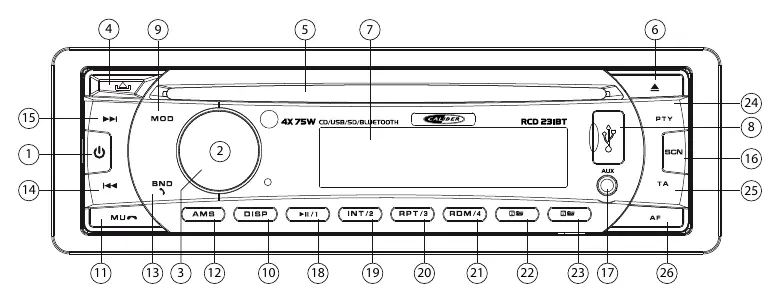
- Front Panel Layout p. 5
- Installation p. 2, 3
- Specifications p. 18
Table of contents
Manual images
Click an image to enlargeQuick guide from the manual
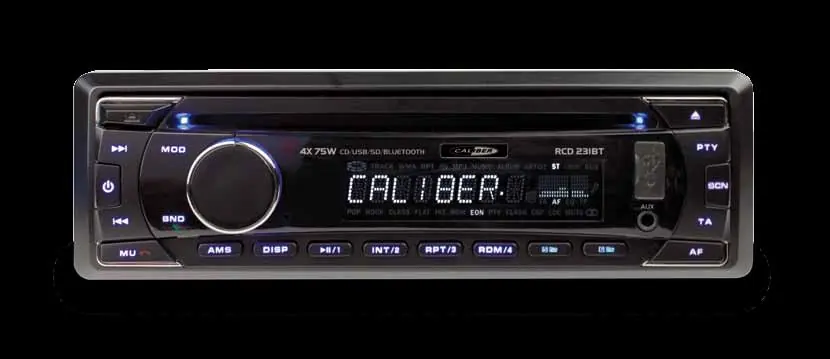
The Caliber RCD 231BT is a car radio supporting CD, USB, SD, and Bluetooth connectivity. This guide covers essential installation, operation, and maintenance procedures to ensure optimal performance.
Installation
Before installation, ensure the unit will not interfere with driving. The installation angle should not exceed 30 degrees from horizontal.
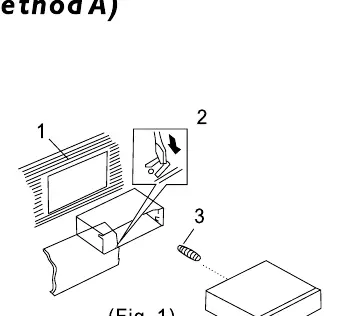
- DIN Front-Mount: Insert the holder into the dashboard, select the appropriate tab based on dashboard thickness, and bend tabs inwards to secure.
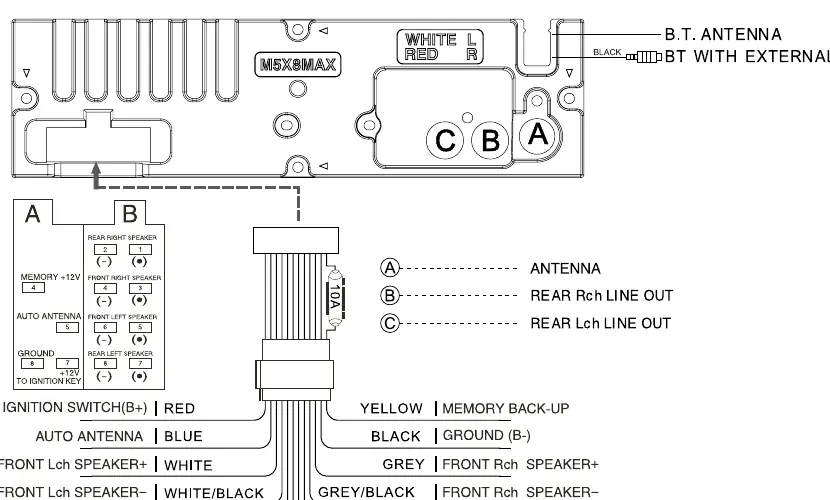
- Wiring: Connect the wiring harness according to the diagram. Key connections include: Yellow (Memory Back-up), Black (Ground), Red (Ignition Switch), and various speaker outputs.
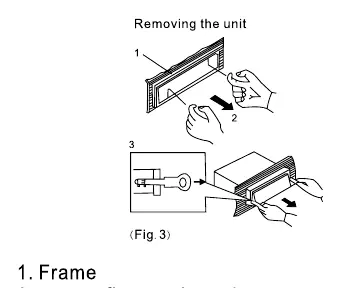
- Removing the unit: Insert the supplied levers into the grooves on both sides of the unit until they click, then pull the unit out.
Front Panel
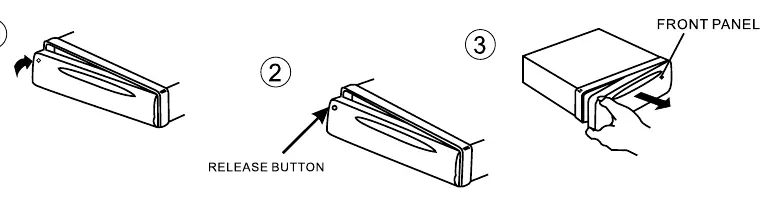
The front panel is detachable for security. To install, insert the panel into the housing until it clicks. To remove, press the Release button.
General Operations
- Power: Press the Power button to turn the unit on or off.
- Sound Adjustment: Press the SEL button to cycle through Volume, Bass, Treble, Balance, and Fader. Use the volume knob to adjust the selected setting.
- Mute: Press the Mute button to silence the audio.
- DSP: Press and hold the function button to access DSP settings (Flat, Classic, Pop, Rock) and ESP (12/45 seconds).
Radio Operations
- Band Selection: Press the BAND button to switch between FM1, FM2, FM3, AM1, and AM2.
- Station Tuning: Use the Tune Seek/Track buttons to manually or automatically tune to stations.
- Memory Storing: Press and hold the AMS button to automatically store the 6 strongest stations. Alternatively, use preset buttons 1-6 to store favorite stations.
- RDS: Use the AF button to toggle Alternative Frequencies and the PTY button to select program types (Speech/Music).
Media Playback (CD/USB/SD)
The unit supports CD, USB, and SD/MMC cards (up to 4GB). Insert the media to start playback automatically. Use the Play/Pause, Repeat, Random, and Intro buttons to control playback. For MP3/WMA files, you can search by track, file name, or character using the AMS button and volume knob.
Bluetooth
- Pairing: Turn on the unit, activate Bluetooth on your mobile device, and search for "CALIBER". Enter password "8888".
- Handsfree: Use the BAND button to accept calls and MUTE to reject or hang up.
- Audio Streaming: Once connected via A2DP, you can stream music from your phone.
Maintenance
Keep CDs clean by wiping with a dust-free cloth in the direction of the arrow. Do not use solvents. Remove the front panel when the car is parked to prevent theft and protect the unit.
Manufacturer information
Caliber Europe
Practical help
Common problems
No Power
Check if the ignition key is switched on or if the fuse is blown.
CD cannot be loaded or ejected
Ensure no disc is already inside, check insertion direction, or allow the unit to cool if the temperature is too high.
No Sound
Check if volume is at minimum or if wiring is connected properly.
Sound Skipping
Ensure installation angle is less than 30 degrees or clean the CD.
Operation keys do not work
Press the RESET button or reinstall the front panel.
Before use
- Verify wiring connections against the diagram.
- Ensure the installation angle is less than 30 degrees.
- Check that the fuse is intact.
- Ensure the CD is inserted with the label facing up.
- Remove the front panel when leaving the vehicle.
Show more Show less
Specs in practice
- Power Output
- 4 x 75W maximum output power.
- Load Impedance
- 4 ohms.
- Frequency Coverage
- 87.5 - 108MHz (FM).
Images and diagrams
- Wiring diagram shows color-coded cables for speakers, power, and antenna.
- Front panel layout identifies 26 buttons and ports including USB, AUX, and CD slot.
Model compatibility
- Supports CD, CD-R, CD-RW.
- Supports USB/SD/MMC up to 4GB.
- Supports MP3 and WMA formats.
- Bluetooth supports HSP, HFP, A2DP, and AVRCP profiles.

Manual page author
David Miller
Documentation analyst