Automotive / Car Audio
User manual for Caliber RMD 057DAB car radio
Quick start guide for the Caliber RMD 057DAB car radio. Includes installation, wiring, DAB+ antenna setup, and operation instructions.
Table of contents
Manual images
Click an image to enlargeQuick guide from the manual
The Caliber RMD 057DAB is a car radio featuring FM/DAB+ radio, Bluetooth connectivity, and USB/SD playback. This guide provides essential information for installation and daily operation. Always ensure the vehicle is parked safely before performing any operations that require prolonged attention.
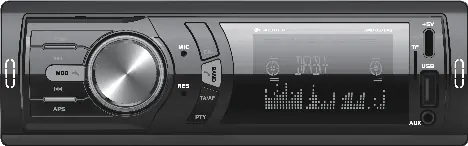
Installation
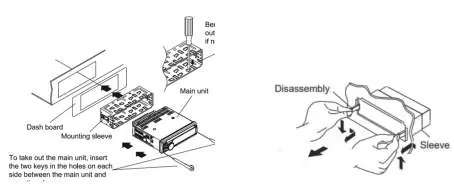
The unit is designed for 12V negative ground vehicles. Do not block vents or radiator panels to prevent overheating.
DAB+ Antenna Installation
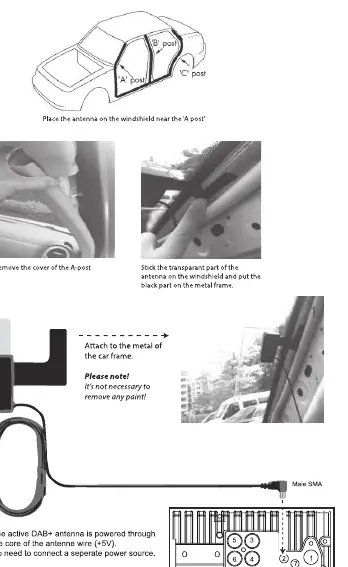
For optimal DAB+ reception, install the included antenna on the windshield near the A-post. Stick the transparent part of the antenna on the windshield and the black part on the metal frame. The antenna is powered through the core of the antenna wire (+5V), so no separate power source is needed.
Wiring
Refer to the wiring diagram on page 2 for specific connections:
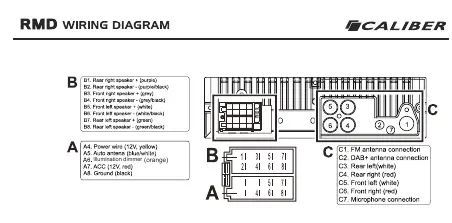
- A4: Power wire (12V, yellow)
- A5: Auto antenna (blue/white)
- A6: Illumination dimmer (orange)
- A7: ACC (12V, red)
- A8: Ground (black)
- B1-B8: Speaker connections (Front/Rear, Left/Right)
- C1: FM antenna connection
- C2: DAB+ antenna connection
- C7: Microphone connection
Operation
Standard Operation
Use the [POW] button (1) to turn the device on or off. Use the [MOD] button (8) to switch between FM radio, DAB+ radio, USB/SD, Bluetooth, and Aux-in.
Audio and Lighting Settings
Turn the [VOL] knob (2) to adjust volume. Briefly press the [VOL] button (3) to open the menu for settings like Bass, Treble, Balance, Fader, Equalizer, Loudness, and Lighting. If the orange wire is connected to the car's light switch, the display and button lighting will dim automatically when car lights are turned on.
Radio Operation
In radio mode, briefly press the (10) or (11) buttons to search for the next station. Press and hold to search manually. Use the [BAND] button (9) to switch between FM bands (F1-F3). Press [APS] (15) to automatically save preset stations.
Bluetooth
Use the [MOD] button (8) to select Bluetooth. Search for "CALIBER_RMD057" on your phone and enter password "0000". Once connected, "BT ON" will appear on the screen.
USB/SD Operation
Insert a USB or SD card to start playback automatically. Note that the Type-C USB port is for charging only and cannot be used for file playback.
Safety
Do not disassemble or modify the unit. Use only the correct ampere rating when replacing fuses. If a problem occurs, stop using the unit immediately and contact an authorized Caliber dealer.
Manufacturer information
Caliber Europe
Practical help
Common problems
Bluetooth connection fails
Ensure Bluetooth is active on your phone, search for 'CALIBER_RMD057', and enter password '0000'.
No DAB+ signal
Ensure the DAB+ antenna is correctly installed on the windshield near the A-post. Reception can be influenced by weather conditions.
USB playback not working
The Type-C USB port is for charging only. Use the standard USB port for music playback.
Before use
- Verify the vehicle has a 12V negative ground system.
- Install the DAB+ antenna on the windshield near the A-post.
- Connect the orange wire to the car light switch if auto-dimming is desired.
- Check that the fuse rating is 10A.
- Ensure the ambient temperature in the vehicle is between 0°C and +45°C.
Specs in practice
- Power Supply
- 12VDC
- Speaker Impedance
- 4-8 Ohm
- FM Frequency Range
- 87.5-108.0 MHz
- DAB+ Frequency Range
- 174-240 MHz
- USB Charge Output
- 5.0VDC, Max 2.0A (10.0W)
Images and diagrams
- Wiring Diagram: Shows connections for power (A), speakers (B), and antennas/mic (C).
- DAB+ Antenna: Illustrates correct placement on the windshield near the A-post.
Model compatibility
- Requires 12V negative ground vehicle.
- Type-C USB port is for charging only.
- RDS availability may vary by country.

Manual page author
David Miller
Documentation analyst
Organizes user manual content into clear summaries, with attention to model details, product context, and everyday usability.