Automotive / Car Audio
User Manual for Caliber RMD 061DAB-BT Car Radio
Quick guide for the Caliber RMD 061DAB-BT car radio. Includes wiring diagrams, DAB antenna installation, Bluetooth pairing, and operation instructions.
Table of contents
Manual images
Click an image to enlargeQuick guide from the manual
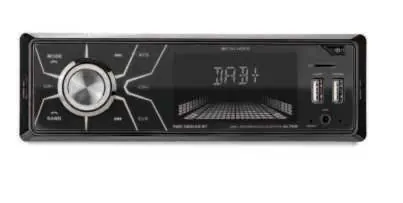
The Caliber RMD 061DAB-BT is a car radio system featuring DAB+, FM, Bluetooth, USB, and SD card playback. This document provides essential installation and operation instructions. Always ensure the vehicle is parked before operating the unit.
Safety Precautions
- Use only in vehicles with a 12V negative ground electrical system.
- Do not disassemble or modify the device.
- Keep volume at a level that allows you to hear outside traffic noises.
- Operating temperature range is 0°C to +45°C.
- Use the correct 10A fuse rating when replacing.
Wiring and Installation
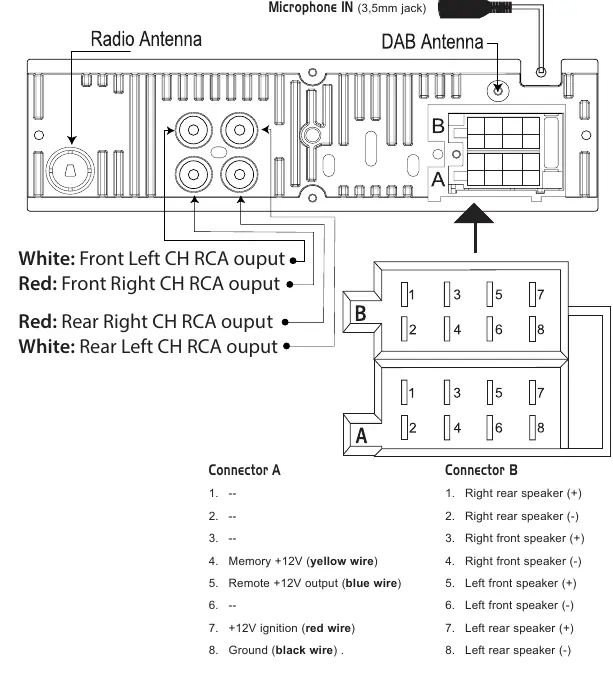
Proper wiring is critical for the unit to function correctly, including memory retention.
Wiring Diagram
- Connector A (Power): Pin 4 (Yellow) for Memory +12V, Pin 5 (Blue) for Remote +12V output, Pin 7 (Red) for +12V ignition, Pin 8 (Black) for Ground.
- Connector B (Speakers): Pins 1-8 correspond to Right/Left Rear and Front speakers.
DAB Antenna Installation
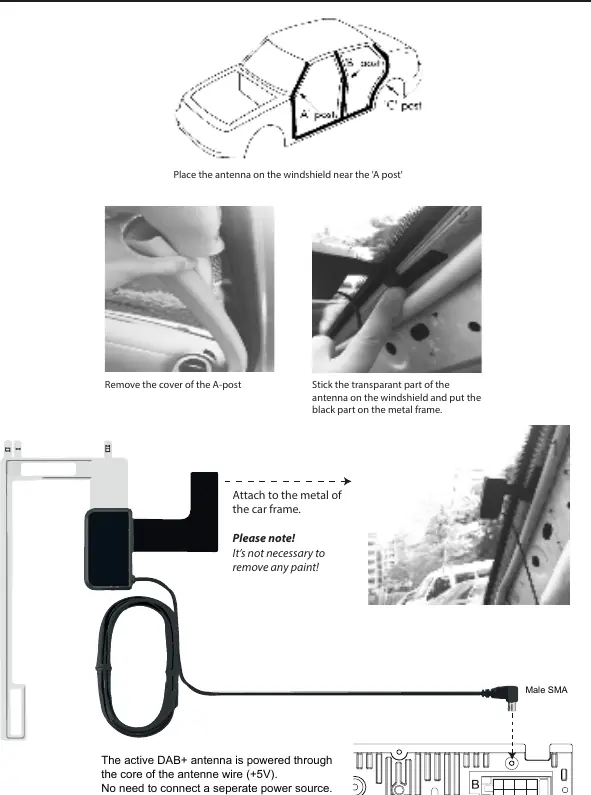
The active DAB+ antenna is powered through the antenna wire core (+5V), so no separate power source is needed.
- Remove the cover of the A-post.
- Place the antenna on the windshield near the A-post.
- Stick the transparent part of the antenna on the windshield and attach the black part to the metal frame.
Operation and Controls
The unit is controlled via the front panel buttons and the rotary volume knob.
- Power: Press to turn the unit on or off.
- Mode: Switch between sources (Radio, USB, SD, Bluetooth).
- Audio Menu: Adjust Bass, Treble, Balance, Fader, Loudness, EQ, DX/LOCAL, and Stereo/Mono.
- Reset: If the unit malfunctions, use a non-metallic pointed object to press the reset button for 5 seconds to restore factory settings.
Bluetooth Setup
- Press the MODE button to open Bluetooth.
- Activate Bluetooth on your mobile phone and search for available devices.
- Select RMD061DAB-BT_CALIBER.
- Enter password 0000 if prompted.
- Upon successful connection, the display will show BT ON.
Specifications
- Power Supply: 12V DC, negative ground.
- Max Power Output: 75W x 4 channels.
- DAB Frequency: 174-240 MHz.
- USB/SD Capacity: Max 32GB.
- Bluetooth Frequency: 2402-2480 MHz.
Manufacturer information
Caliber Europe
Practical help
Common problems
Unit does not turn on
Check the wiring connections, specifically the Red (+12V ignition) and Yellow (Memory +12V) wires.
Bluetooth connection fails
Ensure the unit is in Bluetooth mode. If connection fails, the display shows 'NO CON'. Try re-pairing from your phone.
Settings are lost after turning off the car
Ensure the Yellow wire (Memory +12V) is connected to a constant power source, not a switched one.
Before use
- Verify vehicle has a 12V negative ground system.
- Ensure the 10A fuse is installed correctly.
- Check that the antenna is mounted on the windshield near the A-post.
- Confirm all speaker wires are connected to the correct polarity.
- Ensure the USB/SD card is formatted correctly and does not exceed 32GB.
Specs in practice
- Max power output
- 75W x 4 channels, total peak power capability.
- Bluetooth Max e.r.p.
- <100mW/20dBm, indicating transmission power.
Images and diagrams
- Connector A handles power and control signals (Memory, Ignition, Ground).
- Connector B handles all four speaker connections.
- The DAB antenna installation requires attaching the black part to the car's metal frame for grounding.
Model compatibility
- USB and Micro SD cards must be 32GB or smaller.
- Operating temperature must be between 0°C and +45°C.
- Bluetooth password is '0000'.

Manual page author
Emily Carter
User documentation editor
Prepares concise manual descriptions and highlights the most useful setup, operation, and maintenance information for readers.