Electronics / Speakers & Soundbars
Caliber CLIP Bluetooth Speaker User Manual
Quick start guide and user manual for the Caliber CLIP (HPG 101BA) Bluetooth speaker. Learn how to pair, use TWS mode, control music, manage calls, and follow safety guidelines.
Table of contents
Quick Guide
The Caliber CLIP is a portable Bluetooth speaker designed for versatile use with a magnetic clip and spring clamp. This guide provides essential instructions for operation, TWS pairing, and safety.
- Power On/Off: Press and hold the power button for 3 seconds.
- Charging: Ensure the adapter voltage matches the product. Charge only between 0°C and 40°C.
- TWS Mode: Allows pairing two speakers for stereo sound.
Product Overview
The device features the following controls and components:
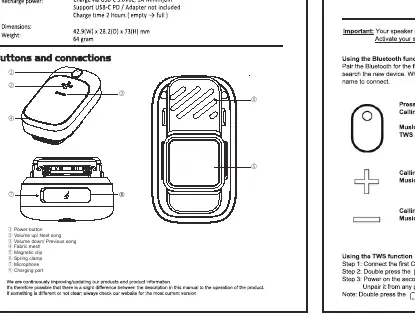
- Power Button: Main control for power and TWS functions.
- Volume/Track Controls: Dedicated buttons for volume adjustment and track navigation.
- Fabric Mesh: Speaker grille.
- Magnetic Clip & Spring Clamp: Mounting mechanisms for attaching the speaker.
- Microphone: Built-in for hands-free calls.
- Charging Port: For battery replenishment.
Operation
Calls
- Answer/End Call: Short press the power button.
- Reject Call: Press and hold the power button for 3 seconds.
- Volume: Short press volume buttons to adjust.
Music Playback
- Play/Pause: Short press the power button.
- Next Track: Press and hold the Volume Up button for 3 seconds.
- Previous Track: Press and hold the Volume Down button for 3 seconds.
- Voice Assistant: Triple-click the power button to activate Siri or Google Assistant.
TWS Mode (True Wireless Stereo)
To pair two Caliber CLIP speakers for stereo sound:
- Connect the first speaker to your Bluetooth device.
- Double-click the power button on the first speaker.
- Turn on the second speaker. Ensure it is disconnected from any previously paired Bluetooth devices.
- Double-click the power button on the second speaker to link them.
- To exit TWS mode, double-click the power button on either speaker.
Safety and Maintenance
- General: Do not disassemble the product or insert foreign objects. Keep away from rain, moisture, and liquids.
- Battery: Do not dispose of in fire or expose to temperatures above 70°C. Do not attempt to remove the battery.
- Cleaning: Use a soft, dry cloth. For stubborn stains, dampen the cloth with water only. Avoid chemical cleaners that may damage the paint or plastic.
- Hearing Safety: Do not listen at high volumes for extended periods to prevent hearing damage.
Manufacturer information
Caliber Europe
Practical help
Common problems
Speaker will not turn on
Ensure the battery is charged. Check that the charging cable and adapter are functional.
TWS pairing fails
Ensure the second speaker is disconnected from any previously paired Bluetooth devices before attempting to link.
Distorted sound
Lower the volume. Avoid listening at maximum volume for long periods.
Before use
- Verify the adapter voltage matches the product specifications.
- Charge the battery in an environment between 0°C and 40°C.
- Ensure the speaker is turned off during the charging process.
- Disconnect the second speaker from any previous Bluetooth devices before starting TWS pairing.
Specs in practice
- Bluetooth Version
- v5.1, supports A2DP, AVRCP, and HFP profiles.
Images and diagrams
- Buttons 1-3: Power, Volume Up/Next, Volume Down/Previous.
- Features 4-6: Fabric mesh, Magnetic clip, Spring clamp.
- Features 7-8: Microphone, Charging port.
Model compatibility
- Supports Siri and Google Assistant via triple-click command.
- TWS mode requires two Caliber CLIP units.

Manual page author
David Miller
Documentation analyst
Organizes user manual content into clear summaries, with attention to model details, product context, and everyday usability.