Electronics / Speakers & Soundbars
User Manual for Caliber HPG 240BT Bluetooth Speaker
Quick guide for the Caliber HPG 240BT Bluetooth speaker. Learn how to pair via Bluetooth, use TWS mode, play music from USB/SD, charge the battery, and understand the controls.
PDF source: NL · summary: English
Quick answers from the manual
Quick answer
- The Caliber HPG 240BT is a portable Bluetooth speaker. Use the power button (9) to turn it on/off, the Mode button (10) to switch between Bluetooth, AUX, USB, and SD modes, and the Play/Pause button (11) to control playback or activate TWS pairing. p. 3, 4, 10
Key actions
- Turn on/off p. 3, 4, 10
- Pair Bluetooth p. 4, 10
- Activate TWS p. 5, 11
First start
- Charge the device fully before first use using a 5V 2A adapter. p. 2, 4, 10
Show 4 more answers Show less
Problems and fixes
Bluetooth connection drops
Long press the [MODE] button to disconnect and re-pair.
p. 4, 10Maintenance and reset
- Clean with a soft, dry cloth. Do not attempt to repair the device yourself. p. 4, 10
Technical specifications
| Parameter | Value | Meaning | Pages |
|---|---|---|---|
| Bluetooth Range | 10 meters | Maximum distance for stable connection. | p. 2 |
| Total Power | 20W | Speaker output power. | p. 2 |
| Battery Capacity | 1500mAh | Internal rechargeable battery capacity. | p. 2 |
| Dimensions | 287(W) x 112(D) x 127(H) mm | Physical size of the speaker. | p. 2 |
Where to find it in the PDF
- Specifications p. 2
- Controls Diagram p. 3
- Operation Instructions p. 4, 5
Table of contents
Quick guide from the manual
The Caliber HPG 240BT is a portable Bluetooth speaker featuring TWS (True Wireless Stereo) pairing, USB/Micro SD playback, and an AUX input. This guide provides essential instructions for operating the device safely and efficiently.
Device Overview and Controls
The device features the following controls and ports:
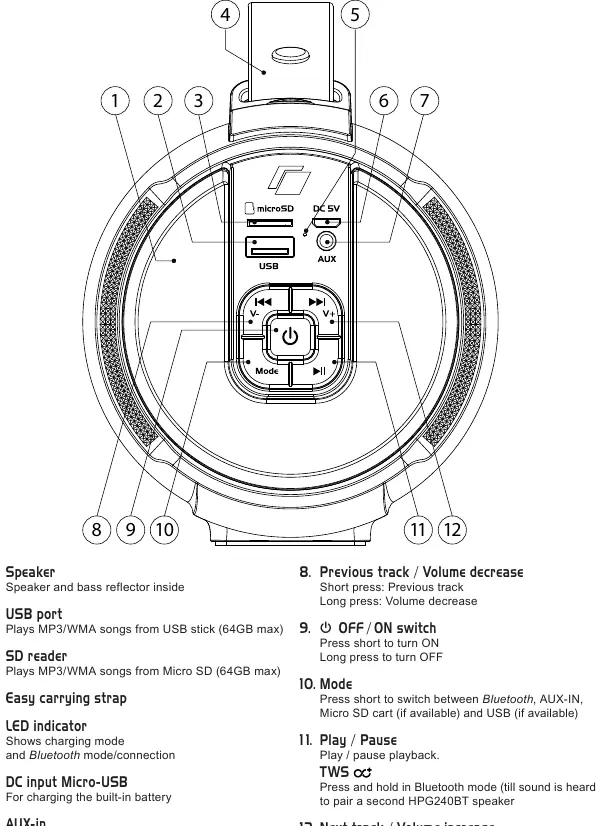
- 1. Speaker: Contains the speaker and bass reflector.
- 2. USB port: Plays MP3/WMA files from a USB stick (up to 64GB).
- 3. SD reader: Plays MP3/WMA files from a Micro SD card (up to 64GB).
- 4. Carrying strap: For portability.
- 5. LED indicator: Shows charging status and Bluetooth connection mode.
- 6. DC input (Micro-USB): For charging the built-in battery.
- 7. AUX-in: Wired connection for external devices using a jack-to-jack cable.
- 8. Previous track / Volume decrease: Short press for previous track, long press for volume down.
- 9. Power switch: Long press to turn ON/OFF.
- 10. Mode: Short press to switch between Bluetooth, AUX-IN, Micro SD, and USB modes.
- 11. Play / Pause / TWS: Play/pause playback. Press and hold in Bluetooth mode to pair a second HPG 240BT speaker.
- 12. Next track / Volume increase: Short press for next track, long press for volume up.
Getting Started
Charging the Battery
The device has a built-in rechargeable battery. Connect a USB adapter to the DC-in port (6) using the provided cable. The LED (5) will light up red during charging and turn off when fully charged. Charging time is approximately 2-4 hours with a 5V 2A adapter.
Bluetooth Connection
- Turn on the speaker using the power button (9).
- Press the [MODE] button (10) to select Bluetooth mode; the LED (5) will flash blue.
- Enable Bluetooth on your mobile device and search for 'HPG240BT_CAL'.
- Select the device from the list. If prompted, enter the access key '0000'.
- Once paired, you will hear a sound, and the LED will flash slowly.
Playback Modes
USB and Micro SD
Insert a USB stick or Micro SD card into the respective ports. The device will automatically switch to the correct mode and begin playback. Use the track control buttons (8/12) to navigate.
AUX-IN
Connect an external device (e.g., MP3 player) to the AUX-in port (7). The speaker will automatically switch to AUX mode. Note that playback controls on the speaker do not function in this mode.
TWS (True Wireless Stereo) Mode
You can pair two identical HPG 240BT speakers for stereo sound:
- Turn on both speakers and ensure they are in Bluetooth mode.
- Long press the power button (9) on one of the speakers to initiate pairing. You will hear a tone when pairing is successful.
- Connect your phone to the main speaker via Bluetooth.
- To exit TWS mode, long press the Play/Pause button (11).
Safety and Maintenance
- Cleaning: Use a soft, dry cloth. For stubborn stains, dampen the cloth with water only.
- Temperature: Ensure the ambient temperature is between 0°C and +45°C.
- Battery: The built-in battery is not replaceable. Do not attempt to remove or replace it.
- Placement: Place on a flat surface with sufficient ventilation.
- Repairs: Do not attempt to repair the device yourself. Contact an authorized dealer.
Manufacturer information
Caliber Europe
Practical help
Common problems
Speaker does not turn on
Ensure the battery is charged using the provided USB cable and a 5V 2A adapter.
Bluetooth pairing fails
Ensure the speaker is in Bluetooth mode (LED flashing blue) and your phone is searching for 'HPG240BT_CAL'.
Playback controls not working
Playback controls on the speaker do not function in AUX-IN mode; control playback from the connected device.
Before use
- Charge the battery fully (2-4 hours)
- Ensure the ambient temperature is between 0°C and +45°C
- Keep the speaker on a flat surface
- Use only the provided charging cable and adapter
Show more Show less
Specs in practice
- Bluetooth Version
- 5.0 (+BR+EDR+BLE), supports A2DP, AVRCP, HFP & HSP profiles.
- Storage Capacity
- Supports USB stick and Micro SD card up to 64GB.
Images and diagrams
- The device features a control panel on the side containing the power button, mode selector, and playback controls.
- Ports for USB, Micro SD, and AUX are located on the side panel for easy access.
- The LED indicator provides status updates for charging and Bluetooth connection.
Model compatibility
- Supports MP3/WMA files on USB/SD.
- TWS mode requires two identical HPG 240BT speakers.
- Compatible with devices supporting AVRCP for playback control.

Manual page author
Michael Turner
Technical manual editor