Electronics / Cameras
User Manual for Canon Prima Super 150U Film Camera
Get the most out of your Canon Prima Super 150U film camera with this comprehensive user guide. Learn how to load film, set up the battery, use various shooting modes, and adjust custom functions for perfect shots.
Table of contents
Manual images
Click an image to enlargeQuick Guide from the Manual
The Canon Prima Super 150U is a fully automatic 35mm lens-shutter AF camera. Before using the camera, ensure you have a CR2 lithium battery installed and 35mm film loaded. The camera features various shooting modes, including autoflash, portrait, and close-up, which can be selected using the Mode button. Always keep the lens and AF sensor clean to ensure proper focusing.
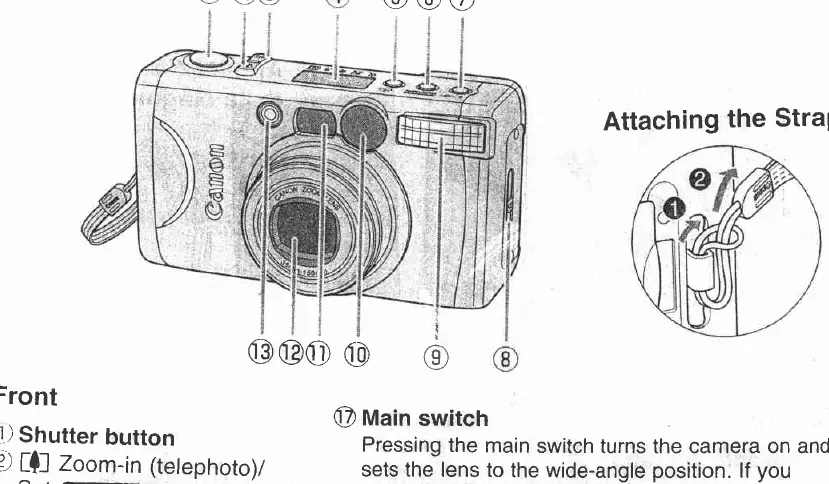
Getting Started
Loading the Battery: Open the battery cover and insert one CR2 lithium battery, ensuring the terminals are aligned correctly. The battery level indicator will appear on the LCD panel. If the battery level is low, replace it immediately.
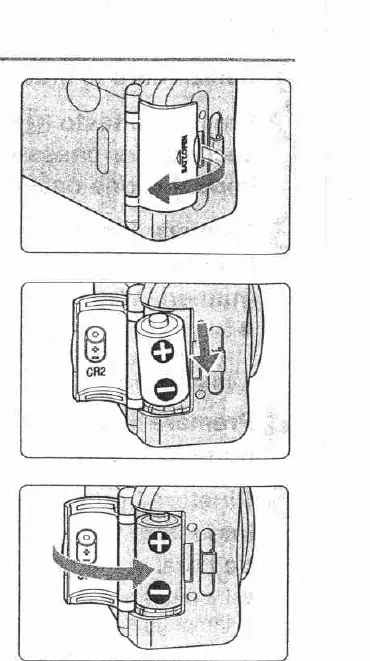
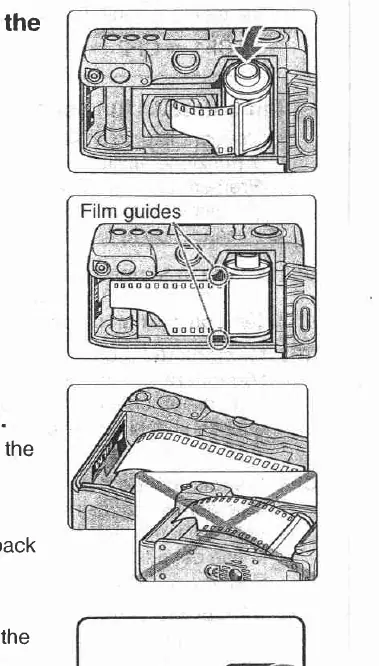
Loading the Film: Open the back cover using the release lever. Position the film correctly between the film guides and pull the film leader to the indicator mark. Close the back cover; the camera will automatically wind the film to the first frame. If the frame counter shows a blinking '0', the film did not load correctly.
Taking Pictures
Autoflash Mode: Turn the camera on using the main switch. Compose your shot by zooming in or out. Position the wide area AF frame over your subject and press the shutter button halfway to focus. When the green lamp lights up, the subject is in focus. Press the shutter button fully to take the picture.
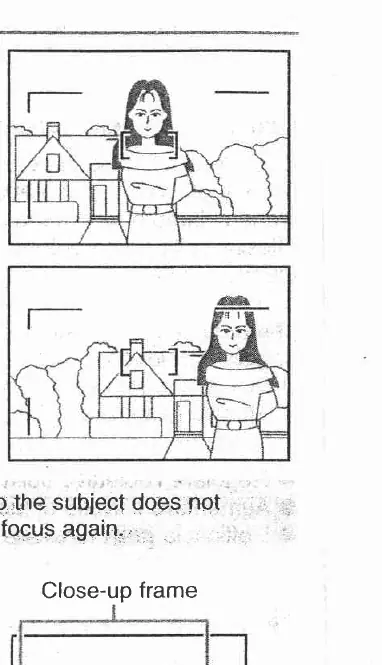
Focus Lock: Use this feature when the subject is off-center or within 1.5m. Position the AF frame over the subject, press the shutter button halfway to lock focus, recompose the shot, and press the shutter button fully.
Shooting Modes
Select the shooting mode by pressing the MODE button:
- Moving Objects: Uses servo autofocus to keep moving subjects in focus.
- Dark Backgrounds: Ideal for night portraits; uses slow shutter speeds, so a tripod is recommended.
- Portraits: Automatically zooms to frame the subject from the waist up.
- Close-up: Allows shooting as close as 60cm.
- Real-time: Enables taking pictures at the exact moment the shutter button is pressed.
Flash and Red-eye Reduction
You can change the flash mode using the flash button. Options include:
- Autoflash: Fires automatically in low light or backlit conditions.
- Flash ON: Fires for every shot.
- Flash OFF: Suppresses flash operation.
- Red-eye Reduction: Available in specific modes to minimize the red-eye effect.
Custom Functions
To access custom functions, hold the self-timer button and press the flash button while the power is off. You can customize settings such as Real-time Release (CF1), Shooting Mode Memory (CF2), Disabling Automatic Film Rewind (CF3), Center-point AF (CF4), and Continuous Shooting (CF5).
Specifications
Lens: Canon zoom lens 38-150 mm f/5.6-11.3. Focusing: AIAF. Film Speed: DX-coded ISO 25-3200. Power Source: One CR2 lithium battery. Dimensions: 107 x 58.7 x 51.5 mm. Weight: 200g (excluding battery).
Manufacturer information
Canon Inc.
Practical help
Common problems
Green lamp blinks 4 times per second
The subject is difficult to focus. Focus on something at the same distance, lock the focus, and then recompose.
Camera does not operate
Check if the battery terminals are aligned correctly.
Frame counter shows a blinking '0'
The film did not load correctly. Open the back cover and reload the film.
'H' is displayed on the LCD
Remove the battery, wait until 'H' disappears, and then reload the battery.
Before use
- Insert one CR2 lithium battery.
- Load 35mm film and ensure it is positioned correctly between the film guides.
- Check that the battery level indicator appears on the LCD panel.
- Clean the lens and AF sensor with a blower brush to prevent focusing problems.
Specs in practice
- Shooting Distance
- 0.8m to infinity (wide-angle), 1.0m to infinity (telephoto), 0.6m to infinity (close-up).
- Battery Life
- Approximately 14 rolls of 24-exposure film at normal temperature with 50% flash use.
Images and diagrams
- The front view identifies the shutter button, zoom buttons, LCD panel, flash, and lens.
- The LCD panel diagram explains indicators for date, exposure compensation, frame counter, and flash modes.
Model compatibility
- Uses 35mm film.
- Recommended to use ISO 400 DX-coded film.

Manual page author
Michael Turner
Technical manual editor
Reviews PDF manuals for structure, safety notes, and practical product details so readers can find the right information quickly.