Electronics / Camera Lenses
Canon RF 10-20mm F4 L IS STM Lens User Manual
Quick guide for the Canon RF 10-20mm F4 L IS STM lens. Learn how to attach the lens, use the focus mode, control ring, image stabilizer, and install gelatin filters.
Table of contents
Manual images
Click an image to enlargeQuick Guide from the Manual
This guide provides essential information for operating the Canon RF 10-20mm F4 L IS STM lens. Ensure your camera firmware is updated to the latest version to avoid limitations such as unavailable magnified view functionality or potential malfunctions. When moving the lens between cold and warm environments, use an airtight plastic bag to prevent condensation. This lens features a rear gelatin filter holder; ensure filters are cut precisely to the template size to avoid light leaks or damage.
Safety Precautions
- Do not look directly at the sun or strong light sources through the lens to avoid loss of sight.
- Always attach the lens cap when the lens is not in use to prevent the lens from concentrating sunlight, which may cause fire.
- Avoid leaving the product in places exposed to extremely high or low temperatures.
Handling and Shooting Precautions
- Condensation: If moving the lens between different temperature environments, place it in an airtight plastic bag until it adjusts gradually.
- Aperture Control: Aperture blades may move during zooming and focusing; this is normal.
- Shooting: Keep the front lens surface clean using a blower, as the short focus distance makes dust easily visible.
- Video: The lens supports focus breathing correction. If distortions occur, try changing the focal length to telephoto, reducing focus speed, or increasing the f-stop.
Nomenclature
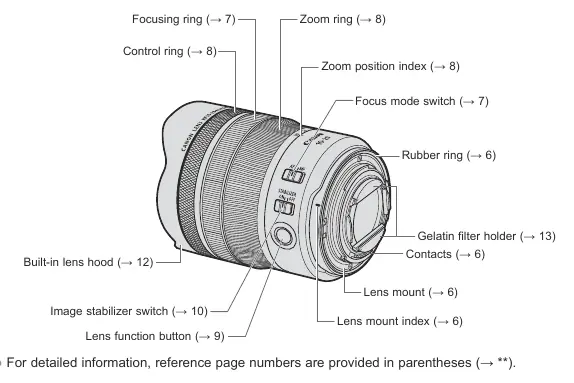
The lens features a focusing ring, zoom ring, control ring, focus mode switch, image stabilizer switch, and a lens function button. It also includes a built-in lens hood and a rear gelatin filter holder.
Attaching and Detaching the Lens
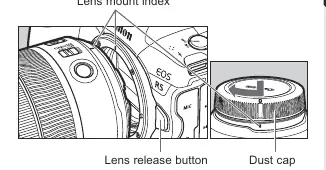
- Set the camera power switch to OFF.
- Align the lens mount indexes on the lens and camera.
- Turn the lens clockwise until it clicks into place.
- To detach, press the camera's lens release button and turn the lens counterclockwise.
Focus Mode
Set the focus mode switch to AF for autofocus or MF for manual focusing. When using manual focus, turn the focusing ring to adjust. Note that the focusing ring is electronic.
Zooming and Control Ring
- Zooming: Turn the zoom ring. Finish zooming before focusing to ensure accuracy.
- Control Ring: Can be assigned functions like shutter speed or aperture settings via the camera menu.
Lens Function Button
By default, this button acts as an AF stop button. It can be customized in the camera's [Customize buttons] menu. Pressing it during autofocus pauses the operation, which is useful for maintaining focus distance.
Image Stabilizer
Set the switch to ON to use image stabilization. It is effective for hand-held shots in low light or when using panning techniques. Set to OFF when using a tripod or when stabilization is not required.
Filters
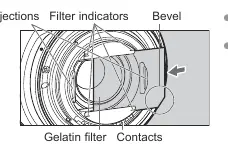
The lens uses a rear gelatin filter holder. Download the filter template, print it at 100% size, and cut the filter to match. Insert the filter into the holder, ensuring the bevel is at the bottom right. Only use filters with a thickness of 0.2 mm or less.
Specifications
- Focal Length/Aperture: 10-20mm f/4
- Lens Construction: 12 groups, 16 elements
- Min. Focusing Distance: 0.25 m
- Weight: Approx. 570 g
- Filter: Rear gelatin filter holder
Manufacturer information
Canon Inc.
Practical help
Common problems
Image distortion or movement during video
Change focal length to telephoto, reduce focus speed (Movie Servo AF), or increase the f-stop.
Condensation on lens
Place the lens in an airtight plastic bag before moving between cold and warm environments to allow gradual temperature adjustment.
Filter not fitting or causing issues
Ensure the filter is cut exactly to the template size. If cut too small, light leaks occur; if too large, it may not fit or damage the camera.
Before use
- Check that camera firmware is updated to the latest version.
- Ensure lens contacts are clean and free of fingerprints.
- Set camera power switch to OFF before attaching or detaching the lens.
- Remove the lens cap.
- Verify the gelatin filter is correctly installed if using one.
Specs in practice
- Focal Length
- 10-20mm ultra-wide zoom range.
- Max Aperture
- f/4 constant aperture throughout the zoom range.
- Min. Focusing Distance
- 0.25 meters (approx. 0.82 ft).
Images and diagrams
- Nomenclature diagram identifies the location of the focusing ring, zoom ring, control ring, and switches.
- Filter template diagram provides exact dimensions for cutting gelatin filters for full-frame and APS-C sensors.
- Filter insertion diagram shows the correct orientation (bevel at bottom right) for installing the filter.
Model compatibility
- Compatible with EOS R series cameras.
- Not compatible with extenders.
- Multiple exposure shooting is not possible on certain cameras (EOS R, RP, Ra, R5, R6).

Manual page author
David Miller
Documentation analyst
Organizes user manual content into clear summaries, with attention to model details, product context, and everyday usability.