Electronics / Cameras
Canon EOS Rebel T6 / 1300D Basic Instruction Manual
A quick guide for the Canon EOS Rebel T6 / 1300D digital SLR camera. This manual covers initial setup, battery charging, lens attachment, basic and creative shooting modes, Live View, movie recording, and wireless connectivity features.
Table of contents
Manual images
Click an image to enlargeQuick guide from the manual
This guide provides essential steps for setting up and using your Canon EOS Rebel T6 / 1300D. Before shooting, ensure the battery is charged, a compatible SD card is inserted, and the lens is properly attached. Use the Mode Dial to select your desired shooting mode, such as Scene Intelligent Auto for fully automatic operation or Creative Zone modes for more control. Always test your camera before important shoots to ensure images are properly recorded.
Getting Started
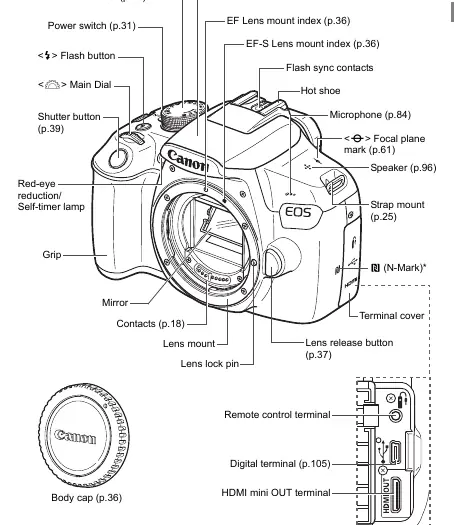
Before using the camera, charge the battery pack LP-E10 using the provided charger. Insert the battery and a compatible SD, SDHC, or SDXC memory card into the compartment. Attach a Canon EF or EF-S lens by aligning the mount index and turning until it clicks. Set the power switch to ON and configure the date, time, and zone settings as prompted.
Basic Shooting Modes
The camera features various shooting modes accessible via the Mode Dial:
- Scene Intelligent Auto: Fully automatic mode where the camera analyzes the scene and sets optimal parameters.
- Creative Auto: Allows easy adjustments to depth of field, drive mode, and flash settings.
- Portrait: Blurs the background to make the subject stand out.
- Landscape: Keeps both near and far objects in focus.
- Close-up: Ideal for small subjects like flowers.
- Sports: Optimized for moving subjects.
- Food: Adjusts color tones for appetizing results.
- Night Portrait: Balances subject and background exposure at night; use of a tripod is recommended.
Live View Shooting
You can shoot while viewing the image on the LCD monitor. Press the Live View shooting button to enable this mode. Note that autofocusing may take longer in Live View compared to viewfinder shooting. Use the AF method settings (FlexiZone - Single, Live mode, or Quick mode) to suit your subject.
Movie Shooting
Set the Mode Dial to the movie icon to enable movie recording. The camera records in MOV format. You can use autoexposure or manual exposure settings. Be aware that movie shooting may stop automatically if the internal temperature rises or if the file size reaches 4GB.
Wireless Functions
The camera includes built-in Wi-Fi and NFC capabilities. You can connect to a smartphone using the Camera Connect app to view, save, or remotely control the camera. NFC allows for easy connection by touching the smartphone to the camera's N-mark.
Safety and Maintenance
Handle the camera as a precision instrument. Do not drop it or subject it to physical shock. The camera is not waterproof. If condensation forms, remove the battery and card and wait for it to evaporate. Clean the lens and sensor carefully; for stubborn dirt, contact a Canon Service Center.
Manufacturer information
Canon Inc.
Practical help
Common problems
Focus indicator blinks in the viewfinder
The subject lacks contrast or is too close. Aim at an area with better contrast or move further away.
Flash fires in daylight
The camera is compensating for a backlit subject. Use Flash Off mode if you do not want the flash to fire.
Bottom of the picture is unnaturally dark
The lens hood may be casting a shadow, or the subject is too close. Remove the hood or move further away.
Camera will not connect wirelessly
Ensure Wi-Fi/NFC settings are enabled and that no cables (USB/HDMI) are connected to the camera.
Before use
- Charge the battery pack LP-E10
- Insert a compatible SD, SDHC, or SDXC memory card
- Attach a Canon EF or EF-S lens
- Set the lens focus mode switch to AF
- Set the date, time, and zone
- Select the desired interface language
Specs in practice
- 18.0 Megapixels
- Effective resolution of the CMOS sensor for detailed images.
Images and diagrams
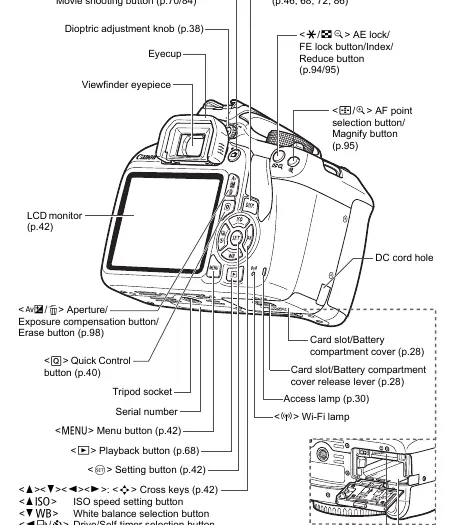
- Nomenclature diagrams identify all buttons, dials, and ports on the camera body.
- Quick Start Guide provides a visual sequence for battery, card, and lens installation.
Model compatibility
- Compatible with all Canon EF and EF-S lenses.
- Not compatible with EF-M lenses.
- Requires SD, SDHC, or SDXC memory cards.

Manual page author
David Miller
Documentation analyst
Organizes user manual content into clear summaries, with attention to model details, product context, and everyday usability.