Electronics / Cameras
User Manual for Canon EOS Rebel T3 / EOS 1100D
Quick guide and user manual for the Canon EOS Rebel T3 / EOS 1100D digital camera. Learn about setup, basic shooting modes, Live View, movie recording, and image playback.
Table of contents
Manual images
Click an image to enlargeQuick guide from the manual
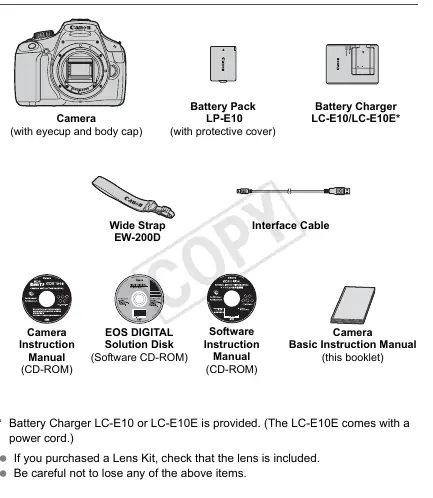
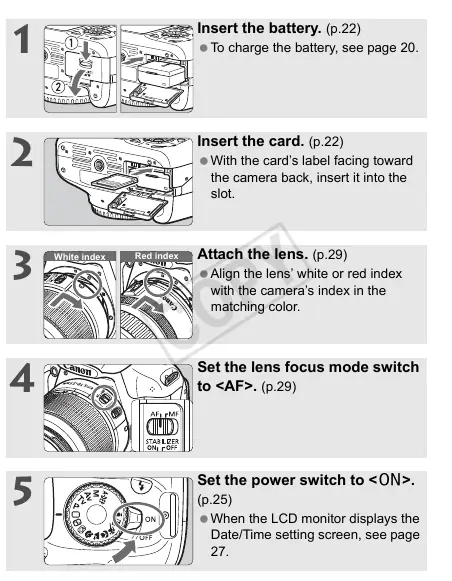
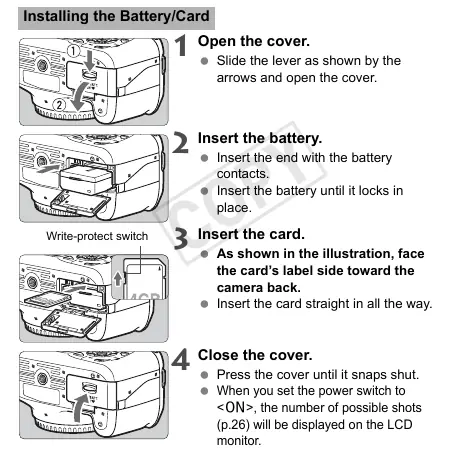
This manual provides essential instructions for operating the Canon EOS Rebel T3 / EOS 1100D. Before using the camera, ensure you have charged the battery pack (LP-E10) and inserted a compatible SD, SDHC, or SDXC memory card. Attach your lens, set the focus mode to AF, and turn the power switch to ON to begin.
Getting started
The camera requires initial setup including date and time configuration. Ensure the battery is fully charged before use. When inserting the memory card, ensure the write-protect switch is in the correct position. The camera is compatible with EF and EF-S lenses; align the index marks on the lens and camera body to attach them securely.
Basic shooting
The camera features a Mode Dial with Basic Zone and Creative Zone modes. For beginners, the Full Auto mode (indicated by the green square icon) automatically adjusts settings for point-and-shoot photography. Other modes include:
- Portrait: Blurs the background to make the subject stand out.
- Landscape: Keeps both near and far objects in focus.
- Close-up: Ideal for small subjects like flowers.
- Sports: Optimized for moving subjects.
- Night Portrait: Balances subject exposure with night backgrounds.
Live View shooting
You can shoot while viewing the image on the LCD monitor. Press the Live View button to enable this mode. Note that autofocusing in Live View may take longer than through the viewfinder. Using a tripod is recommended to prevent camera shake during Live View or movie recording.
Movie shooting
The camera can record High-Definition (HD) movies. Set the Mode Dial to the movie icon to begin. Ensure you use a high-capacity SD card (Speed Class 6 or higher) for proper recording. The camera records in MOV format.
Image playback
Press the Playback button to view captured images and movies. You can navigate through images using the cross keys. Movies can be played back directly on the camera, and you can adjust the volume using the Main Dial during playback.
Handling and maintenance
The camera is a precision instrument. Avoid dropping it or exposing it to water, extreme heat, or strong magnetic fields. Clean the lens and sensor carefully; if stubborn dirt remains, contact a Canon Service Center. Always remove the battery if the camera will not be used for an extended period.
Manufacturer information
Canon Inc.
Practical help
Common problems
Focus confirmation light blinks
The subject is too close or lacks sufficient contrast. Move away or aim at an area with better contrast.
Flash pops up in daylight
The camera detected a backlit subject and raised the flash to lighten dark areas.
Picture is dark after flash use
The subject is too far away. Ensure the subject is within 5 meters (16.4 feet) of the camera.
Bottom of picture is unnaturally dark
The subject is too close, and the lens barrel is casting a shadow. Move at least 1 meter away or remove the lens hood.
Before use
- Charge the battery pack (LP-E10) fully.
- Insert a compatible SD, SDHC, or SDXC memory card.
- Attach the lens and set the focus mode switch to AF.
- Set the power switch to ON.
- Configure the date and time settings.
Specs in practice
- 12.2 effective megapixels
- The resolution of the CMOS sensor for capturing detailed images.
- 3 fps continuous shooting
- The camera can capture up to 3 frames per second in continuous mode.
- ISO 100-6400
- The sensitivity range of the sensor to light, adjustable for different shooting conditions.
Images and diagrams
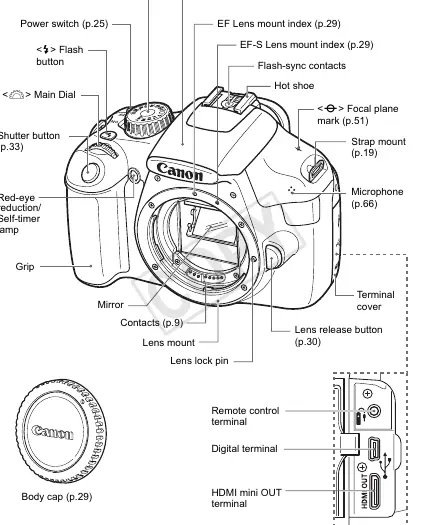
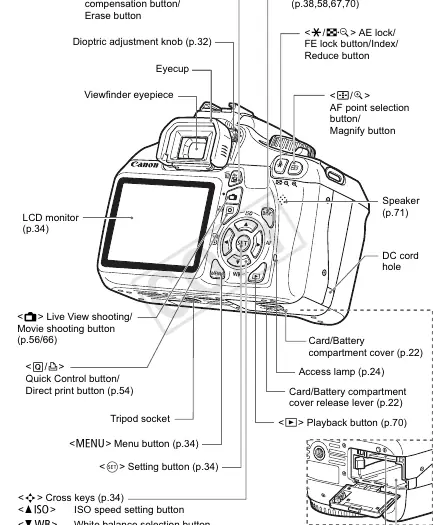
- Mode Dial: Used to select between Basic Zone (automatic) and Creative Zone (manual) shooting modes.
- Shutter Button: A two-step button; press halfway to focus and set exposure, press completely to take the picture.
- Quick Control Button: Accesses the Quick Control screen to change settings like drive mode and flash firing.
Model compatibility
- Compatible with SD, SDHC, and SDXC memory cards.
- Supports Canon EF and EF-S lenses.
- Requires Adobe Reader 6.0 or higher to view the PDF manuals on the included CD-ROM.

Manual page author
Emily Carter
User documentation editor
Prepares concise manual descriptions and highlights the most useful setup, operation, and maintenance information for readers.