Electronics / Camera Lenses
User Manual for Canon EF-S 10-18mm f/4.5-5.6 IS STM Lens
Quick guide for the Canon EF-S 10-18mm f/4.5-5.6 IS STM lens. Learn about mounting, focus modes, image stabilization, and handling precautions.
Table of contents
Manual images
Click an image to enlargeQuick guide from the manual
The Canon EF-S 10-18mm f/4.5-5.6 IS STM is an ultra-wide angle zoom lens designed for compatible EOS cameras. Key features include an Image Stabilizer (IS) and a stepping motor (STM) for quiet, smooth autofocus. Please note that this lens is designed for EF-S compatible cameras; ensure your camera firmware is up to date, especially for models like the EOS REBEL T4i/650D.
Nomenclature
The lens features several key controls:
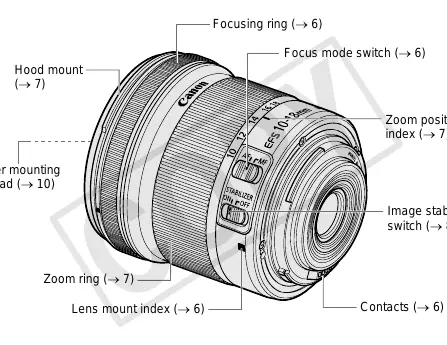
- Focusing ring: Used for manual focus adjustments.
- Zoom ring: Used to adjust the focal length.
- Focus mode switch: Toggles between AF (Autofocus) and MF (Manual Focus).
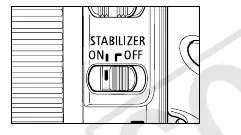
- Image stabilizer switch: Turns the image stabilization function ON or OFF.
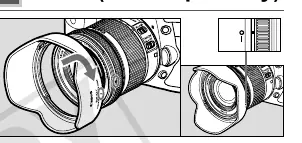
- Hood mount: For attaching the EW-73C lens hood.
- Filter mounting thread: Located at the front of the lens (67mm diameter).
Mounting and Detaching the Lens
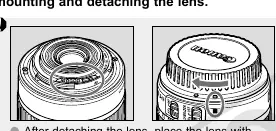
Refer to your camera's instructions for specific mounting procedures. When detaching the lens, place it with the rear end up to protect the contacts. If contacts become soiled or scratched, it may cause connection issues. Always use the dust cap when the lens is not attached to the camera.
Setting the Focus Mode
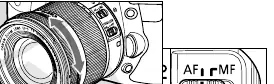
To shoot in autofocus mode, set the focus mode switch to AF. For manual focus, set the switch to MF and rotate the focusing ring. Note that manual focus adjustments are not possible when the camera is OFF. Quickly rotating the focusing ring may result in delayed focus.
Zooming
To zoom, rotate the zoom ring. It is recommended to finish zooming before focusing, as zooming after focusing can affect the focus. Zooming while the camera is OFF or during image exposure may result in delayed focus or blurred light streaks.
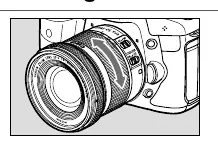
Image Stabilizer
The Image Stabilizer helps reduce camera shake. Set the switch to ON to activate. When using a tripod, it is recommended to turn the stabilizer OFF to save battery power. The stabilizer is effective for hand-held shots in low light, when flash is prohibited, or when panning subjects in motion.
Lens Hood
The EW-73C hood (sold separately) helps cut out unwanted light and protects the front element. Align the hood's attachment mark with the red dot on the lens and turn until it clicks into place. Ensure it is attached properly to avoid vignetting.
Filters and Accessories
You can attach 67mm filters to the front of the lens. Only one filter should be attached at a time. If using a polarizing filter, remove the lens hood first. Extension tubes like the EF12 II can be used for magnified shots, though MF mode is recommended for accuracy.
Handling and Safety Precautions
- Condensation: If moving the lens between cold and warm environments, place it in an airtight plastic bag until it acclimates to prevent condensation.
- Heat: Do not leave the lens in excessive heat, such as in a car, as this can cause malfunctions.
- Safety: Do not look at the sun or bright light sources through the lens.
Specifications
The lens features an optical construction of 11 groups and 14 elements. The minimum focusing distance is 0.22m (0.72ft). The filter diameter is 67mm, and the weight is approximately 240g (8.5 oz). Note that extenders and close-up lenses are not compatible with this model.
Manufacturer information
Canon Inc.
Practical help
Common problems
Lens won't focus or focus is delayed
Ensure the camera is ON. If the camera is in sleep mode, press the shutter button halfway to wake it. Avoid rotating the focus ring too quickly.
Vignetting (darkening of picture corners)
Ensure the lens hood is attached correctly and fully locked into position.
Camera stops operating (EOS REBEL T4i/650D)
Update the camera firmware to version 1.0.4 or later. If it occurs, remove and reinsert the battery.
Before use
- Check camera compatibility (must support EF-S lenses).
- Update camera firmware if using older models like the T4i/650D.
- Remove the dust cap.
- Align the lens mount index with the camera mount.
- Set the focus mode switch to AF or MF as desired.
- Ensure the Image Stabilizer switch is set to ON for hand-held shooting.
Specs in practice
- Focal Length
- 10-18mm ultra-wide angle zoom.
- Filter Diameter
- 67mm; use this size for compatible filters.
- Min. Focusing Distance
- 0.22m (0.72ft); the closest distance the lens can focus on a subject.
Images and diagrams
- The nomenclature diagram identifies the focusing ring, zoom ring, and switches.
- Mounting instructions show the alignment of the lens mount index.
Model compatibility
- Compatible with EOS cameras supporting EF-S lenses.
- Not compatible with extenders.
- No close-up lenses are designed for this specific model.

Manual page author
Emily Carter
User documentation editor
Prepares concise manual descriptions and highlights the most useful setup, operation, and maintenance information for readers.