Electronics / Camera Lenses
Canon EF 50mm f/1.8 STM Lens User Manual
A comprehensive user guide for the Canon EF 50mm f/1.8 STM lens. This manual covers essential setup, including mounting and detaching the lens, configuring focus modes, using accessories like hoods and extension tubes, and important...
Table of contents
Manual images
Click an image to enlargeQuick Guide
This lens is a compact, lightweight, high-quality standard lens designed for Canon cameras. Before using the lens, ensure your camera firmware is updated to the latest version via the Canon website. Always handle the lens with care, avoiding direct sunlight and extreme temperature changes to prevent condensation or malfunction.
Nomenclature
The lens features the following components:
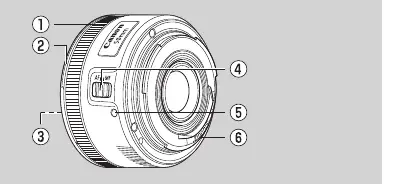
- Focusing ring: Used for manual focus adjustments.
- Hood mount: Attachment point for the ES-68 hood.
- Filter mounting thread: 49mm thread for attaching filters.
- Focus mode switch: Toggles between AF (Autofocus) and MF (Manual Focus).
- Lens mount index: Alignment mark for attaching the lens to the camera.
- Contacts: Electronic communication points between lens and camera.
Mounting and Detaching
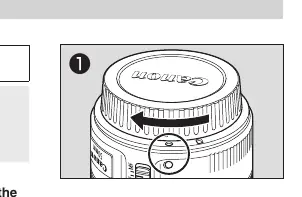
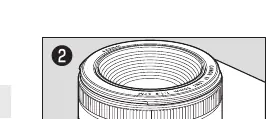
Refer to your camera's specific instructions for mounting and detaching the lens. When the lens is detached, place it with the rear end up to prevent scratches. If the contacts become soiled or have fingerprints, clean them with a soft cloth to prevent faulty connections. To attach the dust cap, align the lens mount index with the circle index on the cap and turn clockwise.
Setting the Focus Mode
To switch between focus modes, use the focus mode switch on the side of the lens:
- Autofocus (AF): Set the switch to AF.
- Manual Focus (MF): Set the switch to MF and rotate the focusing ring to adjust focus.
Note: If the camera is in ONE SHOT AF mode, you can perform full-time manual focus by pressing the shutter button halfway and turning the focusing ring. The focus cannot be adjusted in MF mode while the camera is off.
Accessories
Hood (ES-68): Helps block unwanted light and protects the lens. Align the hood's attachment mark with the red dot on the lens and turn until the red dot aligns with the hood's stop position mark. The hood can be reverse-mounted for storage.
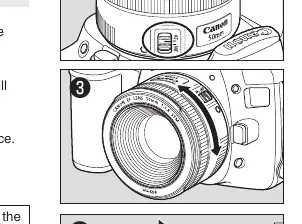
Filters: You can attach 49mm filters to the front of the lens. Only one filter may be attached at a time.
Extension Tubes: You can use EF12 II or EF25 II extension tubes for magnified shots. MF mode is recommended for accurate focusing when using these tubes.
Handling and Maintenance
To prevent condensation when moving the lens between cold and warm environments, place the lens in an airtight plastic bag and allow it to warm up gradually. Do not leave the lens in excessive heat, such as in a car in direct sunlight. If the lens is in sleep mode, press the shutter button halfway to recover.
Specifications
Key technical specifications include:
- Filter diameter: 49mm
- Min. focusing distance: 0.35m / 1.15ft
- Weight: 160g / 5.7oz
- Max. magnification: 0.21x
- Lens construction: 5-6 elements
Manufacturer information
Canon Inc.
Practical help
Common problems
Focus adjustment is delayed
Avoid turning the focusing ring suddenly.
Lens not operating properly
Check if contacts are soiled or have fingerprints; clean with a soft cloth. Ensure camera firmware is up to date.
Condensation on lens
Place the lens in an airtight plastic bag before moving it between cold and warm environments to allow gradual temperature adjustment.
Focus unstable with close-up lenses
Close-up lenses cannot be used with this lens as they cause the front to become heavy and unstable.
Before use
- Check the Canon website for the latest camera firmware.
- Ensure the lens contacts are clean and free of fingerprints.
- Remove the dust cap before shooting.
- Verify the focus mode switch is set to the desired mode (AF or MF).
Specs in practice
- Filter diameter (49mm)
- The size of screw-in filters compatible with the front of the lens.
- Min. focusing distance (0.35m)
- The closest distance the lens can focus on a subject.
Images and diagrams
- Nomenclature diagram identifies the focusing ring, hood mount, filter thread, focus switch, mount index, and contacts.
- Hood attachment diagram shows aligning the hood mark with the red dot on the lens and rotating to lock.
Model compatibility
- Compatible with EF12 II and EF25 II extension tubes.
- Extenders (teleconverters) cannot be used with this lens.
- Close-up lenses cannot be used with this lens.

Manual page author
Michael Turner
Technical manual editor
Reviews PDF manuals for structure, safety notes, and practical product details so readers can find the right information quickly.