Electronics / Cameras
Canon RF-S 18-150mm F3.5-6.3 IS STM Lens Instructions
Comprehensive guide for the Canon RF-S 18-150mm F3.5-6.3 IS STM lens, covering installation, focusing, zooming, image stabilization, and safety precautions.
Table of contents
Product Overview
The Canon RF-S 18-150mm F3.5-6.3 IS STM is a high-magnification zoom lens designed for EOS R series cameras compatible with RF-S lenses. It features an integrated Image Stabilizer (IS) and a Stepping Motor (STM) for smooth, quiet operation.
Safety Precautions
To ensure safe operation and prevent injury or damage, observe the following:
- Do not look directly at the sun or strong light sources through the lens to avoid vision loss.
- Always attach the lens cap when not in use to prevent the lens from concentrating sunlight, which could cause a fire.
- Avoid exposing the product to extreme temperatures.
- Do not insert fingers into the lens mechanism.
Installation and Handling
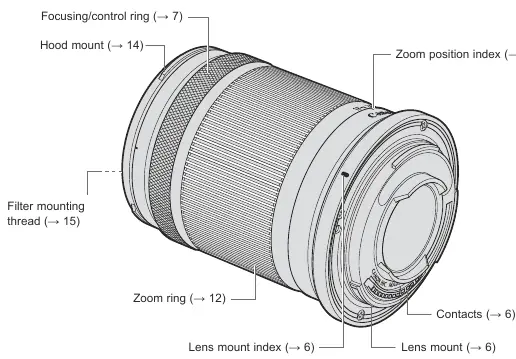
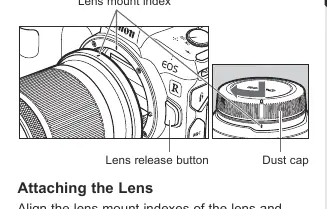
To attach the lens, align the lens mount indexes on the lens and camera, then rotate the lens clockwise until it clicks. To detach, press the camera's lens release button and rotate the lens counterclockwise. Always turn the camera power off before attaching or detaching the lens. Keep the lens contacts clean and free of fingerprints to ensure proper communication between the lens and camera.
Focusing and Control
The lens features a versatile focusing/control ring. Its function is determined by the camera settings. In autofocus (AF) mode, the lens provides standard focusing. Manual focusing (MF) is available by setting the camera to MF mode. The lens also supports an MF-only range for close-up shots at the wide end, allowing for closer focusing distances than in AF mode.
Zooming and Image Stabilization
Turn the zoom ring to adjust the focal length. It is recommended to finish zooming before focusing. The built-in Image Stabilizer helps reduce blur caused by camera shake. It is effective for hand-held shooting in low light or when using slower shutter speeds. For movie shooting, the Dynamic IS function provides enhanced stabilization while walking. When using a tripod, it is recommended to turn the Image Stabilizer off.
Maintenance and Accessories
The lens supports a 55mm filter. A dedicated lens hood (sold separately) can be attached to reduce flare and protect the front element. For storage, the hood can be reverse-mounted. If the lens is moved between cold and warm environments, use an airtight plastic bag to prevent condensation.
Related manuals
Related manuals from the same brand or category.
Electronics / Cameras
Canon RF 16mm F2.8 STM Instructions
CanonElectronics / Cameras
Canon RF 16mm F2.8 STM Lens Instructions
CanonElectronics / Cameras
Canon RF 16-28mm F2.8 IS STM Lens Instructions
CanonElectronics / Cameras
Canon 15x50 IS All Weather Binoculars Instruction Manual
CanonElectronics / Cameras
Canon Prima Super 150U Film Camera Instructions
CanonComputers / Printers
Canon imageRUNNER 1643iF / 1643i User's Guide
Canon
Manual page author
Michael Turner
Technical manual editor
Reviews PDF manuals for structure, safety notes, and practical product details so readers can find the right information quickly.