Electronics / Cameras
Canon RF-S 18-45mm f/4.5-6.3 IS STM Lens Instructions
Comprehensive guide for the Canon RF-S 18-45mm f/4.5-6.3 IS STM lens, covering installation, operation, focusing modes, image stabilization, and safety precautions.
Table of contents
Product Overview
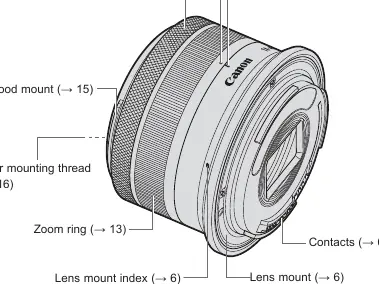
The Canon RF-S 18-45mm f/4.5-6.3 IS STM is a compact, standard zoom lens designed for EOS R series cameras compatible with RF-S lenses. It features an integrated Image Stabilizer (IS) and a Stepping Motor (STM) for smooth, quiet operation. Please ensure your camera firmware is updated to the latest version to avoid potential functionality limitations.
Safety Precautions
- Warning: Never look directly at the sun or strong light sources through the lens, as this may cause permanent vision loss.
- Warning: Always attach the lens cap when not in use to prevent the lens from concentrating sunlight, which could lead to fire or malfunction.
- Caution: Avoid exposing the lens to extreme temperatures, which may cause damage or burns. Do not insert fingers into the lens mechanism.
Attaching and Detaching
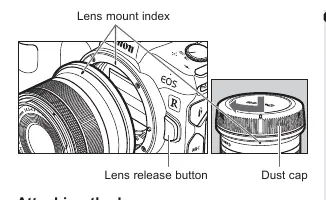
Always turn the camera power switch to OFF before changing lenses. Align the lens mount index on the lens with the corresponding mark on the camera body and rotate clockwise until it clicks. To detach, press the camera's lens release button and rotate the lens counterclockwise. Keep the rear contacts clean and dry to ensure proper communication between the lens and camera.
Shooting Preparations
The lens features a retraction mechanism for compact storage. To prepare for shooting, rotate the zoom ring in the direction of the white arrow until it clicks into the shooting position. Shooting is not possible while the lens is in the retracted state.
Focusing and Control
The focusing/control ring can be assigned as either a focus ring or a control ring via the camera menu. In autofocus (AF) mode, the camera handles focusing. In manual focus (MF) mode, you can manually adjust focus. Note that the lens includes an 'MF-only range' for close-up shots, which is accessible only when the camera is set to MF mode.
Image Stabilizer
The built-in Image Stabilizer helps reduce blur during hand-held shooting, especially in low-light conditions or when using slower shutter speeds. It is recommended to turn the Image Stabilizer OFF when using a tripod. The system is effective for both still subjects and panning shots.
Maintenance and Handling
Avoid sudden temperature changes to prevent condensation inside the lens. If moving between cold and warm environments, place the lens in an airtight plastic bag until it reaches ambient temperature. Keep the lens clean and store it in a cool, dry place.
Related manuals
Related manuals from the same brand or category.
Electronics / Cameras
Canon RF 16mm F2.8 STM Instructions
CanonElectronics / Cameras
Canon RF 16mm F2.8 STM Lens Instructions
CanonElectronics / Cameras
Canon RF 16-28mm F2.8 IS STM Lens Instructions
CanonElectronics / Cameras
Canon 15x50 IS All Weather Binoculars Instruction Manual
CanonElectronics / Cameras
Canon Prima Super 150U Film Camera Instructions
CanonComputers / Printers
Canon imageRUNNER 1643iF / 1643i User's Guide
Canon
Manual page author
Michael Turner
Technical manual editor
Reviews PDF manuals for structure, safety notes, and practical product details so readers can find the right information quickly.