Lighting / Controllers & Dimmers
Casambi BLE to DALI Ceiling Mounted AC PIR Sensor User Manual
Quick guide for the Casambi BLE to DALI Ceiling Mounted AC PIR Sensor. Learn about installation, wiring diagrams, detection patterns, and configuration settings for this 10A relay sensor.
Table of contents
Manual images
Click an image to enlargeImportant Information
This sensor is designed for indoor applications requiring automated lighting control. Important: Do not install the device with power applied. Ensure the device is not exposed to moisture. The sensor combines presence sensing, daylight harvesting, and DALI dimming using Casambi radio technology.
Product Description
The ceiling-mounted sensor is a fully distributed mesh network node. It works with DALI LED drivers or luminaires to provide energy savings and occupant comfort. It is suitable for low bay applications and supports features like DALI broadcast, scene control, and autonomous sensor-based control.
Installation Precautions
To ensure proper operation and avoid false alarms, follow these guidelines:
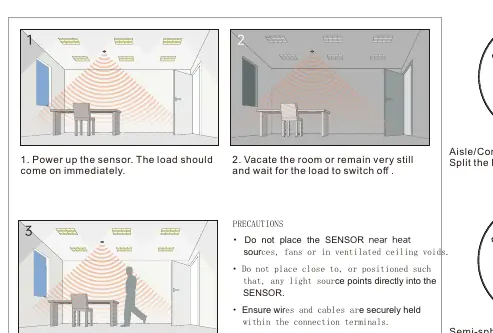
- Avoid areas with frequent temperature changes (air conditioners, fans, refrigerators, ovens).
- Avoid areas with significant air flow.
- Do not face glass doors or windows directly to avoid interference from strong light.
- Do not install opposite large, constantly moving objects (large trees, tall bushes, or large furniture).
- Avoid areas exposed to direct sunlight.
- Ensure wires and cables are securely held within the connection terminals.
- Disconnect the sensor from the circuit before performing insulation testing of the wiring circuit.
Wiring Diagram
The sensor requires connection to the AC mains and DALI signal lines. The wiring configuration is as follows:
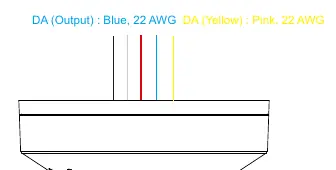
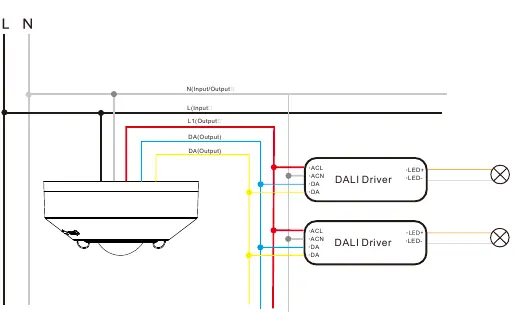
- L (Input): Black, 18 AWG
- N (Input): White, 18 AWG
- L1 (Output): Red, 18 AWG
- DA (Output): Blue, 22 AWG
- DA (Yellow): Pink, 22 AWG
The sensor connects to DALI drivers via the DA lines.
Detection Patterns
The detection area depends on the installation height and the lens mask used:
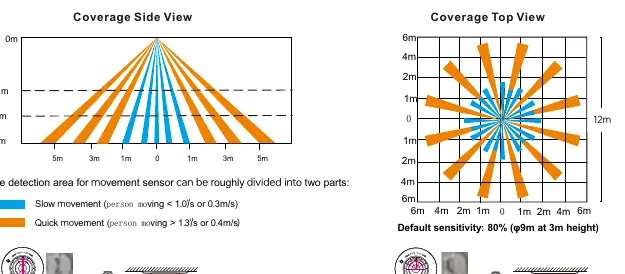
- Default sensitivity: 80% (9m diameter at 3m height).
- Corridor Lens Mask: 4-5m diameter at 3m height.
- Semi-Circular Mask: Half-detection pattern.
- Movement detection: Max 10-12m at 3m height.
Technical Specifications
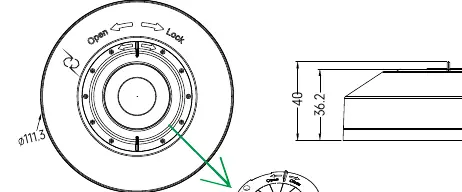
- Operating voltage: 100-277VAC 50/60Hz
- Relay: Max 10A, 100-277V (general use/resistive load)
- Standby power:<0.5W
- Operating temperature: -10°C to +50°C
- IP rating: IP20
- Wireless: 2.4GHz ISM band, 50m range in open field
Practical help
Common problems
False alarms
Ensure the sensor is not placed near heat sources, fans, vents, or areas with significant air flow.
Load not switching
Verify that the sensor is powered, wiring is secure, and movement is within the detection range.
Interference
Avoid facing glass doors or windows directly to prevent interference from strong light or external movement.
Before use
- Disconnect power before installation.
- Ensure wires are securely held in terminals.
- Verify installation height (max 12m).
- Check for heat sources or air flow near the sensor.
- Confirm the lens mask type matches the desired detection pattern.
Specs in practice
- Operating voltage
- 100-277VAC 50/60Hz power supply requirement.
- Detection range
- Max 10-12m at 3m height; performance varies by site conditions.
Images and diagrams
- Wiring Diagram: Shows L, N, L1, and DA connections to DALI drivers.
- Detection Pattern: Illustrates coverage side and top views for different lens masks.
Model compatibility
- Works with DALI drivers or luminaires.
- Suitable for indoor applications.

Manual page author
Michael Turner
Technical manual editor
Reviews PDF manuals for structure, safety notes, and practical product details so readers can find the right information quickly.