Lighting / Controllers & Dimmers
User Manual for Sunricher SR-ZG9032A-PIR Zigbee Motion Sensor
Comprehensive user guide for the Sunricher SR-ZG9032A-PIR Zigbee Motion Sensor. Includes wiring diagrams, commissioning steps, Zigbee network pairing, TouchLink setup, and configuration of proprietary attributes via the Sensor Tools app.
Table of contents
Manual images
Click an image to enlargeQuick Guide from the Manual
The SR-ZG9032A-PIR is a fixture-integrated sensor combining occupancy sensing, daylight harvesting, and 0-10V dimming. Setup is performed via Zigbee 3.0 compatible gateways. For basic commissioning, ensure the device is powered and the gateway is in pairing mode. The device features a 'Prog.' button for manual pairing, factory resets, and TouchLink commissioning.
Product Description
This device is designed for indoor use, fitting into various luminaires. It enables wireless control of 0-10V dim-to-off LED drivers. It supports autonomous sensor-based control, scheduler control, and OTA firmware updates.
Wiring and Installation
Warning: Do not install with power applied to the device. Do not expose the device to moisture.
- Mounting: Requires a 1/2" trade size knockout (22.2-22.3mm).
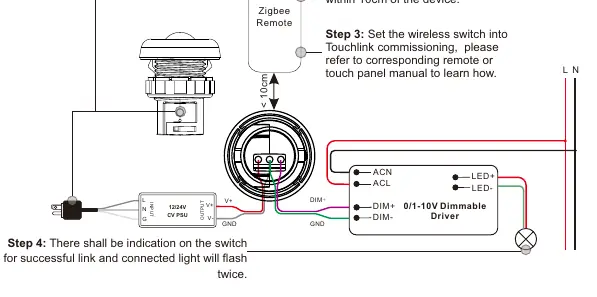
- Wiring: Connect the 12/24V DC power supply to the input terminals. Connect the 0-10V dimmable driver to the DIM+ and GND terminals.
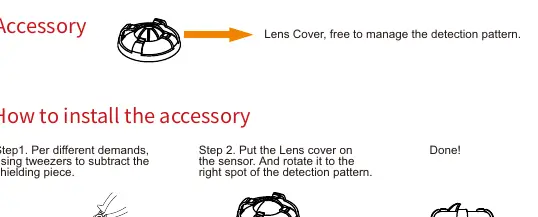
- Accessory: A lens cover is included to manage the detection pattern. Use tweezers to remove shielding pieces as needed and rotate the cover to the desired position.
Zigbee Network Pairing
To add the device to a Zigbee network:
- Set your Zigbee gateway or hub to 'Add lighting device' or 'Pairing mode'.
- Short press the 'Prog.' button 5 times (or reset power 5 times) to enter pairing mode.
- The LED indicator and connected light will blink 5 times upon successful pairing.
TouchLink and Advanced Features
The device supports TouchLink for direct control without a gateway:
- TouchLink to Switch: Short press 'Prog.' 4 times to start commissioning. Bring the wireless switch within 10cm of the sensor.
- Factory Reset: Short press 'Prog.' 5 times or reset power 5 times.
- Find and Bind: Short press 'Prog.' 3 times to enter Find and Bind mode to link with target nodes.
Configuration via App
Advanced attributes (such as pairing duration, PWM frequency, and sensitivity) can be modified using the Sensor Tools app via Bluetooth:
- Download 'Sensor Tools' from the App Store or Google Play Store.
- Enable Bluetooth and Location on your smartphone.
- Connect to the device in the app.
- Navigate to 'All attributes' to modify settings like 'Pairing duration' or 'Motion sensor sensitivity'.
Detection Area
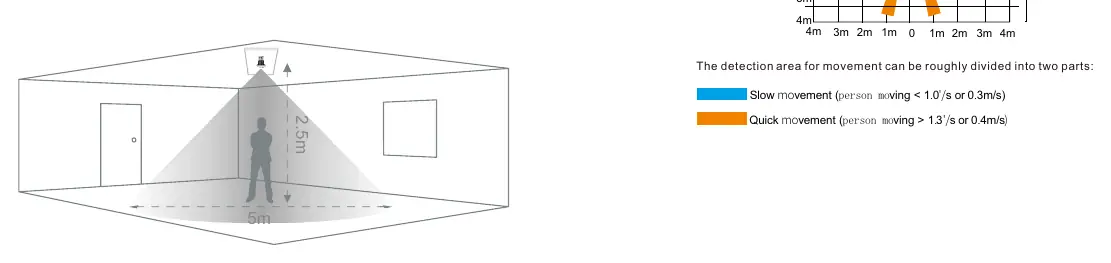
The sensor has a 130-degree detection angle. The coverage is divided into slow movement (person moving < 0.3m/s) and quick movement (person moving > 0.4m/s). Avoid installing near air conditioners, fans, or heat sources to prevent false alarms.
Technical Specifications
- Input Voltage: 12/24 VDC
- Wireless Protocol: Zigbee 3.0
- Wireless Range: 100 feet (30m) Line of Sight
- Operating Temperature: 32°F to 104°F (0°C to 40°C)
- Dimming Control: Analog (0-10V)
Practical help
Common problems
Device not pairing with gateway
Ensure the gateway is in pairing mode and the device is within range. Try resetting the device by pressing the 'Prog.' button 5 times.
False alarms
Avoid installing near air conditioners, fans, refrigerators, or heat sources. Ensure the sensor is not facing glass doors or windows directly.
Light not dimming correctly
Check 0-10V wiring connections. Ensure the LED driver is a 'Dim-to-Zero' compatible 0-10V driver.
Before use
- Verify 12/24 VDC power supply is available.
- Ensure the mounting hole is 22.2-22.3mm.
- Download the 'Sensor Tools' app for advanced configuration.
- Check that the LED driver supports 0-10V dimming.
- Ensure the environment is indoor and free from excessive moisture.
Specs in practice
- Input Voltage
- Requires 12V or 24V DC power.
- Wireless Range
- Up to 30 meters (100 feet) in line of sight.
- Detection Angle
- 130 degrees field of view.
- Mounting Height
- Recommended height is 2.5m (8ft).
Images and diagrams
- Wiring diagram illustrates connections between the power supply, sensor, and 0-10V driver.
- Coverage diagrams show the detection zones for slow and quick movements.
Model compatibility
- Requires a Zigbee 3.0 compatible gateway.
- Compatible with 0-10V dim-to-off LED drivers.
- Supports Zigbee Green Power switches.

Manual page author
Michael Turner
Technical manual editor
Reviews PDF manuals for structure, safety notes, and practical product details so readers can find the right information quickly.