Wearables / Watches
User Manual for Casio 10B+7L Watch
Quick guide for the Casio 10B+7L watch. Learn how to set the time, calendar, daily alarm, and use the stopwatch functions with this easy-to-follow manual.
Table of contents
Manual images
Click an image to enlargeQuick guide from the manual
This guide covers the basic operation of the Casio 10B+7L watch. The watch uses three buttons (A, C, and L) to navigate modes and adjust settings. If you encounter confusing information on the display, it indicates an incorrect entry sequence; simply restart the process.
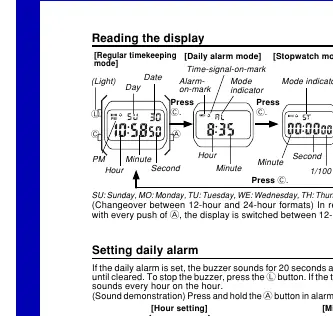
Reading the display
The watch features several modes, including Regular timekeeping, Daily alarm, Stopwatch, and Time/calendar setting. You can switch between 12-hour and 24-hour formats in regular timekeeping mode by pressing the A button.
Setting the time and calendar
To adjust the time or calendar, follow these steps:
- Press the C button three times to enter the time/calendar setting mode.
- Use the L button to cycle through the settings: Seconds, Hour, Minute, Month, Date, and Day.
- Press the A button to increase the number for the selected setting.
- Press the C button to complete the process.
Note: If you do not operate any button for a few minutes while a selection is flashing, the watch automatically returns to the regular timekeeping mode.
Setting the daily alarm
To set or adjust the daily alarm:
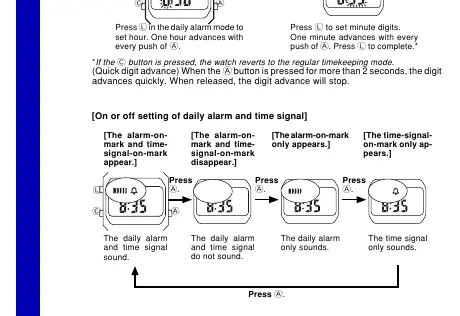
- Press the C button to enter the daily alarm mode.
- Press the L button to select the Hour or Minute setting.
- Press the A button to advance the digits.
- Press the L button to complete the setting.
You can toggle the alarm and time signal on or off by pressing the A button while in the alarm mode. Holding the A button in alarm mode will sound the buzzer for testing.
Stopwatch operation
The stopwatch measures up to 59 minutes and 59.99 seconds. Use the following operations:
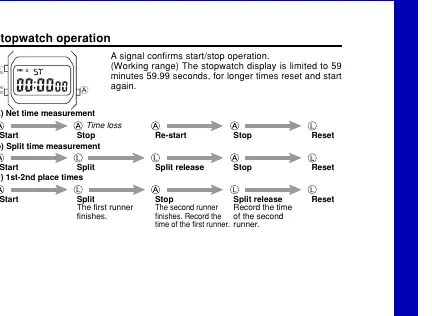
- Net time measurement: Start, Stop, Re-start, Stop, Reset.
- Split time measurement: Start, Split, Split release, Stop, Reset.
- 1st-2nd place times: Start, Split (first runner finishes), Stop (second runner finishes), Split release (record time of second runner), Reset.
Specifications
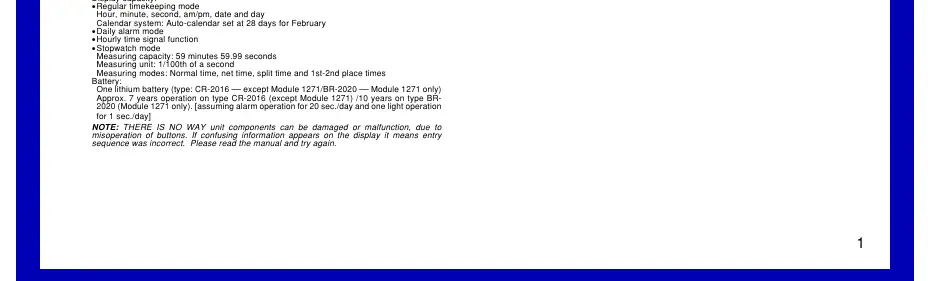
- Accuracy: ±30 seconds a month.
- Battery: CR-2016 (approx. 7 years) or BR-2020 (approx. 10 years for Module 1271).
- Stopwatch: 1/100th of a second measuring unit.
Practical help
Common problems
Alarm does not sound
Ensure the alarm is turned on. Check the display for the alarm-on mark.
Stopwatch stopped unexpectedly
The stopwatch display is limited to 59 minutes 59.99 seconds. Reset and start again for longer times.
Before use
- Verify the watch is in the correct mode (Regular timekeeping, Alarm, or Stopwatch).
- Ensure the alarm is set if you require daily alerts.
- Check if the time format is set to 12-hour or 24-hour according to your preference.
- Confirm the battery type if replacement is needed (CR-2016 or BR-2020).
Specs in practice
- Stopwatch Capacity
- 59 minutes 59.99 seconds.
- Battery Life
- Approximately 7 years for CR-2016 or 10 years for BR-2020 (Module 1271).
Images and diagrams
- The display diagrams illustrate how to navigate between modes using the C button.
- The setting diagrams show the sequence for adjusting time, calendar, and alarm parameters using the L and A buttons.
Model compatibility
- Module 1271 uses the BR-2020 battery, while other versions use the CR-2016 battery.

Manual page author
Michael Turner
Technical manual editor
Reviews PDF manuals for structure, safety notes, and practical product details so readers can find the right information quickly.