Wearables / Watches
Timex Ironman Stopwatch User Guide
Quick guide for the Timex Ironman Stopwatch. Learn how to use stopwatch modes, set alarms, configure the countdown timer, and manage lap data.
Table of contents
Manual images
Click an image to enlargeQuick guide from the manual
The Timex Ironman Stopwatch is operated using three primary buttons and a mode-based interface. To navigate between modes, press the MODE button. The sequence is: Time Mode – Stopwatch Mode – Data Mode – Countdown Mode – Alarm Mode – Dual Time Mode.
Device Overview
The device features three control buttons:
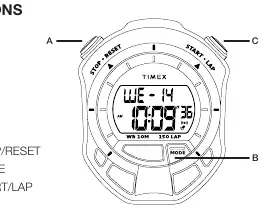
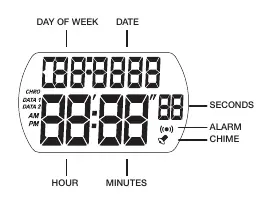
- A (STOP/RESET): Used to stop the timer, reset, or navigate settings.
- B (MODE): Used to cycle through the different modes.
- C (START/LAP): Used to start the timer, trigger a split/lap, or increase values during settings.
Time Mode
To set the time:
- Press MODE until TIME is displayed.
- Press and hold STOP/RESET until Seconds flash.
- Press START/LAP to reset Seconds.
- Press MODE to advance to Hours, Minutes, Year, Month, Date, and 12/24 Hour format.
- Use START/LAP to adjust values.
- Press STOP/RESET to exit settings.
In Time Mode, press and hold START/LAP to display the Month, Date, and Year.
Stopwatch Mode
The stopwatch supports 150 laps with a measuring range of 00:00’00” to 9:59’59”.
- Press MODE until Chro is displayed.
- Press START/LAP to start the timer.
- Press STOP/RESET to stop the timer.
- To record a split/lap, press START/LAP while the timer is running.
- Press STOP/RESET to reset the timer.
Data Mode
Access stored lap and split data:
- Press MODE until DATA is displayed.
- Press START/LAP to view individual LAP times.
- Press STOP/RESET to view individual SPLIT times.
Countdown Timer
- Press MODE until Tmr is displayed.
- Press and hold STOP/RESET to enter settings (Hours, Minutes, Seconds).
- Use START/LAP to adjust values and MODE to switch between fields.
- Press STOP/RESET to exit settings.
- Press START/LAP to start the countdown.
- Press STOP/RESET to pause.
Alarm Mode
The device supports up to five alarms and an hourly chime.
- Press MODE until AL is displayed.
- Press STOP/RESET to access AL-1 settings.
- Press START/LAP to toggle the Chime on/off.
- Press and hold STOP/RESET to set the alarm time (Hours/Minutes).
- Use START/LAP to adjust values and MODE to switch fields.
- Press STOP/RESET to exit.
Safety and Maintenance
This unit contains an internal Lithium-polymer battery. Do not attempt to remove the case-back or the battery. Store the unit within 32 to 77°F (0 to 25°C). Do not operate the unit outside the -4 to 131°F (-20 to 55°C) temperature range. This is not a medical device and is not recommended for persons with serious heart conditions.
Manufacturer information
Timex Group USA, Inc.
Practical help
Common problems
Alarm is sounding continuously
Press any button to stop the alarm.
Cannot read display while moving
Do not attempt to read the display while moving; it is unsafe and distracting. Read only when safe to do so.
Before use
- Ensure the unit is within the operating temperature range (-4 to 131°F / -20 to 55°C).
- Do not attempt to remove the case-back or battery.
- Consult a physician before starting an exercise program if you have heart conditions.
- Register your product at the Timex website for warranty and support.
Specs in practice
- Stopwatch Range
- 00:00’00” – 9:59’59”
- Lap Capacity
- Up to 150 laps
- Countdown Range
- 23:59’59” – 0:00’00”
Images and diagrams
- Button A: STOP/RESET
- Button B: MODE
- Button C: START/LAP
Model compatibility
- Not a medical device.
- Not recommended for persons with serious heart conditions.

Manual page author
Emily Carter
User documentation editor
Prepares concise manual descriptions and highlights the most useful setup, operation, and maintenance information for readers.