Wearables / Watches
User Manual for Timex Digital Watch 10N-095000-01
Quick guide for the Timex Digital Watch 10N-095000-01. Learn how to set the time, date, alarm, stopwatch, and countdown timer, plus important battery safety information.
Table of contents
Manual images
Click an image to enlargeQuick Guide from the Manual
This document provides essential operating instructions and safety warnings for the Timex Digital Watch. Important: The watch battery is not intended for consumer replacement; please consult a jeweler or professional for battery service. Keep the watch away from children due to the ingestion hazard of the button cell battery.
Product Overview
The Timex Digital Watch features include:
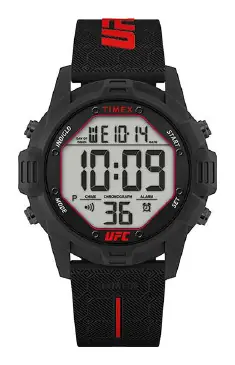
- Alarm
- Dual Time
- Stopwatch
- Countdown Timer
- Indiglo night-light
- Calendar
- 30 Meters Water Resistance
Basic Operations
The watch uses four buttons (A, B, C, D) for navigation and control:
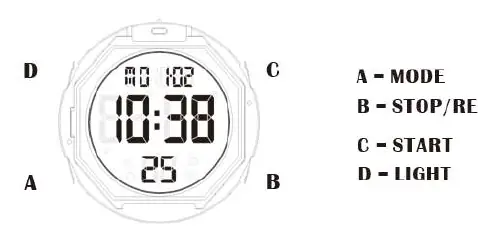
- Button A: Switch modes (Stopwatch, Countdown Timer, Alarm).
- Button B: Stop/Reset (or enter setting mode).
- Button C: Start (or adjust settings).
- Button D: Indiglo night-light.
Time, Date, and 12/24-Hour Setting
- From normal time-of-day, press and hold Button B for a few seconds to enter setting mode.
- Use Button C to adjust the value (Hour, Minute, Month, Day, Year, 12/24-Hour format).
- Press Button A to confirm each setting and move to the next.
- Press Button B when finished to exit and return to time-of-day.
Stopwatch
- Press Button A once to enter Stopwatch mode.
- Press Button C to start the stopwatch.
- Press Button B to take a split time or Button C to stop.
- While stopped, press and hold Button B to reset.
- Press Button A to return to time-of-day.
Countdown Timer
- Press Button A twice to enter Timer mode.
- Press and hold Button B for a few seconds to enter setting mode.
- Use Button C to set Hours, Minutes, and Seconds, and to toggle the Repeat feature.
- Press Button A to confirm each setting.
- Press Button B to return to the timer screen.
- Press Button C to start or pause the timer. Hold Button B while paused to reset.
Alarm
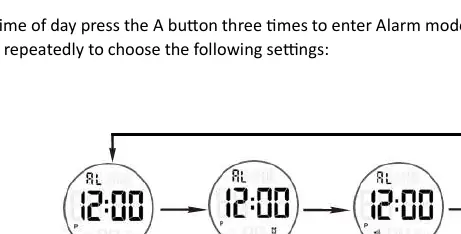
- Press Button A three times to enter Alarm mode.
- Press Button C repeatedly to cycle through alarm/chime settings (All Off, Only Alarm On, Only Hourly Chime On, All On).
- To set the alarm time, hold Button B for a few seconds.
- Use Button C to adjust Hours and Minutes, pressing Button A to confirm each.
- Press Button B when finished to save.
Battery Safety
This product contains a lithium metal CR2032 button cell battery. Ingestion can cause severe internal chemical burns and death in as little as 2 hours. Keep batteries out of reach of children. If the battery compartment does not close securely, stop using the product immediately.
Manufacturer information
Timex Group USA, Inc.
Practical help
Common problems
Battery replacement
The battery is not intended for consumer replacement. Take the watch to a jeweler or professional.
Battery compartment not closing
Stop using the product immediately, remove the batteries, and keep them away from children.
Before use
- Ensure the battery compartment is securely closed.
- Verify the watch is set to the correct time and date.
- Confirm the watch is not exposed to temperatures above 158°F (70°C).
- Do not mix old and new batteries or different battery types.
Specs in practice
- 30 Meters Water Resistance
- Suitable for daily use, but not for swimming or diving.
Images and diagrams
- Button A: Mode selection.
- Button B: Stop/Reset/Settings.
- Button C: Start/Adjust.
- Button D: Night-light.
Model compatibility
- Not for use with rechargeable batteries.
- Do not recharge, disassemble, or incinerate the battery.

Manual page author
Emily Carter
User documentation editor
Prepares concise manual descriptions and highlights the most useful setup, operation, and maintenance information for readers.