Electronics / Routers
Cisco CSR 1000v Deployment Guide for Microsoft Azure
Comprehensive guide for deploying and configuring Cisco CSR 1000v virtual routers within the Microsoft Azure cloud environment, covering prerequisites, resource requirements, and licensing.
Table of contents
Overview of Cisco CSR 1000v
The Cisco Cloud Services Router (CSR) 1000v is a full-featured Cisco IOS XE router designed for deployment in the Microsoft Azure cloud. It enables IT departments to implement enterprise-class networking services, including advanced VPN features such as IPsec, DMVPN, FlexVPN, Easy VPN, and SSLVPN. The router supports dynamic routing protocols like EIGRP, OSPF, and BGP, allowing for the construction of complex multi-tier architectures and secure interconnection between corporate locations and cloud environments.
Prerequisites and Resources
To successfully deploy the Cisco CSR 1000v, you must have an active Microsoft Azure account and subscription. Deployment requires several specific Azure resources, which can be created during the process if they do not already exist. These include a resource group, virtual network with defined subnets, route tables, security groups, and public IP addresses. Storage accounts must use the Standard_LRS type. Additionally, you must obtain a valid software license for the router.
Deployment Options
Cisco provides solution templates in the Azure Marketplace to simplify the deployment process. A full solution template is recommended for new networks, as it automatically creates necessary resources for 2, 4, or 8 network interface configurations. For existing infrastructure, a single-interface template allows for manual integration. After initial deployment, additional interfaces can be added via PowerShell or Azure CLI commands.
Availability Sets and High Availability
Availability sets are used to group virtual machines to ensure isolation from hardware or software failures within the data center. When deploying with multiple network interfaces, you must create a new availability set. Parameters such as Fault Domain Count and Update Domain Count can be configured to manage how VMs are distributed across physical hardware and power sources.
Licensing Models
The Cisco CSR 1000v utilizes the Bring Your Own License (BYOL) model. This supports traditional Cisco Software Licensing (CSL) via Product Authorization Keys (PAK) or Cisco Smart Licensing, which allows for dynamic license management across multiple instances without locking them to specific serial numbers. Note that users are responsible for both the Cisco software license costs and the underlying Microsoft Azure VM instance charges.
Manufacturer information
Cisco Systems, Inc.
Practical help
Common problems
Need to deploy multiple CSR 1000v instances in a single availability set.
Deploy the first instance using a solution template to create the availability set, then deploy subsequent instances as individual CSR 1000v units, selecting the existing availability set.
Resource group dependency issues.
If an object depends on another in a different resource group, the second group cannot be deleted until the object is removed. Create a new resource group for each new deployment.
Before use
- Verify active Microsoft Azure subscription.
- Ensure a valid Cisco software license (PAK or Smart License) is obtained.
- Determine if a new virtual network is required or if existing infrastructure will be used.
- Select the appropriate solution template (2, 4, or 8 NICs) based on network needs.
- Confirm availability of Standard_LRS storage account type.
Specs in practice
- Fault Domain Count
- Number of fault domains; VMs in the same domain share common storage, power, and network switches.
- Update Domain Count
- Number of update domains; groups of VMs and hardware that can be rebooted simultaneously.
Images and diagrams
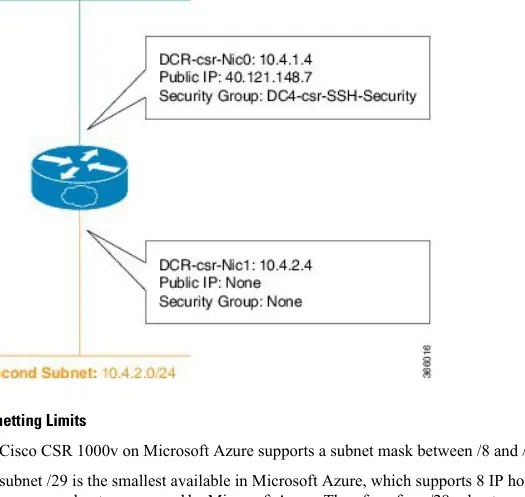
- The diagram illustrates a 2-interface configuration (NIC0 and NIC1) on separate subnets.
- NIC0 is assigned a public IP address and protected by a security group.
- NIC1 operates on a secondary subnet without a public IP or specific security group rules.
Model compatibility
- Availability sets are only available for public cloud deployments, not government cloud.
- Only Standard_LRS storage account type is currently supported.

Manual page author
Emily Carter
User documentation editor
Prepares concise manual descriptions and highlights the most useful setup, operation, and maintenance information for readers.