Electronics / Collaboration Devices
Network Infrastructure Guide for Cisco Collaboration System 10.x
A comprehensive design and configuration guide for network infrastructure supporting Cisco Collaboration System 10.x, covering LAN, WAN, and Wireless LAN requirements, QoS implementation, and network services.
Table of contents
Manual images
Click an image to enlargeQuick Guide to Network Infrastructure
This document provides design and configuration guidelines for network infrastructure supporting Cisco Collaboration System 10.x. It covers the requirements for LAN, WAN, and Wireless LAN environments to ensure high availability and quality of service (QoS) for voice and video traffic.
LAN Infrastructure Design
Proper LAN design is essential for Unified Communications. It should be structured as a layered model consisting of the Access, Distribution, and Core layers. Key recommendations include:
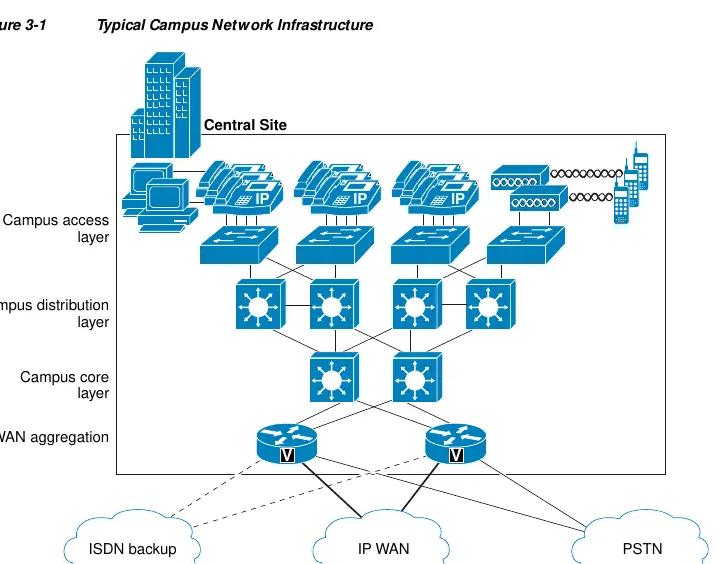
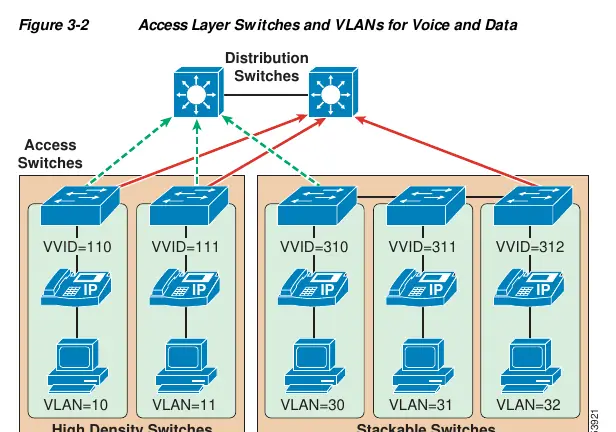
- Access Layer: Assign a single IP subnet per VLAN. Limit the number of devices per VLAN to approximately 512 to manage broadcast traffic and ARP cache.
- Redundancy: Implement redundant links and devices to ensure high availability. Use Layer 3 links between redundant distribution switches to avoid topological loops.
- QoS: Enable end-to-end QoS. Classify traffic as close to the edge as possible. Use multiple egress queues on switches to prioritize voice and video traffic.
Network Services Configuration
Reliable network services are critical for collaboration endpoints:
- DNS: Use geographically redundant DNS servers. For basic deployments without DNS, configure endpoints to use IP addresses.
- DHCP: Use redundant DHCP servers. Configure DHCP Option 150 to provide TFTP server addresses to IP phones.
- TFTP: Used for configuration files and firmware. For large deployments, distribute TFTP servers and use load balancing by assigning different ordered lists of TFTP servers to different subnets.
- NTP: Synchronize all network devices to a common time source (Stratum 1, 2, or 3) to ensure accurate time-stamping of logs and CDRs.
WAN Infrastructure and QoS
WAN design must account for bandwidth limitations and potential link failures:
- Design: Choose topologies (hub-and-spoke, meshed) that provide fault tolerance. Use redundant WAN links where possible.
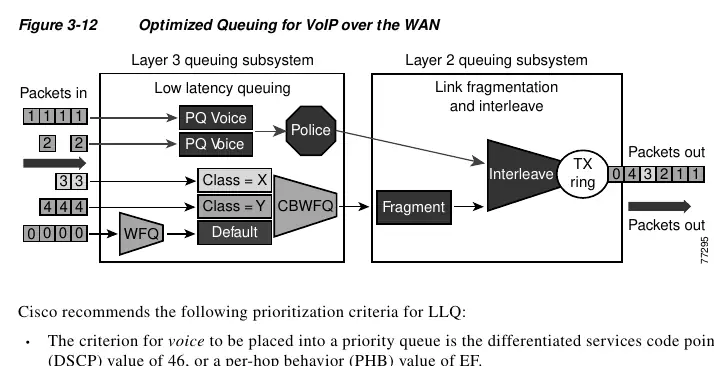
- QoS: Implement traffic shaping, link fragmentation and interleaving (LFI), and low-latency queuing (LLQ) to manage traffic on low-speed links.
- Bandwidth Provisioning: Provision bandwidth for both bearer traffic (voice/video) and call control signaling. Use the 75% rule (total bandwidth for applications should not exceed 75% of link capacity).
Wireless LAN Infrastructure
Wireless networks require specific considerations for voice and video:
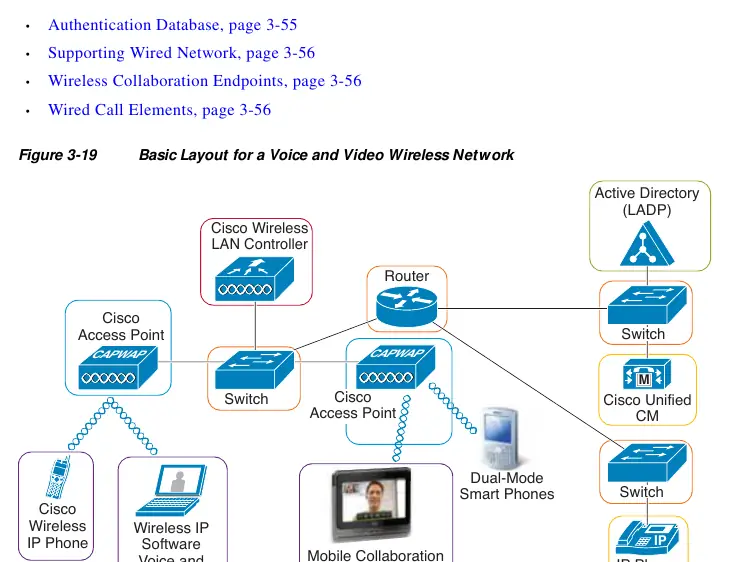
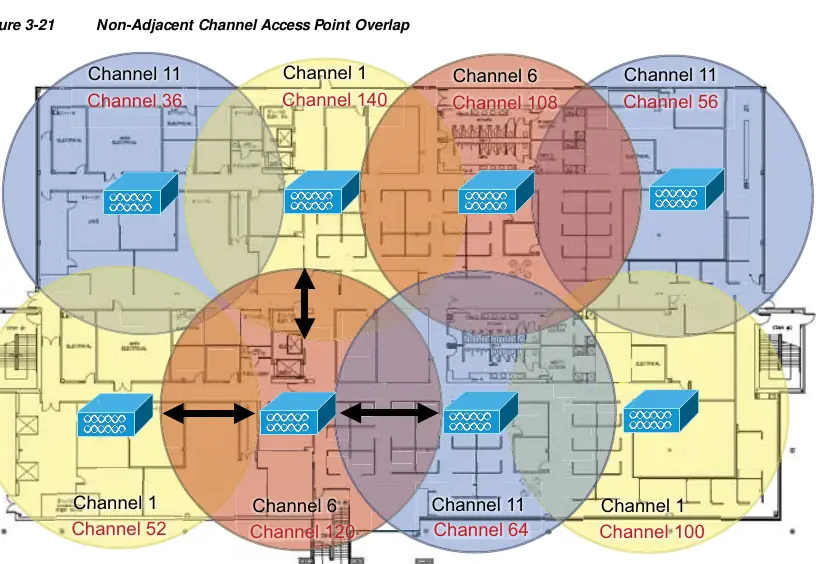
- Architecture: Wireless access points (APs) and wireless LAN controllers (WLCs) are central components.
- High Availability: Ensure a 20% to 30% cell boundary overlap on non-adjacent channels for seamless roaming.
- Capacity Planning: Size the solution based on the supported capacity of the wireless endpoints.
- QoS: Use Wi-Fi Multimedia (WMM) and Traffic Specification (TSPEC) for call admission control. Configure QoS policies on APs to prioritize voice and video traffic.
Manufacturer information
Cisco Systems, Inc.
Practical help
Common problems
Voice quality degradation
Implement QoS, ensure adequate bandwidth, and use traffic shaping on WAN links to prevent buffer overflow.
TFTP timeout during phone upgrade
Use a local TFTP server for larger firmware files or increase timeout settings.
One-way audio on wireless
Enable Dynamic Transmit Power Control (DTPC) on the AP to match the transmit power of the voice endpoints.
Before use
- Verify network topology (Access, Distribution, Core layers).
- Configure QoS markings (DSCP/CoS) for voice and video traffic.
- Ensure redundant DNS and DHCP servers are deployed.
- Calculate bandwidth requirements for voice and video bearer traffic.
- Perform a site survey for wireless network deployment.
Specs in practice
- DSCP 34 (AF41)
- Recommended marking for video conferencing traffic.
- DHCP Option 150
- Used by IP phones to identify TFTP server addresses.
Images and diagrams
- Figure 3-1: Typical Campus Network Infrastructure layout.
- Figure 3-2: Access Layer Switches and VLANs for Voice and Data.
- Figure 3-12: Optimized Queuing for VoIP over the WAN.
- Figure 3-19: Basic Layout for a Voice and Video Wireless Network.
Model compatibility
- Cisco Unified IP Phones 6900, 8900, and 9900 Series support EnergyWise Power Save Plus mode.
- 802.11n can operate on 2.4 GHz and 5 GHz, but 5 GHz is recommended for Unified Communications.
- Cisco recommends NTP v4 for Unified CM servers.

Manual page author
Emily Carter
User documentation editor
Prepares concise manual descriptions and highlights the most useful setup, operation, and maintenance information for readers.