Software / Apps Services
Configuration Guide for Preserve 802.1Q Tagging with 802.1P Marking over ATM PVCs
A technical configuration guide for enabling 802.1Q tagging and 802.1P marking over ATM PVCs on Cisco IOS XE 17.x. Includes CLI configuration steps, prerequisites, and troubleshooting tips.
Table of contents
Quick guide from the manual
This document provides instructions for configuring the Preserve 802.1Q Tagging with 802.1P Marking over ATM PVCs feature. This feature allows 802.1Q tags to be transported over ATM permanent virtual circuits (PVC) used in ADSL2+ uplinks. It enables service providers to offer broadband-enabled services, such as voice, video, and data, with real-time network performance.
Prerequisites
- Basic understanding of ATM, bridging, DHCP, and VLANs.
- An ADSL2+ uplink.
- The feature is supported on Cisco IOS XE 17.x.
Restrictions
- Supports only one bridged 802.1Q VLAN.
- Can be configured only on a point-to-point ATM subinterface.
- Uses ATM Adaptation Layer 5 Subnetwork Protocol Access Protocol (AAL5SNAP) encapsulation.
Configuration steps
To configure the feature, follow these high-level CLI steps:
- Enter privileged EXEC mode (enable) and global configuration mode (configure terminal).
- Define class maps for egress and ingress traffic using class-map match-all.
- Create policy maps using policy-map and define classes to set CoS values (set cos) and QoS groups (set qos-group).
- Configure the ATM interface as point-to-point using interface atm.
- Assign the interface to a bridge group (bridge-group).
- Configure the PVC with pvc, bridge-dot1q encap, and encapsulation aal5snap.
- Apply the service policies using service-policy out and service-policy input.
- Configure PPPoE client settings if required using pppoe-client commands.
Troubleshooting
If you encounter issues with PPP session establishment, use the following debug commands:
- debug ppp authentication
- debug ppp negotiation
For RADIUS or TACACS server authentication issues, use:
- debug aaa authentication
- debug aaa authorization
Caution: Use debug commands with extreme caution as they are CPU-intensive and can impact network performance.
Technical concepts
The feature works by inserting an 802.1Q VLAN tag into the MAC Protocol Data Unit (PDU) before it is sent to the DSLAM. The bridge-dot1q encap command changes the local VLAN ID to the ID required by the service provider. Any 802.1P value is changed to 0, and frames without VLAN tags are sent out over ATM with an added VLAN header.
Manufacturer information
Cisco Systems, Inc.
Practical help
Common problems
PPPoE session disconnection
Occurs if the configured VLAN ID (set using set vlan-inner or bridge-dot1q encap vlanid) differs from the default VLAN ID.
High CPU usage
Debug commands are CPU-intensive; use them with extreme caution to avoid impacting network performance.
Before use
- Ensure basic understanding of ATM, bridging, DHCP, and VLANs.
- Verify the uplink is ADSL2+.
- Ensure the interface is a point-to-point ATM subinterface.
- Confirm only one bridged 802.1Q VLAN is required.
Specs in practice
- bridge-dot1q encap
- Command used to configure the VLAN ID for the service provider; range is 1 to 4094.
Images and diagrams
- Packet structure diagrams illustrate how the 4-byte VLAN header is inserted into the MAC PDU.
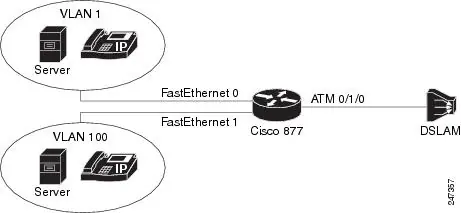
- Topology diagrams show how traffic from multiple VLANs is bridged to a single outgoing VLAN.
Model compatibility
- Requires ADSL2+ uplink.
- Supports only one VLAN ID per PPPoE session.
- Feature available from 17.7 release for specific CoS marking commands.

Manual page author
Emily Carter
User documentation editor
Prepares concise manual descriptions and highlights the most useful setup, operation, and maintenance information for readers.