Software / Apps Services
Cisco IOS XE Cupertino 17.9.x Programmability Configuration Guide
A comprehensive guide for configuring programmability features on Cisco IOS XE Cupertino 17.9.x, including Zero-Touch Provisioning, Guest Shell, Python APIs, NETCONF, RESTCONF, gNMI, and application hosting.
Table of contents
Quick guide from the manual
This guide provides instructions for configuring programmability features on Cisco IOS XE Cupertino 17.9.x. It covers automated provisioning, scripting environments, model-driven configuration protocols, and application hosting.
Provisioning
The manual details automated provisioning methods:
- Zero-Touch Provisioning (ZTP): Automatically bootstraps devices using DHCP and Python scripts.
- iPXE: An enhanced version of PXE for network booting, supporting IPv4/IPv6 and various boot modes (timeout, forever, device).
Shells and Scripting
Cisco IOS XE supports virtualized Linux environments for automation:
- Guest Shell: A virtualized Linux-based environment for running custom applications and Python scripts.
- Python API: Provides programmatic access to the device CLI.
- EEM Python Module: Allows Python scripts to be executed as part of Embedded Event Manager (EEM) actions.
Model-Driven Programmability
The guide covers standard-based configuration protocols:
- NETCONF: XML-based protocol for network configuration.
- RESTCONF: HTTP-based protocol for network configuration.
- gNMI: gRPC-based network management interface.
- Model Based AAA: Implements NETCONF Access Control Model (NACM).
- Model-Driven Telemetry: Streams YANG-modeled data to collectors.
Application Hosting
Cisco IOS XE supports hosting Docker applications:
- Cisco IOx: Framework for hosting applications on network devices.
- ThousandEyes Enterprise Agent: Supported as an embedded Docker-based application for network monitoring.
- Application Auto-Restart: Ensures applications retain their operational state after switchovers.
OpenFlow
The manual describes enabling OpenFlow mode, which allows a controller to direct forwarding functions through a secure channel, supporting both OpenFlow 1.0 and 1.3.
Manufacturer information
Cisco Systems, Inc.
Practical help
Common problems
Zero-Touch Provisioning (ZTP) fails
Ensure the device has no startup configuration. Verify DHCP server configuration (Option 150/67) and ensure the device can reach the TFTP/HTTP server.
Guest Shell not working
Ensure IOx is enabled and configured. Check that the device has sufficient memory and CPU resources allocated for the Guest Shell container.
NETCONF/RESTCONF connection issues
Verify AAA configuration and ensure the user has privilege level 15. Check that the respective service (netconf-yang or restconf) is enabled.
Application hosting fails to start
Check if the storage medium (SSD/bootflash) is correctly formatted and has sufficient free space. Verify that IOx is running.
Before use
- Verify the device is running a supported Cisco IOS XE version.
- Ensure network connectivity for management or in-band ports.
- Configure DHCP server for ZTP if required.
- Check resource requirements (memory/CPU/storage) for Guest Shell or Application Hosting.
- Ensure necessary AAA configurations are in place for NETCONF/RESTCONF.
Images and diagrams
- Single-RP Image Install Workflow: Illustrates the process of installing an OS image via RPC.
- Single-RP Image Activation Workflow: Shows the steps to activate a new OS version.
- IOXMAN Structure: Details how logging and tracing data flows between applications and the host.
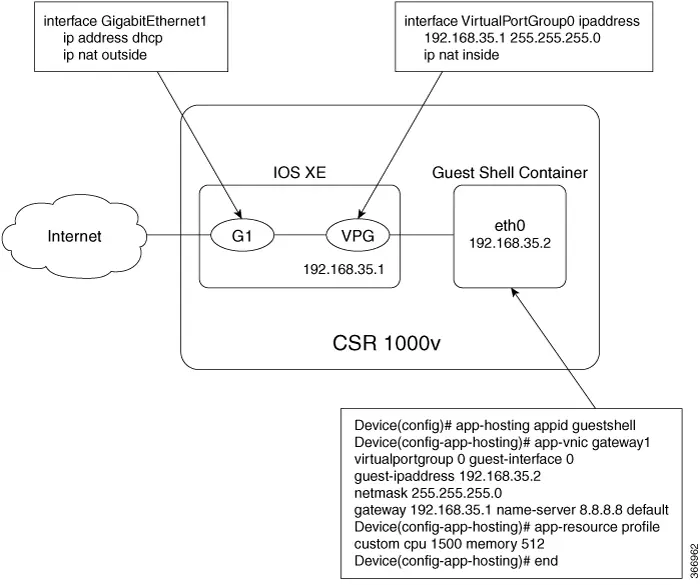
- Managing the Guest Shell using Application Hosting: Shows the network configuration for Guest Shell.
- Modifying Candidate Datastore Steps: Outlines the best practice for using the candidate datastore.
Model compatibility
- Guest Shell is not supported on Cisco Catalyst 9200L SKUs.
- DHCPv6 for ZTP is only supported on Catalyst 9300 and 9500 Series Switches.
- Application hosting supports only Docker applications.
- OpenFlow mode requires a specific boot mode configuration and erases previous configurations.

Manual page author
Emily Carter
User documentation editor
Prepares concise manual descriptions and highlights the most useful setup, operation, and maintenance information for readers.