Software / Apps Services
Cisco TrustSec Configuration Guide for Cisco IOS Release 15M&T
A comprehensive configuration guide for Cisco TrustSec features on Cisco IOS Release 15M&T, covering SXP, SGT mapping, NetFlow export, and SGT caching.
Table of contents
Manual images
Click an image to enlargeQuick Guide to Cisco TrustSec Configuration
This guide provides instructions for configuring Cisco TrustSec (CTS) features on Cisco IOS Release 15M&T. CTS provides security for network devices by authenticating neighbors and applying security policies like group tagging and role-based access control.
Cisco TrustSec Support for IOS
CTS uses Secure RADIUS for authentication, authorization, and encryption. Key components include:
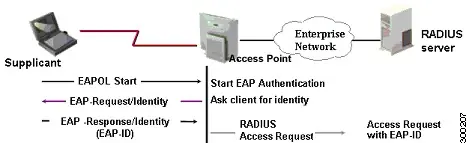
- EAP-FAST: Used for authentication; only Phase 0 (PAC distribution) is supported.
- PAC Provisioning: Automatically provisions clients with Protected Access Credentials.
- Device Enrollment: New devices must be authenticated and trusted to participate in the CTS network.
SGT Exchange Protocol (SXP) Configuration
SXP propagates IP-to-SGT binding information across devices that lack hardware tagging capabilities.
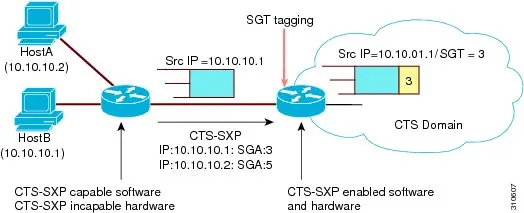
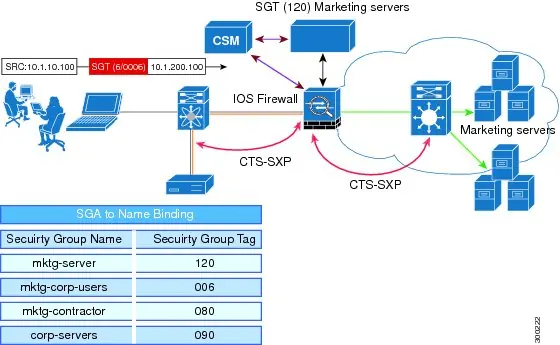
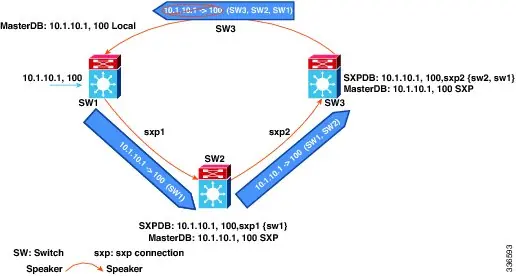
- Enabling SXP: Use the cts sxp enable command.
- Peer Connections: Configure peers as either speaker or listener using cts sxp connection peer.
- Timers: Adjust retry and reconciliation periods to manage connection stability.
- Loop Detection: SXPv4 includes loop detection to prevent stale bindings.
SGT Mapping
CTS supports mapping traffic to Security Group Tags (SGTs) based on interfaces or subnets.
- Interface-to-SGT: Binds all traffic on a Layer 3 ingress interface to a specific SGT.
- Subnet-to-SGT: Binds an SGT to all host addresses within a specified subnet.
Flexible NetFlow Export
You can export Cisco TrustSec fields (source and destination SGTs) using Flexible NetFlow (FNF).
- Configure flow records to include match flow cts source group-tag or collect flow cts source group-tag.
- Apply the flow monitor to an interface to begin exporting data.
SGT Caching
SGT caching allows traffic to pass through services (like WAN accelerators or firewalls) that are not SGT-aware.
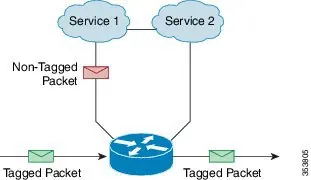
- Global Caching: Enable using cts role-based sgt-caching.
- Interface Caching: Enable on specific interfaces using cts role-based sgt-cache.
- Note: Global and interface-specific configurations are mutually exclusive.
Verification
Use the show commands to verify configurations, such as show cts sxp connections, show cts role-based sgt-map, and show cts interface.
Manufacturer information
Cisco Systems, Inc.
Practical help
Common problems
SXP connection fails to establish
Verify that the peer IP, password, and mode (speaker/listener) are configured consistently on both devices.
SGT mapping conflict
Check the binding source priority: CLI (lowest) < L3IF < SXP < LOCAL < INTERNAL (highest).
SGT caching configuration warning
Global and interface-specific SGT caching are mutually exclusive. Remove one configuration before enabling the other.
Before use
- Ensure the Cisco TrustSec security license is installed on the router.
- Verify L3 connectivity exists between all network devices.
- Check software release compatibility using the Cisco Feature Navigator.
- Configure CTS credentials (ID and password) for authentication.
Images and diagrams
- SXP propagation diagram shows how bindings are passed between devices.
- SGT ZBPF distribution path illustrates how identity information is learned.
- SGT Caching in One-Arm Mode shows how packets are redirected to services and re-tagged.
Model compatibility
- CTS-SXP does not support IPv6.
- CTS-SXP is supported only on physical interfaces.
- SXPv4 loop detection is mandatory for correct operation in looped topologies.

Manual page author
Michael Turner
Technical manual editor
Reviews PDF manuals for structure, safety notes, and practical product details so readers can find the right information quickly.