Lighting / Stage Lighting
User Manual for Citronic Animate Smart Mini Animation Laser 152.748UK
Quick guide for the Citronic Animate Smart Mini Animation Laser (152.748UK). Learn how to operate the device, use DMX modes, connect via Bluetooth, and troubleshoot common issues.
Table of contents
Manual images
Click an image to enlargeQuick guide from the manual
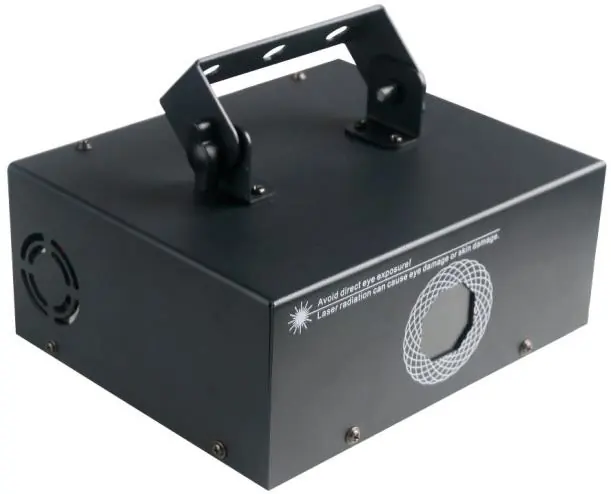
The Citronic Animate Smart is a Class 3B laser effect unit. Before use, ensure the unit is placed in a well-ventilated area and secured with secondary safety fixings if mounted overhead. The unit is controlled via a rear panel menu, DMX512, or the LightElf smartphone application via Bluetooth.
Safety and Placement
This product is a Class 3B laser and should only be installed and used by persons trained in the management of laser radiation. Do not point the laser directly at eyes. Ensure the unit is kept away from damp or dusty environments and that there is adequate airflow around the housing. Always use the included mounting bracket for installation.
Rear Panel Controls
The rear panel features the following controls and connections:
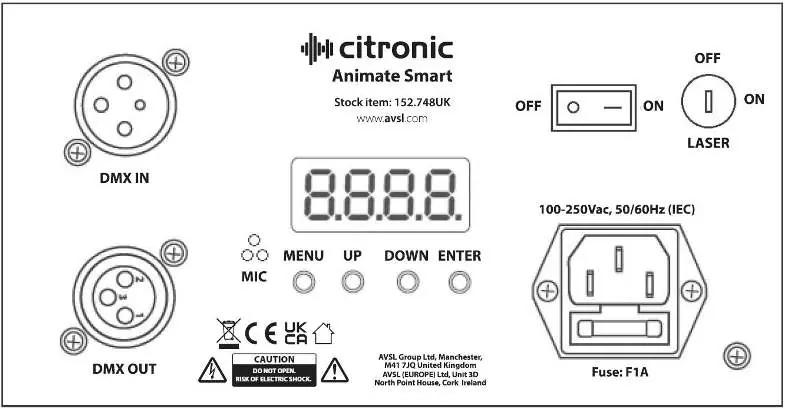
- DMX IN/OUT: XLR connections for DMX signal.
- Menu Buttons: MENU, UP, DOWN, and ENTER buttons for navigating the settings.
- Power Switch: Main power toggle.
- Laser Key: Physical key switch to enable/disable laser output.
- Fuse: F1A fuse holder.
Manual Control Menu
Press the MENU button to enter the settings menu. Use UP and DOWN to navigate and ENTER to confirm. Available settings include:
- Addr: DMX address setting (1-512) and slave mode.
- SHOW: Selects between SHOW 0 (random play) and SHOW 1-6 (specific geometric, dynamic, text, or holiday patterns).
DMX Operation
To use DMX mode, connect the signal source to the DMX input. Select A001 from the menu to enter DMX mode. The unit uses 16 channels:
- CH1: Laser On/Off.
- CH2: Colour selection (fixed, chase, or segmented).
- CH3: Colour chase speed.
- CH4: Pattern group selection (Inner patterns or Dynamic effects).
- CH5: Pattern options.
- CH6: Inner dynamic effect.
- CH7: Inner dynamic effect speed.
- CH8: Pattern size.
- CH9: Pattern auto zoom.
- CH10: Central rotation.
- CH11: Horizontal rotation/flip.
- CH12: Vertical rotation/flip.
- CH13: Horizontal remove.
- CH14: Vertical remove.
- CH15: X Wave.
- CH16: Pattern drawings (Manual or Auto).
Bluetooth App Control
You can control the laser using the LightElf application:
- Install the LightElf app from the Apple or Google app stores.
- Power on the laser and open the app.
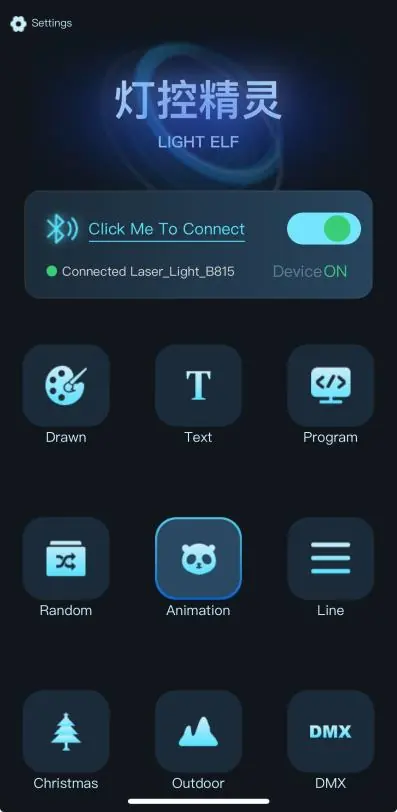
- Press the Click me to connect button and select Laser_Light_B815 from the device list.
- Use the app modes (Drawn, Text, Program, Random, Animation, Line, Christmas, Outdoor) to customize the laser output.
- In Drawn mode, select a colour and use the pencil tool to draw on the center panel, then press Send.
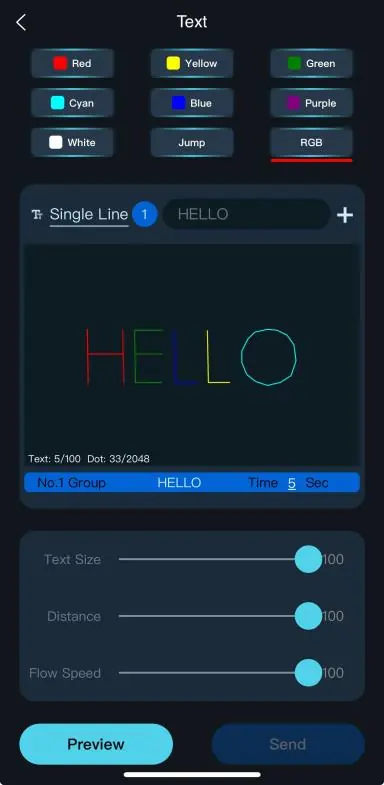
- In Text mode, enter your message, adjust size, distance, and flow speed, then press Send.
Specifications
- Power supply: 110-240Vac, 50/60Hz (IEC)
- Power consumption: 22W (max)
- Laser power: 1600mW
- Laser Class: 3B
- Dimensions: 188 x 193 x 173mm
- Weight: 1.89kg
Troubleshooting
- No power: Check mains voltage, outlet, IEC lead, and fuse.
- No laser output: Check mode settings, DMX controller, Bluetooth connection, and ensure the rear laser key is turned on.
- Unresponsive to DMX: Ensure unit is in DMX mode, check DMX address, master dimmer, and cabling.
- Overheating: Ensure adequate ventilation and distance from heat sources.
Practical help
Common problems
No power
Check that the mains voltage is correct, the outlet is switched on, and the IEC lead and fuse are intact.
No laser or light output
Verify control panel mode settings, check DMX controller levels, ensure Bluetooth connection is active, and confirm the rear laser key is turned on.
Unresponsive to DMX
Ensure the unit is in DMX mode (A on display flashes), check DMX address, master dimmer value, and DMX cabling.
Overheating/cutting out
Ensure adequate ventilation around the unit and that it is not placed too close to a heat source.
Before use
- Verify the package contains the main unit, bracket, UK IEC mains lead, laser key, and user guide.
- Ensure the unit is placed in a well-ventilated area.
- Use secondary safety fixings if mounting the unit overhead.
- Ensure the laser key is inserted and turned to the ON position.
- Install the LightElf application on your smartphone for Bluetooth control.
Specs in practice
- Laser Class 3B
- Requires operation by trained personnel due to potential eye injury risk.
- 16 DMX Channels
- Provides granular control over laser patterns, colours, rotation, and movement.
Images and diagrams
- The rear panel contains the DMX In/Out ports, power switch, laser key switch, and the menu navigation buttons (Menu, Up, Down, Enter).
- The LightElf app interface allows for freehand drawing, text input, and selecting pre-programmed animation modes.
Model compatibility
- Requires an Apple or Android smart device for Bluetooth app control.
- Compatible with standard DMX512 controllers.

Manual page author
David Miller
Documentation analyst
Organizes user manual content into clear summaries, with attention to model details, product context, and everyday usability.