Lighting / Stage Lighting
User Manual for Citronic SilentPAR-200W LED PAR Can
Quick guide for the Citronic SilentPAR-200W LED PAR Can. Learn how to operate the control panel, configure DMX settings, adjust light modes, and troubleshoot common issues.
Table of contents
Manual images
Click an image to enlargeQuick guide from the manual
The Citronic SilentPAR-200W is a professional LED lighting fixture featuring cool and warm white output. Before use, ensure the unit is placed in a well-ventilated area away from damp or dusty environments. The unit can be operated via the rear control panel for standalone modes (Auto, Sound, Static) or via DMX for advanced control. Always disconnect the mains before cleaning or if the unit is exposed to liquid.
Product Description
The SilentPAR-200W utilizes 4 x 50W COB LEDs with a whisper-quiet fan for silent operation. It features a heavy-duty metal chassis and a versatile stand/bracket. The rear panel includes twist-and-lock power connections and 3-pin XLR DMX ports.
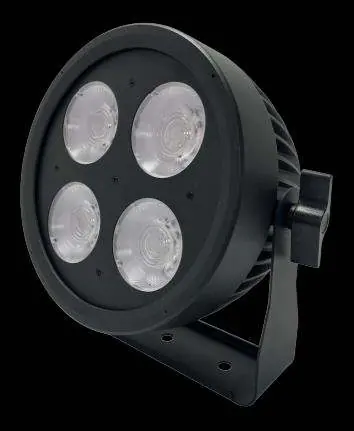
In the box
- 1 x Main unit
- 1 x Stand/mounting bracket and thumbscrews
- 1 x UK twist and lock mains lead
- 1 x User guide
Placement and Cleaning
Ensure adequate airflow around the fixture housings to prevent overheating. Keep the unit away from damp or dusty environments. To clean, use a soft cloth with a neutral detergent for the casing and a vacuum cleaner to clear dust from the ventilation grilles. Do not use strong solvents.
Control Panel Operation
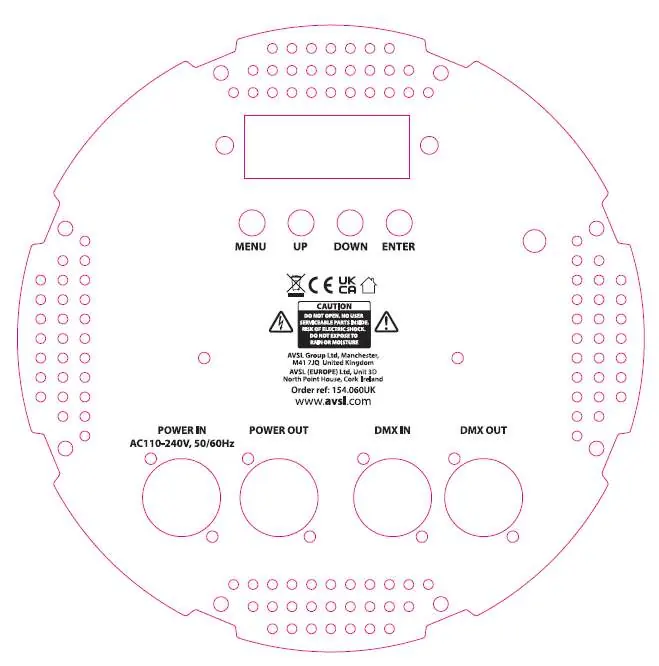
The rear panel features an LCD display and four buttons: MENU, UP, DOWN, and ENTER. Press MENU to enter the settings menu, use UP and DOWN to navigate, and press ENTER to save your selection.
Manual Control Menu
- Auto mode: Adjust speed (SP 01-20) and strobe (St 00-19).
- DMX mode: Set the start address (Addr) for 4, 6, or 9 channel modes.
- Sound Mode: Select sound-activated modes and adjust sensitivity.
- Edit color: Manually adjust intensity for EYE1-EYE4 and LED strobe.
- Product Set: Configure display backlight time and protection temperature (50-65°C).
DMX Operation
Connect the DMX signal source to the DMX input using a balanced XLR lead. You can daisy-chain extra fixtures using the DMX out port. The unit supports 4, 6, or 9 channel modes. Ensure the correct start address is set via the menu.
Troubleshooting
- No power: Check the mains lead and fuse.
- No light output: Check control panel mode settings and DMX controller dimmer/blackout settings.
- Unresponsive to DMX: Verify the unit is in DMX mode, the address is correct, and the DMX controller is not set to blackout.
- Overheating: Ensure adequate ventilation and distance from heat sources.
Specifications
- Power: 100-240Vac, 50/60Hz
- Power consumption: 250W
- LED power: 2 x 50W (cool white), 2 x 50W (warm white) COB LEDs
- Colour temperature: 3000K-5600K
- Beam angle: 36°
- Weight: 2.75kg
Practical help
Common problems
No power
Check the mains lead and the fuse. If the fuse blows repeatedly, contact your dealer.
No light output
Check control panel mode settings and ensure the DMX controller is not set to blackout or low dimmer levels.
Unresponsive to DMX
Ensure the unit is in DMX mode, the correct DMX address is set, and the DMX controller is on the correct fixture/page.
Overheating or cutting out
Ensure adequate ventilation around the unit and that it is not placed too close to a heat source.
Before use
- Verify all items are present: main unit, bracket, thumbscrews, and power lead.
- Ensure the installation location is dry and dust-free.
- Check that there is adequate airflow around the fixture.
- Verify the power source is 100-240Vac.
- If using DMX, ensure you have balanced XLR leads ready.
Specs in practice
- Power consumption
- 250W maximum power draw.
- DMX channels
- Supports 4, 6, or 9 channel configurations for different levels of control.
- Colour temperature
- Adjustable range from 3000K (warm) to 5600K (cool).
Images and diagrams
- The rear panel contains the LCD display, menu navigation buttons (MENU, UP, DOWN, ENTER), power input/output (twist and lock), and DMX input/output (3-pin XLR).
Model compatibility
- Requires a DMX controller for advanced lighting effects.
- Uses standard 3-pin XLR cables for DMX signal transmission.

Manual page author
Emily Carter
User documentation editor
Prepares concise manual descriptions and highlights the most useful setup, operation, and maintenance information for readers.