Tools / Power Tools
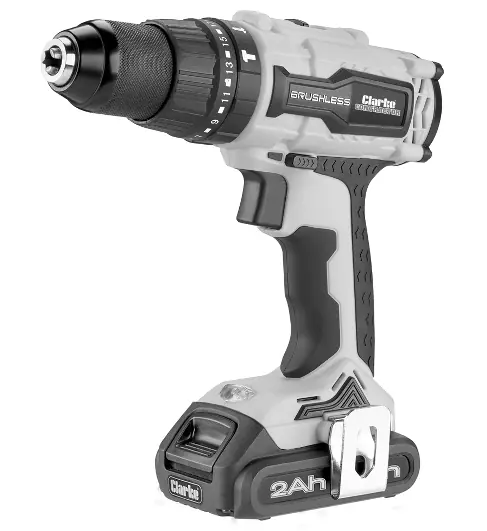
Clarke 18V Cordless Drill CON18LiC User Guide
Quick guide for the Clarke 18V Cordless Drill CON18LiC, covering battery charging, operation modes, torque adjustments, and maintenance tips.
Table of contents
Manual images
Jump to the sectionQuick guide from the manual
This document provides essential operating and maintenance instructions for the Clarke 18V Cordless Drill (Model: CON18LiC). Always read the full safety precautions before use. The drill features three operating modes (hammer, rotary, screwdriver) and two speed ranges.
Battery charging
The battery must be charged before first use. Charge only at ambient temperatures between -10°C and 45°C.
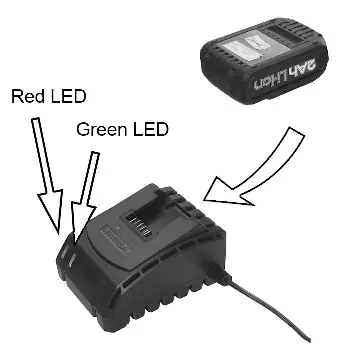
- Connect the charger to the mains supply; the green indicator will light up.
- Slide the battery onto the charger.
- The green indicator stays on, and the red LED flashes during charging.
- When fully charged, both red and green LEDs remain on.
- If both LEDs flash rapidly, the battery is either too hot or defective.
Operation and adjustments
Fitting/Removing Battery: Slide the battery onto the base of the handle to fit. Press the release button on top to remove.
Drill Bits: Grip the chuck collar and rotate the front anti-clockwise to open, insert the bit, then rotate clockwise to tighten.
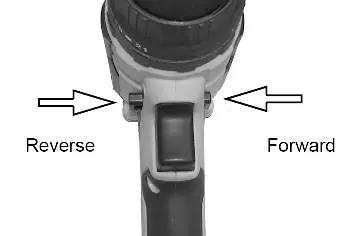
Forward/Reverse: Use the switch above the trigger to select rotation direction. Pushing it to the central position locks the trigger.
Speed Range: Use the selector on top of the drill. Setting 1 (0-400 rpm) for high torque, Setting 2 (0-1500 rpm) for high speed.
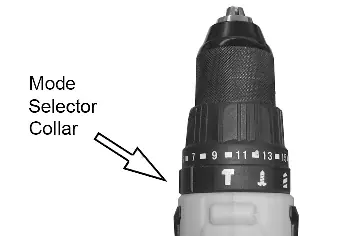
Operating Modes: Rotate the mode selector collar to align the symbol with the arrow: Hammer (concrete/masonry), Rotary (drilling), or Screwdriver.
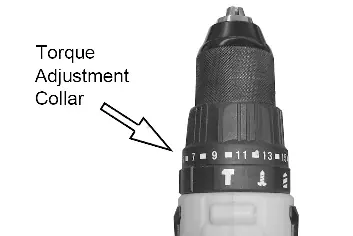
Torque Adjustment: In screwdriver mode, rotate the collar to select the torque setting. Start at 1 and increase until the screw is flush.
Maintenance
- After use, remove the bit and clean the chuck of dust/chippings.
- Keep cooling vents clear and the housing clean with a soft cloth.
- Do not use oil or grease on the handle.
- There are no user-serviceable parts inside.
Manufacturer information
Clarke International
Practical help
Common problems
Both charger LEDs flashing rapidly
The battery pack is either too hot or defective.
Drill will not start
Ensure the forward/reverse switch is not in the central locked position.
Clutch ratchets before screw is seated
Rotate the torque adjustment collar to a higher number.
Before use
- Ensure the work area is clean and well-lit.
- Wear eye protection and appropriate safety gear.
- Check that the battery is fully charged.
- Ensure the forward/reverse switch is in the central locked position before changing bits.
- Verify that no live electrical wires are in the path of the drill bit.
Specs in practice
- Setting 1 (0-400 RPM)
- Low gear, high torque for heavy-duty driving or drilling.
- Setting 2 (0-1500 RPM)
- High gear, high speed for fast drilling.
- Torque settings (21)
- Adjustable levels to prevent over-tightening screws.
Images and diagrams
- The mode selector collar allows switching between hammer, rotary, and screwdriver modes.
- The torque adjustment collar is used specifically in screwdriver mode to control driving force.
- The forward/reverse switch also acts as a safety lock when placed in the central position.
Model compatibility
- Use only the charger specified by the manufacturer.
- Hammer mode is strictly for concrete and masonry; use masonry bits only.
- Class II product, does not require an earth connection.

Manual page author
Emily Carter
User documentation editor
Prepares concise manual descriptions and highlights the most useful setup, operation, and maintenance information for readers.