Automotive / Navigation
Cobra 19MINI CB Radio Quick Start Guide
Quick start guide for the Cobra 19MINI ultra-compact CB radio. Learn how to operate the radio, adjust squelch and ASQ, use VOX, and configure menu settings.
Table of contents
Manual images
Jump to the sectionQuick guide from the manual
The Cobra 19MINI is an ultra-compact recreational CB radio featuring 40 channels and 4 Watts of RF output power. This guide provides essential instructions for daily operation, including channel selection, squelch management, and menu configuration.
Device Overview
The radio consists of a main unit and a microphone. Key controls include:
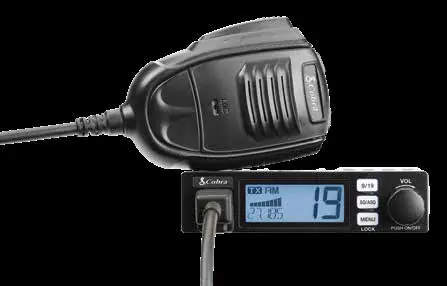
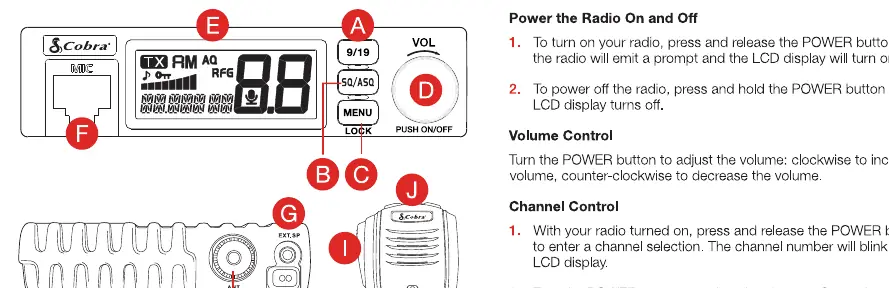
- 9/19 Button: Quick access to emergency channels.
- Squelch Control Button: Adjusts signal threshold.
- Menu/Lock Button: Accesses settings and locks the keypad.
- POWER On/Off and Volume Control: Rotary knob for power and audio level.
- Channel Up/Down Buttons: Located on the microphone for quick channel changes.
- Microphone Jack: Connection for the included microphone.
- External Speaker Jack: For connecting an 8 Ohm external speaker.
- Antenna Jack: Connection for the CB antenna.
Operating the Radio
Power and Volume: Press the POWER button to turn the radio on or off. Rotate the knob to adjust volume levels.
Channel Control: Press the POWER button to enter channel selection mode, then rotate the knob to change the channel. Alternatively, use the UP/DN buttons on the microphone.
Squelch and ASQ Control: You can manually adjust squelch (1-34) or use Auto Squelch (ASQ) (1-9). Press the SQ/ASQ button to toggle between modes and adjust levels using the rotary knob or microphone buttons.
VOX Operation: Press and hold the PTT switch on the microphone, then use the MENU button to activate or deactivate VOX. When active, a microphone icon appears on the display.
Menu Options
To access the menu, press the MENU button. Use the POWER button to select functions and the UP/DN buttons to change settings:
- KEY BP: Beep sound (on/off).
- ROG BP: Roger Beep (off, 01-06).
- VOX L: VOX Sensitivity (01-09).
- VOX T: VOX Delay Time (01-09).
- RF GAIN: RF Gain Control (03, 06, 09, 48, or off).
- TOTSET: Time Out Timer (off, 01-10 minutes).
- PWR AUTO: Automatic Power On (on/off).
- FW VER: Displays firmware version.
Safety and Maintenance
Keypad Lock: Press and hold the MENU button for 3 seconds to lock or unlock the keys. A lock icon indicates the status.
External Speaker: Use an 8 Ohm speaker with a 3.5mm mono connector. Warning: The external speaker output is a Bridge Tied Load (BTL) design; do not short the speaker wires to ground.
Reset to Factory Default: Enter the menu, select the RESET option, and hold the POWER button until the display stops blinking.
Manufacturer information
Cobra Electronics
Practical help
Common problems
Keypad is unresponsive
Check if the keypad lock is active (look for the lock icon). Press and hold the MENU button for 3 seconds to unlock.
External speaker not working or distorted
Ensure you are using an 8 Ohm speaker with a 3.5mm mono connector. Do not short speaker wires to ground as it is a BTL design.
Before use
- Ensure the antenna is properly connected to the antenna jack.
- Verify the power source is connected correctly.
- Connect the microphone to the microphone jack.
- If using an external speaker, ensure it is 8 Ohm compatible.
Specs in practice
- Squelch (1-34)
- Manually sets the threshold for incoming signals to block out noise.
Images and diagrams
- The front panel features a 9/19 emergency button, Squelch/ASQ button, Menu/Lock button, and a combined Power/Volume rotary knob.
- The microphone includes Channel Up/Down buttons and a PTT (Push-To-Talk) switch.
Model compatibility
- Requires 8 Ohm external speaker for optional audio output.
- Uses 3.5mm mono connector for external audio.

Manual page author
David Miller
Documentation analyst
Organizes user manual content into clear summaries, with attention to model details, product context, and everyday usability.