Power / Batteries Chargers
Cobra 1000A Lithium-Ion Jump Starter and Power Bank
Comprehensive user guide for the Cobra 1000A Jump Starter, covering direct-to-battery and in-car jump starting, device charging, and safety status indicators.
Table of contents
Product Overview
The Cobra 1000A Lithium-Ion Jump Starter and Power Bank is a versatile tool designed to provide emergency power for your vehicle and portable devices. This heavy-duty unit features fast-charge USB ports for mobile electronics and two distinct methods for jump-starting a vehicle: direct-to-battery and in-car charging via the 12V accessory port. It is essential to fully charge the unit before its first use and every 12 months thereafter to maintain optimal battery health.
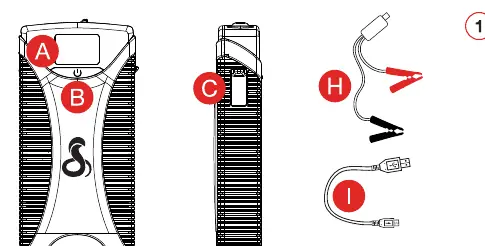
Jump Starting Your Vehicle
There are two primary ways to use the Cobra 1000A to start a vehicle. The direct-to-battery method involves connecting the jumper cable clamps directly to the vehicle battery terminals. Always connect the red clamp to the positive terminal first, followed by the black clamp to the negative terminal. Once connected to the jump starter, wait for the green LED light to appear on the cable before attempting to start the vehicle. After the engine starts, disconnect the cables in the reverse order.
Alternatively, the in-car jump starting method allows you to start the vehicle through the 12V accessory port. Ensure all vehicle accessories are turned off, then connect the jumper cable to the jump starter and plug the other end into the vehicle's 12V port. Set the ignition to the accessory position and wait for the Output Ready message on the jump starter screen. Once the screen indicates it is ready, you may start the vehicle. Note that this method may take up to 15 minutes to charge the vehicle battery sufficiently.
Charging and Maintenance
The Cobra 1000A functions as a power bank for your mobile devices. You can charge smartphones, tablets, and other electronics using the integrated USB-A or USB-C ports. To recharge the jump starter itself, use the USB-C input port connected to a power source, such as a laptop, a car charger, or a wall adapter. The unit features a tri-color status LED that provides real-time feedback on the connection status. A solid yellow light indicates a good connection, while flashing red or yellow lights signal potential issues like reverse polarity or poor cable contact. Always ensure the unit is stored in a cool, dry place and kept away from extreme temperatures to preserve the lithium-ion battery life.
Manufacturer information
Cobra Electronics
Practical help
Common problems
No LED status light
Connection not detected or jump starter is depleted. Check battery level and cable connection.
Solid Red LED
Reverse polarity connection. Reverse the clamps.
Flashing Red LED
Over-current protection. Wait 30 seconds and retry connection.
Flashing Yellow LED
Cables not properly connected or jump starter is too hot. Remove and retry.
Red and Green Flashing Alternately
Safety feature triggered due to too many attempts. Remove cable and wait a few minutes.
Before use
- Fully charge the unit before first use.
- Ensure all vehicle accessories are turned off.
- Verify the jump starter battery level.
- Check that clamps are clean and free of debris.
- Confirm the correct jump start method (Direct vs In-Car).
Specs in practice
- USB-A/USB-C Ports
- Used for charging mobile devices and recharging the jump starter.
- 12V Jump Start Connector
- Dedicated port for attaching the heavy-duty jumper cables.
Images and diagrams
- Direct-to-battery: Connect red to positive, black to negative.
- In-car: Connect to 12V port, set ignition to accessory, wait for ready signal.
- Status LED: Solid yellow indicates a successful connection.
- Recharging: Use USB-C port with a compatible power source.
Model compatibility
- In-car jump starting requires a functional 12V accessory port.
- Direct-to-battery method is recommended if the in-car method fails.
- Compatible with most USB-powered mobile devices.

Manual page author
Michael Turner
Technical manual editor
Reviews PDF manuals for structure, safety notes, and practical product details so readers can find the right information quickly.