Electronics / Networking
Hikvision DS-3WF Series Wireless Bridge Quick Start Guide
Quick start guide for the Hikvision DS-3WF Series Wireless Bridge. Includes setup, activation, safety instructions, and typical application diagrams.
Table of contents
Quick guide from the manual
To set up and activate your wireless bridge, follow these steps:
- Connect the device to your network.
- Access the device via a web browser.
- Activate the device using a password.
- Set the correct country and region code.
- Navigate to the login interface and enter your password to log in.
Overview
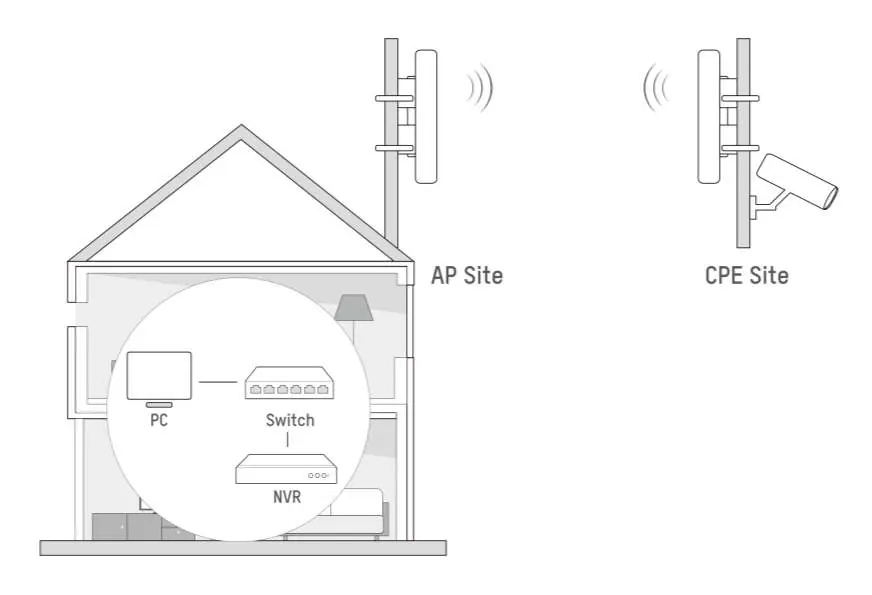
The wireless bridge is designed for long-distance wireless connections. It is suitable for outdoor video security systems and data transmission between sites within a LAN.
Typical Application
The wireless bridge setup typically involves an AP Site and a CPE Site. The system connects components such as a PC, Switch, and NVR to facilitate wireless transmission.
Safety Instructions
Please adhere to the following safety guidelines:
- Class A Product: This device may cause radio interference. If interference occurs, the user may be required to take adequate measures.
- Electrical Safety: Strictly comply with the electrical safety regulations of your nation and region.
- Installation: The socket-outlet must be installed near the equipment and be easily accessible.
- Fire Safety: Do not place naked flame sources, such as lighted candles, on the equipment.
Regulatory Information
This product and its accessories are marked with the CE symbol, indicating compliance with applicable harmonized European standards, including the EMC Directive 2014/30/EU and the RoHS Directive 2011/65/EU. For the RED Directive 2014/53/EU, the device operates within specific frequency ranges and bandwidths (20 MHz, 40 MHz, and 80 MHz) depending on the region.
WEEE Directive: Products marked with this symbol cannot be disposed of as unsorted municipal waste in the European Union. Please return this product to your local supplier upon the purchase of equivalent new equipment or dispose of it at designated collection points.
Battery Directive: This product contains a battery that cannot be disposed of as unsorted municipal waste in the European Union. Refer to the product documentation for specific battery information and recycling instructions.
Manufacturer information
Hikvision
Practical help
Common problems
Radio interference
As this is a Class A product, you may need to take adequate measures to mitigate interference.
Unable to access device
Ensure the device is properly activated via a web browser using the correct password and that the country/region code is set.
Before use
- Ensure electrical safety regulations are met.
- Install a socket-outlet near the equipment.
- Verify that no naked flame sources are placed on the device.
- Ensure the device is configured with the correct country and region code.
Images and diagrams
- The typical application diagram illustrates the setup of an AP Site and a CPE Site, showing the connection between a PC, Switch, and NVR.
Model compatibility
- Suitable for outdoor video security and LAN transmission.

Manual page author
Emily Carter
User documentation editor
Prepares concise manual descriptions and highlights the most useful setup, operation, and maintenance information for readers.