Electronics / Networking
Intellinet 10GBase-T to 10GBase-R Media Converter User Manual
Quick setup guide for the Intellinet 10GBase-T to 10GBase-R Media Converter (Model 508193 v2). Includes connection instructions, LED status indicators, and power requirements.
Table of contents
Quick Guide
This guide covers the setup and operation of the Intellinet 10GBase-T to 10GBase-R Media Converter (Model 508193 v2). Ensure you have an SFP+ transceiver module before starting, as it is required for fiber optic connections.
Connections
Twisted Pair (RJ45): Connect the UTP port of the media converter to an RJ45 port on your network (e.g., an Ethernet switch). Cat5e or better cabling is recommended.
SFP+ Slot: This device requires an SFP+ transceiver module for fiber optic connections.
- Insert the SFP+ transceiver into the media converter.
- Install the fiber optic cable into the transceiver.
- Connect the other end of the fiber optic cable to your fiber network.
Note: Maximum fiber cable length and specifications depend on the specific SFP+ module used.
LED Status
Monitor the device status using the front panel LEDs:
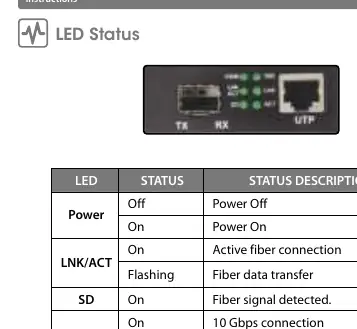
- Power: On (Power On), Off (Power Off).
- LNK/ACT: On (Active fiber connection), Flashing (Fiber data transfer).
- SD: On (Fiber signal detected).
- 10G: On (10 Gbps connection), Off (Less than 10 Gbps).
- TX Link: On (Active copper connection).
- TX Act: Flashing (Copper data transfer).
Power
Plug the 12 VDC power adapter into the input jack on the media converter, then connect it to a power outlet. Use only the included power adapter or one with matching specifications (12 VDC, 1 A).
Safety
This device is for indoor, non-critical applications. Do not use in environments where failure may result in serious harm. Keep away from liquids, moisture, and heat sources. Do not attempt to open or repair the product.
Manufacturer information
Intellinet Network Solutions
Practical help
Common problems
No power
Check that the power adapter is securely connected to the device and the wall outlet.
No fiber connection
Ensure the SFP+ transceiver is fully inserted and the fiber cable is properly connected.
Less than 10Gbps speed
Check the 10G LED; if off, the connection is below 10 Gbps. Verify network equipment and cable quality.
Before use
- Ensure you have a compatible SFP+ transceiver module.
- Use Cat5e or better cabling for the RJ45 connection.
- Verify the power source provides 12V DC, 1A.
- Ensure the installation environment is indoors and non-critical.
Specs in practice
- Cat5e or better
- Recommended cabling standard for the RJ45 port to ensure performance.
Images and diagrams
- The connection diagram illustrates the power input, the RJ45 port for copper network connection, and the SFP+ slot for fiber network connection.
Model compatibility
- Requires an SFP+ transceiver module for fiber connectivity.
- Maximum fiber cable length depends on the specific SFP+ module used.

Manual page author
David Miller
Documentation analyst
Organizes user manual content into clear summaries, with attention to model details, product context, and everyday usability.