Power / Batteries & Chargers
Comsol PB10AL 10000mAh Power Bank User Manual
Quick guide for the Comsol 10000mAh Power Bank (PB10AL). Learn how to charge the power bank, charge your devices, check battery capacity, and follow safety guidelines.
Table of contents
Quick Guide
The Comsol 10000mAh Power Bank (PB10AL) is designed to charge smartphones, tablets, and other USB-powered devices. Before first use, ensure the power bank is fully charged. Use the included Micro USB cable to charge the power bank and the built-in Lightning cable or USB-A ports to charge your devices.
Product Overview
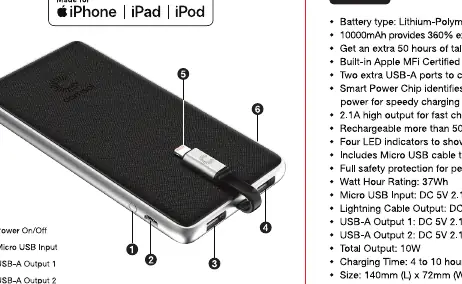
The device features a power button, a Micro USB input for charging the power bank, two USB-A output ports, a built-in Lightning connector, and LED capacity indicators.
Charging the Power Bank
Connect the included micro USB cable to the micro USB input port on the power bank and connect the other end to a USB wall charger. The LEDs will flash to indicate charging status. When charging is complete, all four LEDs will remain on.
Charging Devices
To charge an iPhone, iPad, or iPod, connect the built-in Lightning connector to your device. To charge other devices, use the USB-A output ports with your device's own charging cable. Press the On/Off button to start charging.
Checking Remaining Capacity
Press the On/Off button to check the remaining battery capacity. The LEDs will light up to show the level and turn off automatically after about 30 seconds.
- 4 LEDs: 75% to 100%
- 3 LEDs: 50% to 75%
- 2 LEDs: 25% to 50%
- 1 LED: 5% to 25%
- Flashing LED: Less than 5%
Safety and Maintenance
To maximize battery life, fully charge the power bank before first use. Store in a cool, dry place. Operating temperature should be between -10C and 45C. If not used for long periods, charge every three months. Do not expose to heat, fire, or use harsh chemicals for cleaning.
Technical Specifications
Battery type: Lithium-Polymer. Capacity: 10000mAh. Watt Hour Rating: 37Wh. Input: Micro USB 5V 2.1A. Output: Lightning 5V 2.1A, USB-A 1 & 2 5V 2.1A. Dimensions: 140mm x 72mm x 15.3mm.
Practical help
Common problems
Power bank not charging
Ensure the Micro USB cable is securely connected to the input port and the wall charger.
Device not charging
Ensure the device is connected properly and press the On/Off button to initiate the charging process.
Before use
- Fully charge the power bank before first use.
- Ensure you have a compatible USB wall charger.
- Verify the device you intend to charge is compatible with USB or Lightning connections.
Specs in practice
- Operating Temperature
- -10C to 45C; avoid extreme heat or cold.
Images and diagrams
- 1: Power On/Off button
- 2: Micro USB Input port
- 3: USB-A Output 1
- 4: USB-A Output 2
- 5: Apple Lightning Connector
Model compatibility
- Includes built-in Apple MFi Certified Lightning Cable.
- Compatible with most smartphones including Samsung, LG, Sony, HTC, Nokia, Microsoft, Huawei, Motorola, Google, OnePlus, Oppo.
- Suitable for smartwatches, fitness trackers, digital cameras, and portable gaming consoles.

Manual page author
David Miller
Documentation analyst
Organizes user manual content into clear summaries, with attention to model details, product context, and everyday usability.