Power / Wireless Chargers
Comsol 100W USB-C Wall Charger WCC100WH User Manual
Quick guide for the Comsol 100W USB-C Wall Charger (WCC100WH). Includes power distribution details, usage instructions, safety precautions, and technical specifications.
Table of contents
Quick Guide
The Comsol 100W USB-C Wall Charger is designed to charge up to three devices simultaneously using GaN technology. To use the charger, simply connect your MacBook, laptop, Chromebook, smartphone, or tablet to the appropriate USB-C or USB-A port. The charger automatically manages power distribution based on the number of devices connected.
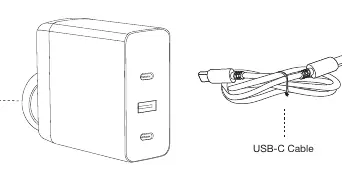
Product Features
- GaN Technology: Ensures efficient charging with less heat in a compact size.
- High Compatibility: Ideal for MacBook Air/Pro, Windows laptops, Chromebooks, and other USB devices.
- Multi-Port Charging: Features two USB-C ports (PD3.0) and one USB-A port (QC 3.0).
- Safety Protections: Built-in protection against over-charging, over-current, over-heating, and short circuits.
Power Distribution
The total power output is 100W. The power delivered to each port changes depending on how many devices are plugged in:
- Single Output: USB-C1 or USB-C2 provides 100W; USB-A provides 18W.
- Two Outputs: USB-C1+C2 provides 50W+50W; USB-C1+A provides 82W+18W; USB-C2+A provides 82W+18W.
- Three Outputs: USB-C1+C2+A provides 41W+41W+18W.
Technical Specifications
- Model: WCC100WH
- Input: AC 100-240V 50/60Hz 2.5A
- USB-C Output 1 & 2: USB PD3.0, 100W Max (5V/3A, 9V/3A, 12V/3A, 15V/3A, 20V/5A)
- USB-A Output: QC 3.0, 18W Max (5V/3A, 9V/2A, 12V/1.5A)
- Dimensions: 69mm (W) x 67mm (D) x 32mm (H)
- Net Weight: 135g
Safety Precautions
- Only use with Information Technology Equipment.
- Do not disassemble the charger; this may cause fire or electric shock.
- Keep the product away from heating elements and do not bend the power cable pins.
- If you notice strange sounds, smoke, or odors, disconnect the power immediately.
- Clean only with a soft dry cloth; do not use water.
- Keep out of reach of small children.
- Unplug the charger from the wall socket if it will not be used for an extended period.
Practical help
Common problems
Device not charging
Ensure the cable is firmly plugged into both the charger and the device. Check if the cable is damaged.
Strange sounds, smoke, or odor
Immediately disconnect the power cable from the wall socket.
Charger overheating
Ensure the charger is not placed near heating elements and is used in a well-ventilated area.
Before use
- Verify the wall socket provides 100-240V power.
- Ensure the USB cable is not damaged or frayed.
- Check that your device is compatible with USB-C or USB-A charging.
- Ensure the charger is kept dry and away from water.
Specs in practice
- Total Power Output
- The maximum combined power (100W) the charger can deliver across all ports simultaneously.
Images and diagrams
- The charger features two USB-C ports (top and bottom) and one USB-A port (middle).
- The AC input is located on the back of the unit.
Model compatibility
- Compatible with most USB-C laptops, Ultrabooks, and Chromebooks.
- Supports Apple Fast Charging and Samsung Super Fast Charging.
- Compatible brands include Apple, HP, Dell, Lenovo, Microsoft, Acer, Asus, and Google.

Manual page author
Emily Carter
User documentation editor
Prepares concise manual descriptions and highlights the most useful setup, operation, and maintenance information for readers.