Home Appliances / Personal Care
Philips 1741F Smart HD Display Sonic Toothbrush
Quick guide for the Philips 1741F Smart HD Display Sonic Toothbrush. Includes charging instructions, usage steps, cleaning, maintenance, and technical specifications.
Quick answers from the manual
Quick answer
- To charge the Philips 1741F, place the handle on the charging base. It requires 12 hours for the initial charge and 8 hours for subsequent charges. Do not use a computer USB port for charging. p. 4, 5
Key actions
- Replace the brush head every 3 months or sooner if bristles fade. p. 2, 3
- Remove the battery before disposal. p. 7
First start
- Charge the device for 12 hours before the first use. p. 4, 5
Maintenance and reset
- Clean by rinsing under water and wiping with a damp cloth. Do not use a dishwasher. p. 6
Technical specifications
| Parameter | Value | Meaning | Pages |
|---|---|---|---|
| Charging Time | 8 hours | Time required for a full charge after the initial 12-hour charge. | p. 4 |
| Waterproof | IPX7 | Water resistance rating. | p. 4 |
Where to find it in the PDF
- Product Components p. 3
- Battery Charging p. 4, 5
- Usage Instructions p. 5
- Cleaning and Storage p. 6
Table of contents
Manual images
Click an image to enlargeQuick Guide
For optimal performance, charge your toothbrush for a full 12 hours before the initial use. Do not charge the device via a computer USB port. Replace the brush head every 3 months or sooner if bristles show signs of wear. If the battery is low, the device will vibrate 4 times and the LED indicator will flash red.
Safety Warnings
- Not suitable for children under 36 months due to small parts.
- Keep the appliance, charging base, and cable out of reach of children.
- Do not use the toothbrush in the bath or shower.
- Do not clean the brush head, handle, or charging base in the dishwasher.
- If you have had oral or gum surgery in the previous 2 months, consult your dentist before use.
- Do not store or charge the device over water or heat.
- Keep away from strong magnetic fields.
- Do not charge on a metal desktop.
Product Components
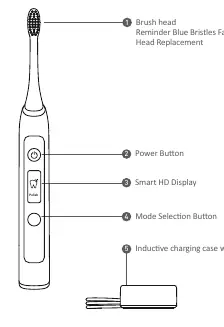
- Brush head with reminder blue bristles
- Power button
- Smart HD Display
- Mode selection button
- Inductive charging case with USB cord
Technical Specifications
- Model: 1741F
- Waterproof: IPX7
- Charging Time: About 8 hours
- Battery: Lithium Rechargeable, 800mAh
- Battery Life: About 1 month (if used 4 minutes daily)
- Modes: Clean, White, Polish, Soft, Sensitive
Battery Charging
Place the brush handle on the charging base. The LED indicator will flash white during charging and remain white when fully charged. For subsequent charges, 8 hours is required for optimal battery life.
Functions and Modes
- Clean: 34,800 strokes/minute for effective cleaning.
- White: 33,000-40,000 strokes/minute for surface stain removal.
- Polish: 35,000 strokes/minute for deep cleaning.
- Soft: 33,000 strokes/minute for gentle care.
- Sensitive: 28,200 strokes/minute for sensitive teeth.
Usage Instructions
- Attach the brush head to the handle, leaving a small gap.
- Apply toothpaste to the wet bristles.
- Place the brush in your mouth before turning it on.
- Move the brush between cleaning areas; the device will pause briefly to indicate when to switch.
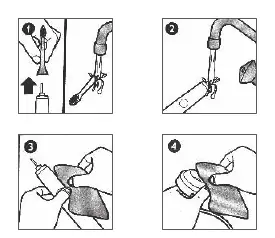
Cleaning and Maintenance
Rinse the brush head and handle under running water. Wipe the handle with a clean, damp cloth. A mild soap may be used if necessary. Do not place any components in the dishwasher.
Storage
If not using for an extended period, unplug the charging base, clean all parts, and store in a cool, dry place away from direct sunlight.
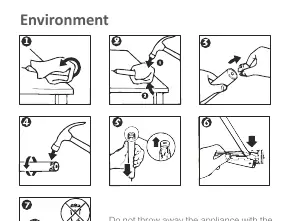
Battery Disposal
The built-in rechargeable battery contains substances that may pollute the environment. Always remove the battery before discarding the appliance at an official collection point. Use a flat-head screwdriver to remove the battery, taking care to protect your eyes and hands.
Manufacturer information
Philips
Practical help
Common problems
Device vibrates 4 times and LED flashes red
The battery is low; place the handle on the charging base.
Charging not working
Ensure you are not charging via a computer USB port; use a proper power source.
Bristles are crushed or bent
Stop using the brush head immediately and replace it.
Before use
- Charge the device for 12 hours before the first use.
- Ensure the brush head is properly attached with a small gap.
- Consult a dentist if you have had oral surgery in the last 2 months.
- Consult a doctor if you have a pacemaker or other implanted device.
Specs in practice
- Reminder Blue Bristles
- Bristles fade to indicate it is time to replace the brush head.
Images and diagrams
- The components diagram shows the brush head, power button, display, mode button, and charging base.
- The usage diagram illustrates applying toothpaste and moving the brush between cleaning areas.
- The battery removal diagram shows the steps to disassemble the handle to access the battery for recycling.
Model compatibility
- Do not use brush heads other than those recommended by the manufacturer.
- Not suitable for children under 36 months.

Manual page author
David Miller
Documentation analyst
Organizes user manual content into clear summaries, with attention to model details, product context, and everyday usability.