HVAC / Ventilation Systems
User Manual for Consciot 10LEDS Solar Landscape Spotlights
Quick guide for Consciot 10LEDS Solar Landscape Spotlights. Learn how to install, operate, and troubleshoot your solar lights with this easy-to-follow manual.
Table of contents
Manual images
Click an image to enlargeQuick Guide from the Manual
Before using your Consciot 10LEDS Solar Landscape Spotlights for the first time, it is highly recommended to turn off the light and charge it under direct sunlight for 48 hours to ensure the battery has sufficient power. The lights are designed to automatically detect ambient light levels, turning on at night and off at sunrise.
Installation
The spotlights can be installed in two ways:
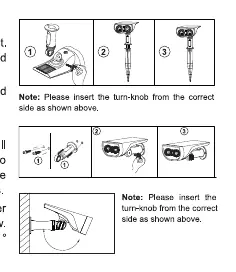
- Method 1: Ground Inserted: Connect the ground stake to the light, adjust the angle of the lamp holder, tighten the knob, and insert the stake vertically into the ground.
- Method 2: Wall Mounted: Drill two holes in the wall and insert the provided wall plugs. Align the screw holes of the holder with the wall plugs and secure with screws. Adjust the angle and tighten the knob.
Operation Guide
The default mode is OFF. Press the red button on the unit to cycle through the lighting modes:
- Low Light Mode: Press the button once. The light will charge during the day and automatically turn on at night. Max working time is 12 hours.
- High Light Mode: From Low Light Mode, press the button again. Max working time is 6 hours.
- OFF: From High Light Mode, press the button again to turn the unit off.
Troubleshooting
If the light fails to turn on, please check the following:
- Ensure there is no strong light source around the solar panel.
- Charge the light for a period under direct sunlight and test again by covering the solar panel.
- Verify that you hear a clear "click" sound when pressing the power button to ensure it has been activated.
Specifications
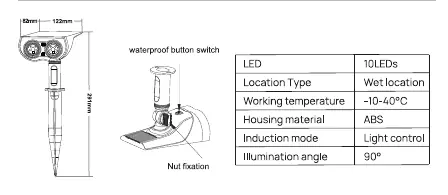
- LEDs: 10 LEDs
- Location Type: Wet location
- Working Temperature: -10 to 40°C
- Housing Material: ABS
- Induction Mode: Light control
- Illumination Angle: 90°
Important Usage Tips
For optimal performance, ensure the solar panel is installed in a location with maximum direct sunlight, free from shade or eaves. Lighting performance depends on sunlight intensity, geographical location, weather conditions, and seasons. In rainy, cloudy, or winter conditions, the working time will be shortened.
Manufacturer information
Consciot
Practical help
Common problems
Light does not turn on at night
Ensure the light is not near other light sources, charge it under direct sunlight, and confirm the button was pressed (listen for a click).
Short lighting duration
The light may not have received enough sunlight. Ensure the solar panel is not shaded by eaves or trees and charge for 48 hours before first use.
Before use
- Charge the light under direct sunlight for 48 hours before first use.
- Verify all parts are present (spotlights, stakes, anchors, screws, knobs).
- Ensure the installation site receives maximum direct sunlight.
- Check that the power button is functional (listen for a click).
Specs in practice
- Light control
- The device automatically detects ambient brightness to turn on at night and off at sunrise.
- Wet location
- The device is rated for outdoor use in wet conditions.
Images and diagrams
- Ground Inserted: Connect stake to light, tighten knob, and insert into ground.
- Wall Mounted: Drill holes, insert plugs, and screw the holder into the wall.
Model compatibility
- Not suitable for indoor use.
- Performance varies significantly based on weather and season.

Manual page author
David Miller
Documentation analyst
Organizes user manual content into clear summaries, with attention to model details, product context, and everyday usability.