Furniture / Tables & Desks
User Manual for Costway Floor Sofa Chair
Quick guide for the Costway Floor Sofa Chair. Learn how to adjust the backrest angle, safely use the chair, and handle returns or damage claims.
Quick answers from the manual
Quick answer
- The Costway Floor Sofa Chair features a 14-stage adjustable backrest. To adjust, push the backrest forward 90 degrees to reset to flat, then select your desired angle. p. 4, 6
Key actions
- Adjusting the backrest angle p. 4, 6
First start
- Initial setup p. 4, 6
Show 4 more answers Show less
Problems and fixes
Product odor
Place in a ventilated place.
p. 4, 6Maintenance and reset
- Resetting the backrest p. 4, 6
Technical specifications
| Parameter | Value | Meaning | Pages |
|---|---|---|---|
| Adjustment Stages | 14 | Number of available backrest positions | p. 4, 6 |
| Angle Range | 0 - 84 degrees | Range of motion for the backrest | p. 4, 6 |
| Adjustment Increment | 6.5 degrees | Change in angle per stage | p. 4, 6 |
Where to find it in the PDF
- Safety and Setup p. 2, 3
- Usage and Adjustment p. 4, 5, 6
- Returns and Claims p. 7, 8
Table of contents
Manual images
Click an image to enlargeQuick Guide
The Costway Floor Sofa Chair is designed for comfort and versatility. Before using the product, ensure you have removed it from the packaging and laid it flat on a stable surface. Distinguish the backrest from the seat to ensure proper orientation. For floor protection, it is recommended to place the chair on a carpet.
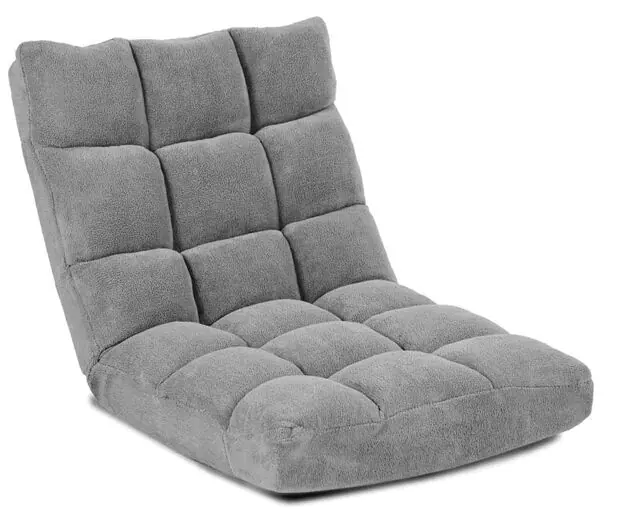
Angle Adjustment
The chair features a 14-stage adjustable backrest to suit your preferred seating position.
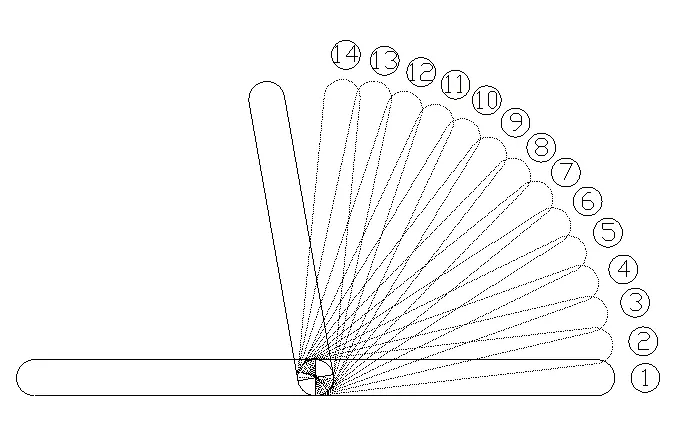
- Adjustment Method: To adjust the angle, push the backrest forward by 90 degrees to reset the mechanism to the flat position.
- Adjustment Range: You can choose from 14 stages, ranging from 0 degrees (flat) to 84 degrees.
- Increment: Each stage provides an adjustment of 6.5 degrees.
Safety Precautions
To ensure safety and product longevity, please observe the following:
- Do not jump on the product.
- Do not sit on the backrest or the handrail, as this may cause the chair to tip over.
- Avoid moving your body violently while on the chair to prevent sliding or tipping.
- Ensure the regulator is properly locked into the desired angle before sitting.
- Do not use the backrest or seat cushion for play.
- Keep the product away from direct sunlight and heat sources.
- If you are sensitive to the product's smell, place it in a well-ventilated area; the smell is not harmful.
- Do not open the zipper.
Returns and Damage Claims
If you need to return the item or file a damage claim, please follow these steps:
- Do not discard the original box or packaging. Returns without original packaging will not be accepted.
- Take a photo of the markings (text) on the side of the box to help identify the product number.
- Take a photo of the damaged part if applicable.
- Contact customer support via the marketplace where the item was purchased, attaching the photos and a description of the claim.
Manufacturer information
Costway
Practical help
Common problems
Product has a noticeable odor
Place the product in a well-ventilated area. The smell is not harmful and will dissipate.
Backrest does not stay in position
Ensure the regulator is fully engaged and adjusted to one of the 14 specific angle stages.
Before use
- Remove the product from packaging and lay it flat.
- Identify the backrest and the seat.
- Place the chair on a flat, stable surface.
- Use on a carpet to protect the floor surface.
- Ensure all small parts and packaging are kept away from children.
Show more Show less
Specs in practice
- Adjustment Stages
- 14 distinct locking positions for the backrest.
- Stage Increment
- 6.5 degrees of change per adjustment stage.
Images and diagrams
- The angle adjustment diagram illustrates 14 stages. Stage 1 represents the flat position (0 degrees), and stage 14 represents the maximum upright position (84 degrees).

Manual page author
Emily Carter
User documentation editor